 Download Online Help
 Print
|
|
|
|
|


The S/N Tab provides information regarding the part for exchange.
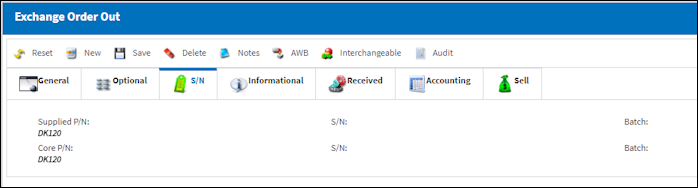
Note: The G/L fields will fill out automatically once saved. The Supplied S/N field allows for the user to choose a specific serial number for the part that is being sent out.
The following options/information is available in this window:
_________________________________________________________________________
Supplied P/N
The part that the user is sending to the customer.
S/N (Supplied)
The serial number of the part being sent out.
Batch (Supplied)
The batch number of the part that is being sent out.
Core P/N
The part that the user will receive from the customer.
S/N (Core)
The serial number of the part the user will receive from the customer.
Batch (Core)
The batch number of the part the user will receive from the customer.
_________________________________________________________________________
Download Online Help
Print
|
©1997-2018 Trax USA Corp. All rights reserved. This manual may not be copied, photocopied, reproduced, translated, or converted to any electronic or machine-readable form, in whole or in part, without prior written approval from Trax USA Corp. |
 |