 Download Online Help
 Print
|
|
|
|
|


Engineering Control Print
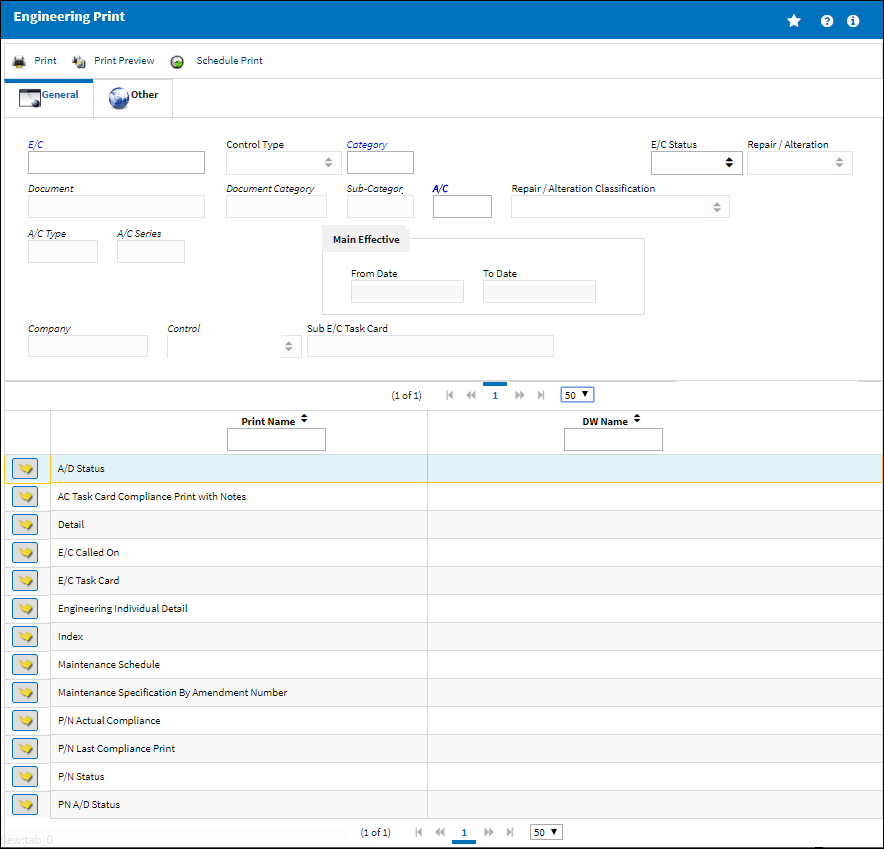
The Engineering Print window allows users to search and create Engineering Control reports based on a collection of filters.
 The prints in this window may be security controlled.
Note: These are customized prints. Print layouts and options may vary per operator.
The following options/information is available in this window:
_________________________________________________________________________
E/C
The Engineering Control that specifies aircraft or component scheduled maintenance intervals.
Control Type
The Engineering Control Type (E/C or Task Card).
Category
The category of the E/C (i.e. AD, SB, CHECK).
E/C Status
The status of the E/C. When creating a new E/C the initial status will default to Pending; if the user requires to hold this E/C until ready it can be left as Pending, or alternatively it can be changed to another status.
Repair/Alteration
Define if the record requires Repair or Alteration.
Document
Any document information to be referenced for the part.
Document Category
The document category code for the document reference associated to the E/C.
Sub-Category
A Sub Category can be used to further define the E/C Category, if applicable. For example, you may want to classify your ADs for Engines, APUs, and Landing Gear separately. The Sub Category Transaction Code is set up via Settings/ Explorer/ System Transaction Code/ Engineering.
A/C
The individual Aircraft tail number.
Repair/Alteration Classification
The level of Repair/Alteration (Major, Minor) required for this E/C.
Main Effective Date
Enter the effective date range for the E/C.
Company
The name of the airline company for which the E/C will be utilized.
Control
The Control (A/C, P/N, A/C Type, or ALL) used to auto generate the E/C reference. This field is used for naming purposes only. When the 'ALL' option is selected the E/C Control field will not auto generate the E/C reference. The E/C reference will auto generate from the Sub E/C field.
Sub E/C Task Card
Enter the associated Sub E/C Task Card.
Print Name
The name of the print to be used for filtering purposes
DW Name
The data window name where the print is applicable.
_________________________________________________________________________
Download Online Help
Print
|
©1997-2018 Trax USA Corp. All rights reserved. This manual may not be copied, photocopied, reproduced, translated, or converted to any electronic or machine-readable form, in whole or in part, without prior written approval from Trax USA Corp. |
 |