 Download Online Help
 Print
|
|
|
|
|


Hierarchical View Button, via E/C Category
Select the Hierarchical View  button to view a graphical display of the steps and all relationships in between that will be involved in the Authorization Process.
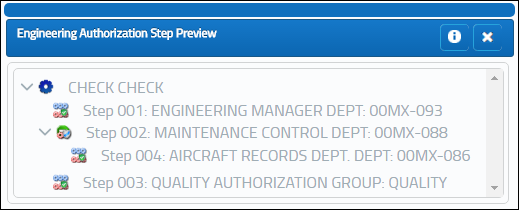
The Parallel Step  icon (red and yellow) appears next to all steps that have a parallel relationship with another Step.
The Authorized Step  icon (green) appears next to all other steps.
Download Online Help
Print
|
©1997-2018 Trax USA Corp. All rights reserved. This manual may not be copied, photocopied, reproduced, translated, or converted to any electronic or machine-readable form, in whole or in part, without prior written approval from Trax USA Corp. |
 |