 Download Online Help
 Print
|
|
|
|
|


E/C Category
The System Transaction Codes are displayed with both the Code Names and Descriptions. The Code Descriptions directly illustrate their functionality and role in the system, as fields are populated and tasks are performed.
Transaction Code: |
E/C CATEGORY |
General Description: |
E/C Category that will be associated with each EC. |
Are Authorization Steps Available? |
Y |
Is System Notification Available? |
Y |
Control Panel Path(s): |
Engineering/ Update/ Engineering Control Selection |
Windows(s): |
oux_engineering_eu |
Related Switch(s): |
|
Functions: |
Categorizing the EC by SB, AD and etc. for sorting print and searching purposes. |
Reports: |
|
Available Functionality:
- Allowing for authorization processes to be established as required by each category.
- Providing system notification as to newly created, modified, deleted, revised and complied with E/Cs. For more information, refer to E/C Category Notification.
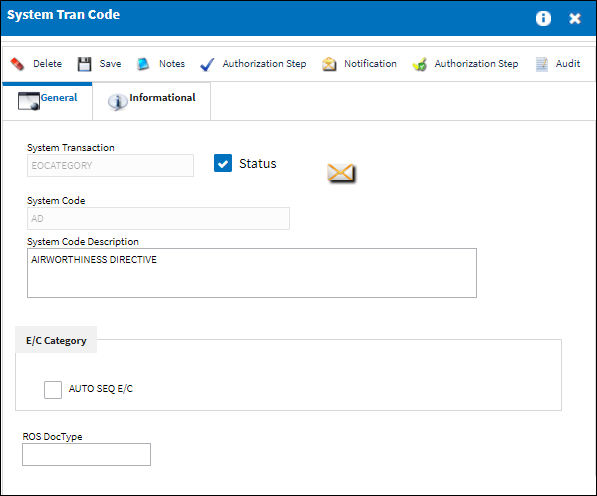
The following options/information is available in this window:
_________________________________________________________________________
Authorization Steps  button
Select this button to pre-define authorization processes for both Aircraft E/Cs as well as Part Number E/Cs. For information on how to set up and authorize authorization steps, refer to Authorization Steps Button.
System Notification  button
This button is used to set up system generated notifications to be sent to users when an E/C with the specified E/C Category is modified. The following notification triggers can be set-up:
New radio button - Notifies when a new E/C is created.
Save radio button - Notifies when an E/C record is saved.
Delete radio button - Notifies when an E/C is deleted.
Terminated radio button - Notifies when an E/C schedule has been reached and complied with.
Revision radio button - Notifies when an E/C has been revised.
Release radio button - Notifies when an E/C has been released for Authorization.
Issued radio button - Notifies when an E/C has been Issued.
P/N E/C Authorization Steps  button
Select this button to set up authorization steps for a P/N E/C. For additional information, refer to the P/N E/C Authorization Steps Button, via E/C Category.
Auto Seq E/C checkbox
Select this checkbox to gray out the E/C field and make the Subcategory and Chapter fields mandatory in the Engineering Control window. For additional information, refer to the Engineering Control, General Tab, via the Engineering Control - E/C Training Manual.
ROS Doc Type
Enter the AeroXchange document type. This is to be used to map the E/C Category to the AeroXchange Document Type.
 This field is only available for customers who have an Interface set up. For additional information, contact the appropriate Interface Administrator.
_________________________________________________________________________
Download Online Help
Print
|
©1997-2018 Trax USA Corp. All rights reserved. This manual may not be copied, photocopied, reproduced, translated, or converted to any electronic or machine-readable form, in whole or in part, without prior written approval from Trax USA Corp. |
 |