 Download Online Help
 Print
|
|
|
|
|


Engineering Content
The System Transaction Codes are displayed with both the Code Names and Descriptions. The Code Descriptions directly illustrate their functionality and role in the system, as fields are populated and tasks are performed.
Transaction Code: |
Engineering Content |
General Description: |
Define categorized notations (content) to auto-populate the E/C Content tab based on the E/C Category specified in the transcode. |
Are Authorization Steps Available? |
N |
Is System Notification Available? |
N |
Control Panel Path(s): |
Engineering/ Update/ Engineering Control Selection |
Windows(s): |
oux_engineering_eu |
Related Switch(s): |
|
Functions: |
Automatic creation of categorized notations (content) in the E/C Content tab. |
Reports: |
|
Available Functionality:
Here the user can specify the categorized notations (content) that can be placed on the lower portion of the E/C Content tab (Engineering/Update/E/C).
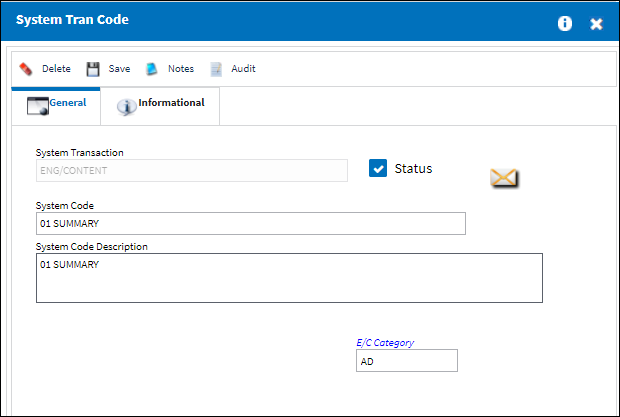
The following options/information is available in this window:
_________________________________________________________________________
E/C Category
Specify an E/C Category if you want this content to only be available when the E/C contains the specified E/C Category. Please note the following switch:
 ADDCONT (Add E/C Content Automatically) To set system switches, go to System Administration/Explorer/System Transaction Configuration. Users can add additional categorized notations (content) regarding an E/C on the lower portion of the Engineering Content Tab. The Engineering Content types are defined in Settings/Explorer/System Transaction Code/Engineering/Engineering Content.
- If this Switch is set to Yes, the lower portion of the E/C Content Tab will automatically populate with 1 of each Engineering Content types. If this switch is set to No, no categories will appear at default. However, the user may manually add as many categorized notations as desired.
_________________________________________________________________________
Download Online Help
Print
|
©1997-2018 Trax USA Corp. All rights reserved. This manual may not be copied, photocopied, reproduced, translated, or converted to any electronic or machine-readable form, in whole or in part, without prior written approval from Trax USA Corp. |
 |