 Download Online Help
 Print
|
|
|
|
|


Task Card Discrepancy Authorization Group Explorer
The Task Card Discrepancy Authorization Group Explorer allows the System Administrator or other designated User to manage which users are in each specific Task Card Discrepancy Authorization Group. Users are added or deleted from Task Card Discrepancy Authorization Groups that are set up in this option.
The user may use the T/C Discrepancy Authorization System Transaction Code to define who is allowed to be part of the authorization process via Engineering/ Explorer/ Task Card Discrepancy Authorization Group Explorer. Within this window, two sections will be displayed. On the left, a list of the existing Authorization Groups, created through the transaction code, and the users/employees assigned to the group(s) when expanded. On the right, a complete listing of the users/employees expanded from their designated User Profile.
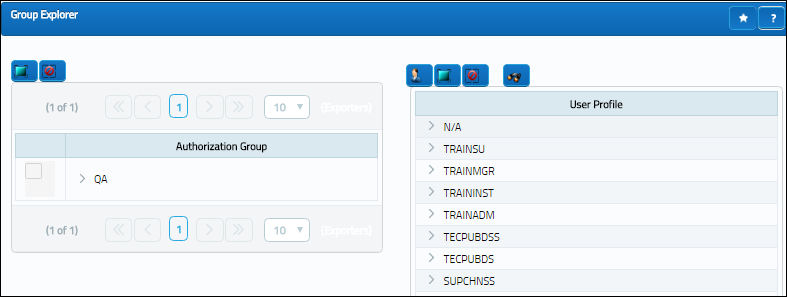
Note: This Authorization Group Explorer functions as part of Engineering Switch  TCDISCAUTH which allows administrators to require a certain amount of Authorization Steps to be performed in order for a Task Card Discrepancy to be authorized. For more information on the T/C Discrepancy Authorization process, refer to Switch TCDISCAUTH via the Engineering Training Manual.
Note: In the Task Card Discrepancy Authorization Group Explorer window, users are categorized by the Adopted Group Profile they belong to in Security Explorer. This is configured for each individual user, and if they are not associated to any Adopted Group Profile, then they fall into the N/A Group Profile. For additional information regarding Group Profiles, refer to the System Administration Training Manual.
Here, the user may select the necessary users to be assigned along with the appropriate group(s) to which they will be assigned.
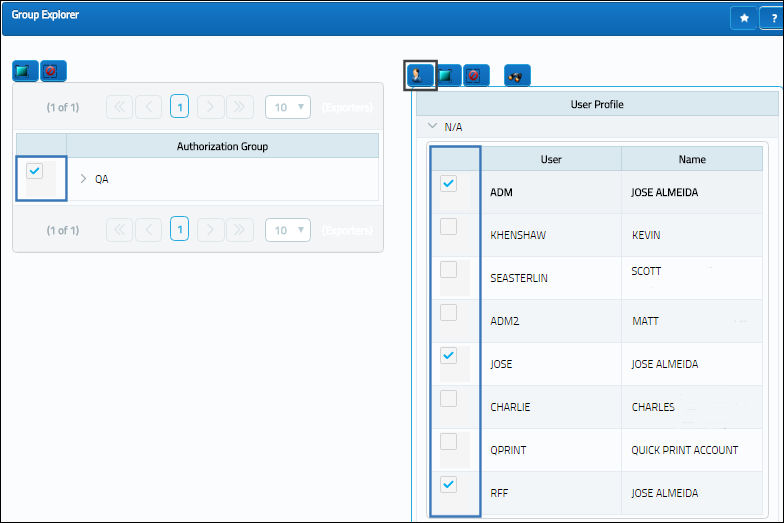
Upon selecting the necessary records, the Add Selected User(s) to Group(s)  button will complete the assignment. Once the user has done so, the following prompt will be received.
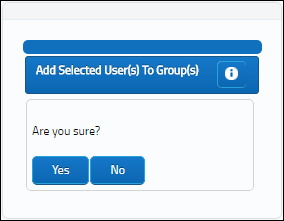
If Yes is selected the employee will be included in the authorization group and will be part of the defined T/C authorization process.
If No, then the employee will NOT be included as part of the authorization group and will not be part of the T/C Discrepancy authorization process. Similarly a user may be removed from the Task Card Authorization Group by selecting the Remove User  button next to the user under the expanded Authorization Group.
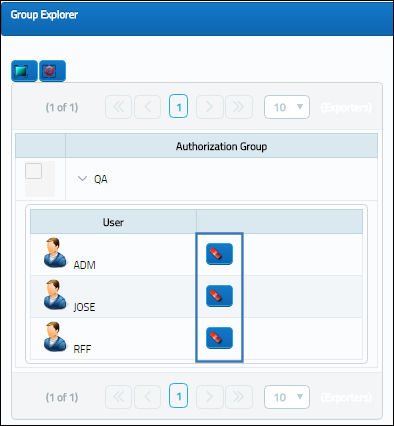
To see how to employ the Task Card Discrepancy Authorization Group as part of a Task Card authorization process, please refer to the Reason Category section of the System Transaction Codes.
Download Online Help
Print
|
©1997-2018 Trax USA Corp. All rights reserved. This manual may not be copied, photocopied, reproduced, translated, or converted to any electronic or machine-readable form, in whole or in part, without prior written approval from Trax USA Corp. |
 |