 Download Online Help
 Print
|
|
|
|
|


The Materials section is used to modify/create the material requirements (parts and kits) to carry out this Task Card. The user may specify if the material is a spare or a tool. The material will be designated for reservation if required. This information will later be used to produce a material pre-load report for a Work Order (check/visit) and can automatically create Picklists and back orders as required.
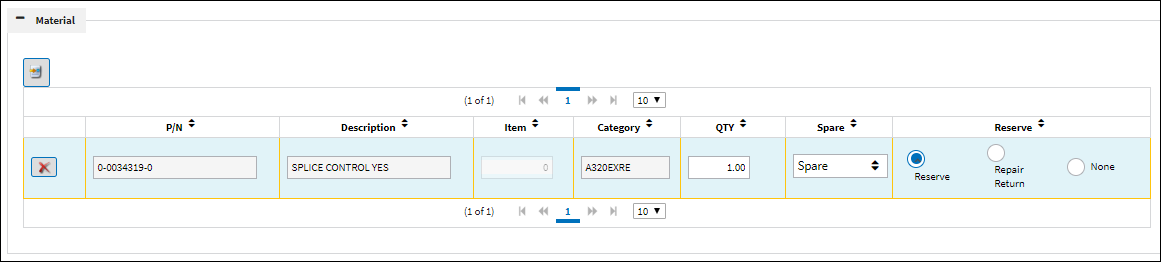
The following options/information is available in this window:
_________________________________________________________________________
New Record  button
Select this button to add a new line item to the section.
Delete Record  button
Delete the selected line item entry.
P/N
The Part Number reference for the aircraft part. This is the Part Number required for the T/C. A part number may be specified only one time per Item Number. However, the same part number may be specified on each unique item number if needed. Users can select into this field or select the Add/Delete Record  button to add a P/N.
Description
The description of the part.
Item
The item number required to accomplish a Task Card.
Category
The category of the part as defined in Settings/ Explorer/ System Transaction Code Explorer/ Settings/ P/N Category (e.g. Rotable, Consumable, Repairable) and entered for the particular part in the P/N Master.
QTY
The quantity of items/parts required.
Note: Only those parts effective to the A/C Tail number will be reserved or requisitioned as part of the Pick List Generation in the Production module.
Spare
If the item required is a spare, this can be either an Expendable or a Rotable part.
Tool
If the item required is a tool, the P/N must be configured as a Tool in P/N Master via Settings/Update/P/N Master.
Reserve radio button
Select this button to reserve the spare or tool when W/O P/N reservation is applied. When a Picklist Reservation is made via a Work Order, only parts that have the Reserve radio button checked will be reserved. For more information regarding picklist creation, please go to Production/Update/Work Order/Picklist  button.
Repair Return radio button
Select this button to repair/return the spare when W/O P/N reservation is applied. When a Picklist Repair/Return is made via a Work Order, only parts that have the Repair/Return radio button checked will be repaired or returned.
None radio button
Select this button if no spare or tool has been reserved or repaired.
_________________________________________________________________________
Additional information can be viewed through the Task Card P/N, Informational tab, and added through the Notes  button.
Also, Notifications can be set up through the Notification  button.
Download Online Help
Print
|
©1997-2018 Trax USA Corp. All rights reserved. This manual may not be copied, photocopied, reproduced, translated, or converted to any electronic or machine-readable form, in whole or in part, without prior written approval from Trax USA Corp. |
 |