 Download Online Help
 Print
|
|
|
|
|


Select the New  button to enter each answer code for the survey question. Enter the complete answer in the Description field and select the Save
 button to save each answer entered.
Note: It is recommended to use a code that clearly identifies the answer.
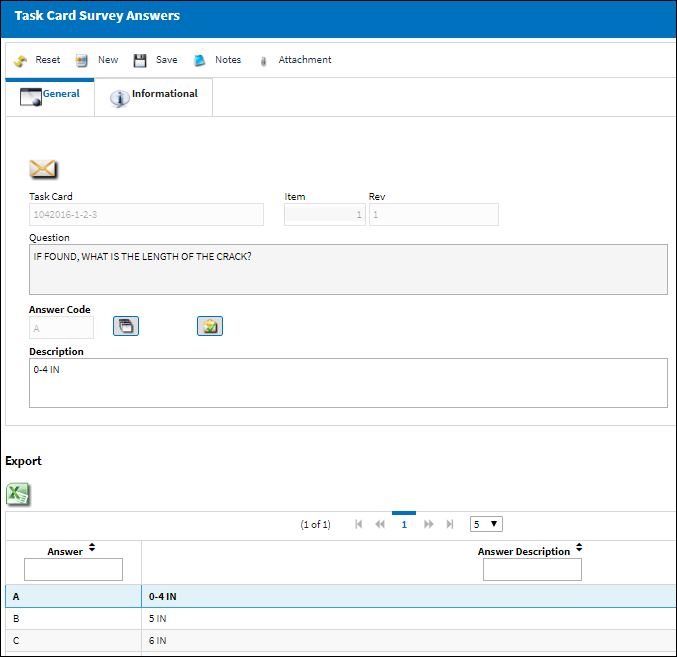
The following options/information is available in this window:
_________________________________________________________________________
Task Card
The Task Card / Job Card that details the scheduled maintenance work.
Item
The Item (question) number of the Task Card Survey.
Rev
The Task Card's most recent Authorized revision number.
Question
State the question that will appear in the survey.
Answer Code
The short code of the answer used to organize the multiple choices.
Answer (E/C Control)  button
Select this button to set the Schedule Control based on the response of the Survey question. For additional information, refer to the Task Card Survey Control.
Note: An E/C must be attached to a Task Card in order for the Multiple Choice functionality of the Task Card Survey to work.
System Notification  button
Select this button to display a notification message. For additional information, refer to the Notification button.
Description
The long description of the multiple choice answer.
_________________________________________________________________________
Download Online Help
Print
|
©1997-2018 Trax USA Corp. All rights reserved. This manual may not be copied, photocopied, reproduced, translated, or converted to any electronic or machine-readable form, in whole or in part, without prior written approval from Trax USA Corp. |
 |