 Download Online Help
 Print
|
|
|
|
|


Mass Authorize Pending TCs Button, via Task Card Authorization Management
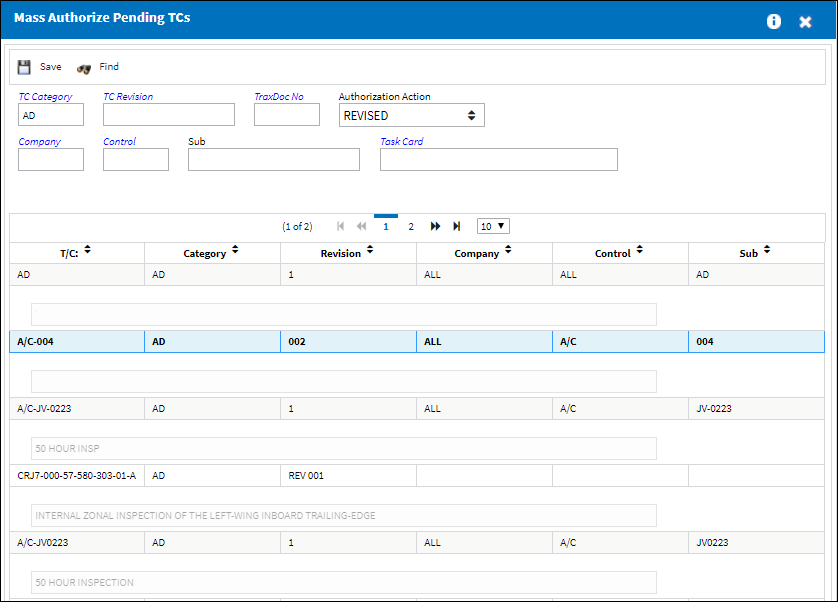
Select the Mass Authorize Pending TCs  button to mass authorize all Task Cards that are pending authorization at one time as defined by selection criteria.
The mass authorization process works the same way for E/Cs as it does for Task Cards. For additional information regarding this process, refer to the Mass Authorize Pending E/Cs Button, via Engineering Authorization Management which can be found in the Engineering - E/C Training Manual.
Note: Switch  TCPREPRT does not support the mass authorization functionality.
Additional Functionality:
When mass authorizing Task Cards, the system will ask the user if they would like to override ALL Tasks for ALL OPEN or GENERATION W/Os.
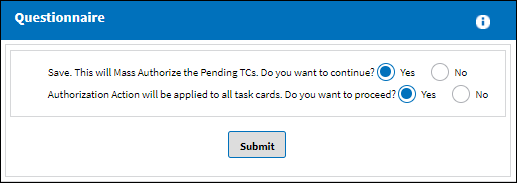
The following two prompts appear. The first asks the user if they would like to Mass Authorize the Pending TCs. Select 'OK'.
A second Authorization Action appears informing the user that a revision will be applied to all Task Cards.
The following information box appears at the to of the window informing the user that all T/Cs have been authorized:

Download Online Help
Print
|
©1997-2018 Trax USA Corp. All rights reserved. This manual may not be copied, photocopied, reproduced, translated, or converted to any electronic or machine-readable form, in whole or in part, without prior written approval from Trax USA Corp. |
 |