 Download Online Help
 Print
|
|
|
|
|


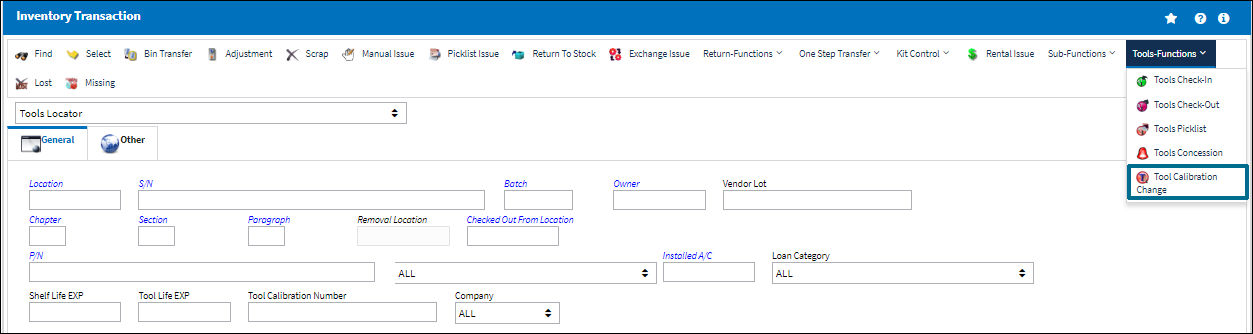
The Tool Calibration Change  button located via the Tools Check In
 multi-button, becomes available when the Tools Locator drop-down view is selected from the Inventory Transaction window. The Tool Calibration Change button allows the user to update the tool calibration number as well as the tool life expiration date.
 This button is security-controlled via Security Explorer/ Inventory/ Update/ Inventory Transaction/ Tool Info Change. For detailed information refer to the Security Explorer via the System Administration Training Manual.
From the Tool Check In multi-button, select the Tool Calibration Change button:
The Tool Calibration Change window is displayed. Here the user can enter the new calibration code in the Tool Calibration Number field.
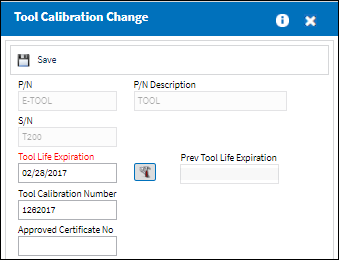
The following options/information is available in this window:
_________________________________________________________________________
P/N
The Part Number reference for the aircraft part.
P/N Description
The description of the part.
S/N
The Serial Number for the specific serialized part.
Tool Life Expiration
The tool life expiration date of the part, as applicable.
Tool Button
Select this button to access the P/N Tool Calibration pop-up window. This feature allows for the set up of multiple calibration units for the tool (i.e. test torque, etc.). These units are set-up in Transaction Code Explorer/Setting/Tool Calibration Parameters.
Prev Tool Life Expiration
The tool's previous expiration date (if applicable).
Tool Calibration Number
This is a unique number used to define a tool.
_________________________________________________________________________
Download Online Help
Print
|
©1997-2018 Trax USA Corp. All rights reserved. This manual may not be copied, photocopied, reproduced, translated, or converted to any electronic or machine-readable form, in whole or in part, without prior written approval from Trax USA Corp. |
 |