 Download Online Help
 Print
|
|
|
|
|


P/N Pool Selection
The P/N Pool Selection window is a query window which allows the user to search for P/N Pool agreements within the system. The information in this window cannot be updated. It is a query only window.
Populate any of the search criteria found below and select the Find  button. The results will populate in the lower half of the window. Choose the desired record and click on the Select
 button. The user will be taken to the P/N Pool Header window.
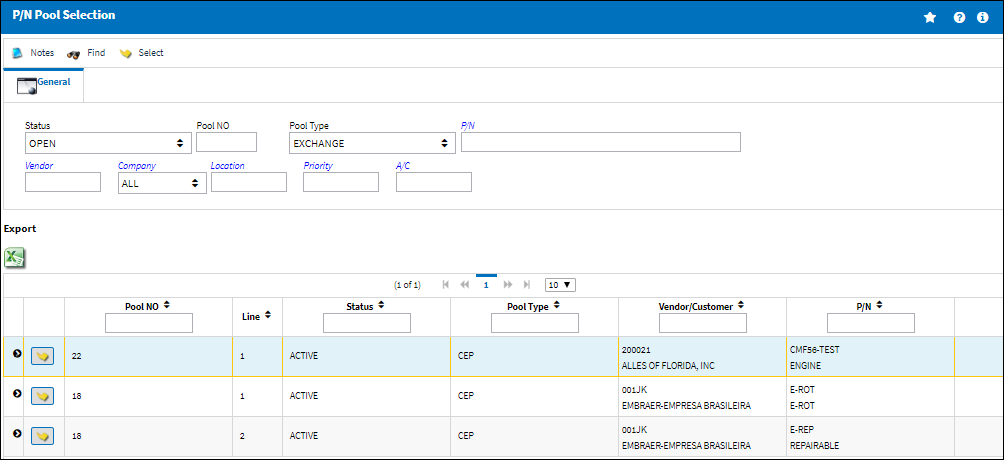
The following options/information is available in this window:
_________________________________________________________________________
Status
The status of the Pool record.
- Open
- Closed
- Under Revision
Pool NO
The Pool reference number.
Pool Type
Select from one of the following pool types:
PBH (Power By the Hour) - The PBH (Power By the Hour) type designates that the agreement is for parts that will be counted by the hour.
Repair - The Repair type designates that the agreement is for parts that will have the option for repair.
Lease - The Lease type designates that the agreement is for parts that will be leased.
Exchange - The Exchange type designates that the agreement is for parts that will be exchanged.
RO/EX - The RO/EX type designates that the agreement is for parts with Repar Order and/or Exchange Order capabilities.
Exchange Out - The Exchange Out type designates that the agreement is for parts that will be exchanged out.
P/N
This is the part number linked to the Pool agreement.
Customer
The Customer that the Pool agreement has been created for. This field is only available when the Exchange Out Pool type is selected.
Vendor
The system code for the service/part provider. The Vendor that the Pool agreement has been made with. The vendor will be the party providing the Pooled parts upon request by the Customer. This field is only available when the Exchange Pool type is selected.
Company
The Company that the P/N Pool part is associated with.
Note: The G/L Company that the P/N was assigned to when entered into inventory or ordered.
Note: For more information, refer to the Multi Company Functionality.
Location
The location that the part will be shipped to. This field is only available when the Exchange/Exchange Out Pool type is selected.
Priority
The priority placed on the transaction (e.g., routine, AOG, etc.). For additional information and functionality, refer to the Priority transaction code via the Orders Transaction Codes.
A/C
The individual Aircraft tail number.
_________________________________________________________________________
Additional Functionality:
Upon searching for the Exchange Out Pool Type, the Exchange Order Out can be created directly from the results for each record from the Create Exchange Order  button. Selecting this opens the X/O Header:
For information regarding the Exchange Order Out tabs and fields within this window, refer to the Exchange Order Out and other relevant tabs.
Note: The Supplied S/N field has been added from the record's X/O Detail to the X/O Header, via P/N Pool Selection for the option to select a specific number during the pool process.
After populating, updating the necessary information, select the Save  button to create the Exchange Order Out for the particular pool process.
Additional information can be included through the Notes  button.
 Download Online Help
Print
|
©1997-2018 Trax USA Corp. All rights reserved. This manual may not be copied, photocopied, reproduced, translated, or converted to any electronic or machine-readable form, in whole or in part, without prior written approval from Trax USA Corp. |
 |