 Download Online Help
 Print
|
|
|
|
|


Click the Optional tab to enter more detailed information about the part(s) requested, (i.e. Batch Number, Serial Number, Condition).
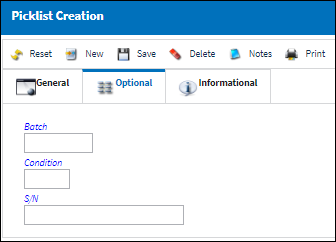
The following options/information is available in this window:
_________________________________________________________________________
Batch
The batch number that is associated with a part when introduced/received into the system.
Condition
The condition of the part.
S/N
The Serial Number for the specific serialized part.
_________________________________________________________________________
Following the completion of the entries of all parts desired on the Picklist and exit.
The system produces a Picklist print, which can be automatically routed to stores (according to printer control set-up on the system for that location).

Once received at stores, the picklist will be issued from there.
The serial numbers and batch numbers are added, and the parts are booked against the work order specified on the picklist.
The Picklist contains only system-selected part numbers, batch/serial numbers required along with the quantities (if applicable) and their bin positions.
Download Online Help
Print
|
©1997-2018 Trax USA Corp. All rights reserved. This manual may not be copied, photocopied, reproduced, translated, or converted to any electronic or machine-readable form, in whole or in part, without prior written approval from Trax USA Corp. |
 |