 Download Online Help
 Print
|
|
|
|
|


A/C Master, Optional 1 Tab
Select the Optional 1 Tab and the system displays the following screen:
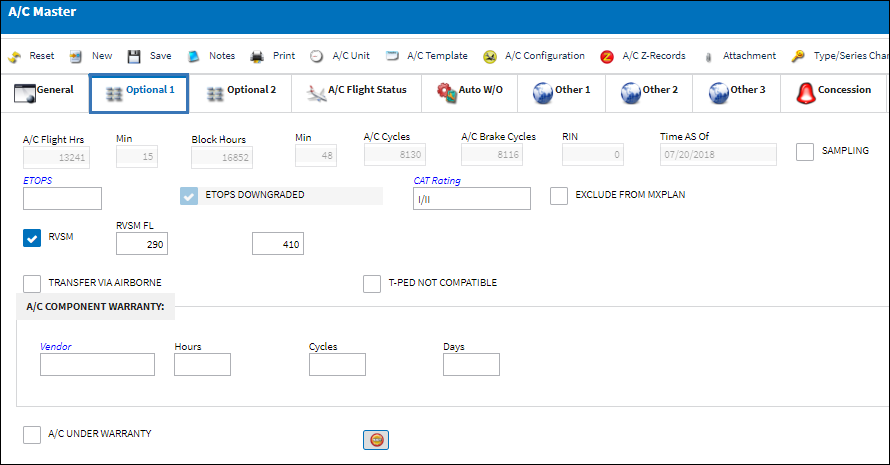
The following options/information is available in this window:
_________________________________________________________________________
Current A/C Flight Hours/Min
The current number of accumulated aircraft Flight Hours and Minutes as of the current Time AS Of date.
Block Hours/Min
The current number of accumulated aircraft Block Hours and Minutes as of the current Time AS Of date.
A/C Cycles
The current number of accumulated Aircraft Cycles as of the current Time AS Of date.
A/C Brake Cycles
The current number of accumulated Aircraft Brake Cycles as of the current Time AS Of date.
RIN
The Retirement Index Number. This number defines the Concession Maximum Value, or life limits, for rotor wing aircraft (e.g., Helicopters).
Time As Of
This field displays the last stamped flight log date that has been entered in the system for this aircraft.
Sampling checkbox
Select this checkbox if this aircraft is to be included in the sampling group defined in the Engineering Schedule Override window. Inspections can be extended on certain aircraft and its E/Cs. A sampling A/C will allow more time between inspections than a non-sampling A/C. For more information refer to the Override Sampling Schedule Button, via Engineering Control Schedule Tab in the Engineering-E/C Training Manual.
Customer
If the aircraft belongs to a customer, specify the customer here.
ETOPS
Extended Twin Engine Operation (Over water designator). The impact of this designation is to alert when installing parts that are non ETOPS rated on an ETOPS rated aircraft. P/N ETOPS designation is specified in the P/N Master/ Technical Engineering Tab. The system will allow the user to install a non ETOPS rated part to an ETOPS rated aircraft. However, the user will be alerted when doing so.
Note: Once the ETOPS has been defined at the A/C Type/Series level, this field will be protected and may not be overridden.
ETOPS Downgraded checkbox
Select this checkbox to downgrade an ETOPS aircraft to a non-ETOPS aircraft. When non-authorized ETOPS parts are placed on an ETOPS aircraft, the aircraft must be downgraded to non-ETOPS. Once an aircraft has been downgraded, it cannot fly any ETOPS routes. This is the manual way to ETOPS downgrade an aircraft. Another method to manually ETOPS downgrade/restore an aircraft is via the A/C Controller Panel. For more information refer to the A/C Controller Panel via the Technical Records Training Manual.
Note: This checkbox is security controlled via Settings/ Update/ A/C Master/ A/C ETOPS Downgrade Flag.
CAT Rating
The Category Rating as entered through the System Transaction Code Cat Rating via Settings. The CAT Rating is the description of the type of A/C landing system and is informational only.
Exclude From MXPlan checkbox
Select this checkbox if the Aircraft is not part of the MXPlan interface.
 This checkbox is part of the Sabre interface. For more information consult a System Administrator.
RSVM checkbox
Reduced Vertical Separation Minimum. This checkbox is used to specify that this aircraft fulfills the requirements to fly in a RVSM designated airspace.
RSVM FL
Enter the Flight Level (FL) Range for RSVM based on the user's country's requirement.
T-PED checkbox
Indicates whether the aircraft is equipped to handle Transmitting Portable Electronic Devices (T-PED) parts. This checkbox contains two status options:
T-PED Not Compatible - Indicates the aircraft is not compatible to handle parts containing a T-PED status.
T-PED Compatible - Indicates the aircraft is compatible and equipped to handle parts containing a T-PED status.
A/C Component Warranty
The standard manufacturer warranty can be applied for new components. Aircraft Component Warranty is cascaded to the components installed at the time of aircraft purchase. The start date of the A/C Component Warranty takes effect once the A/C Initial Template Load has been finalized. The system uses Installed Date of the A/C components as the starting point for the warranty claim.
Vendor - Actual vendor code.
Hours - The warranty coverage for A/C Component Hours.
Note: Once the actual A/C Component Hours exceed the displayed warranty parameters, the aircraft components will not be under warranty.
Cycles - The warranty coverage for A/C Component Cycles.
Note: Once the actual A/C Component Cycles exceed the displayed warranty parameters, the aircraft components will not be under warranty.
Days - The warranty coverage for A/C Component Days.
Note: Once the actual A/C Component Hours exceed the displayed warranty parameters, the aircraft components will not be under warranty.
A/C Under Warranty checkbox
Select this checkbox if A/C is still under warranty.
A/C Warranty
The standard manufacturer warranty for the aircraft.
Vendor - Actual vendor code.
Hours - The warranty coverage for A/C Hours.
Note: Once the actual A/C Hours exceed the displayed warranty parameters, the aircraft will not be under warranty.
Cycles - The warranty coverage for A/C Cycles.
Note: Once the actual A/C Cycles exceed the displayed warranty parameters, the aircraft will not be under warranty.
Days - The warranty coverage for A/C Days.
Note: Once the actual A/C Hours exceed the displayed warranty parameters, the aircraft will not be under warranty.
_________________________________________________________________________
 Warranty Management Process
Download Online Help
Print
|
©1997-2018 Trax USA Corp. All rights reserved. This manual may not be copied, photocopied, reproduced, translated, or converted to any electronic or machine-readable form, in whole or in part, without prior written approval from Trax USA Corp. |
 |