 Download Online Help
 Print
|
|
|
|
|


A/C Master, Other 1 Tab
Select the Other 1 Tab and the system displays the following window:
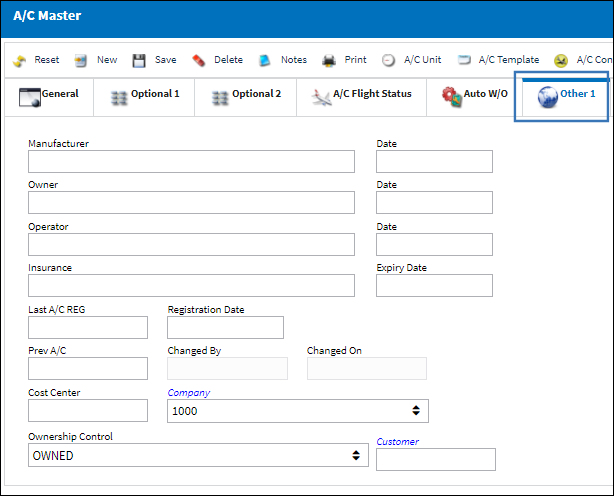
The following options/information is available in this window:
_________________________________________________________________________
Manufacturer/Date
Date and Name of Aircraft manufacturer.
Owner/Date
The Owner of the Aircraft and Date owned from.
Operator/Date
The Operator of the Aircraft and Date operated from.
Insurance/Expiry Date
The Insurance company and Insurance Expiry date.
Last A/C Reg/ Registration Date
The last A/C registration (if applicable) and registration date.
Prev A/C
The Previous Aircraft code.
Changed By
The Identification Code of the Individual making changes.
Changed On
The Date on which changes were made to the A/C Master.
Cost Center
The G/L Cost Center associated to the Aircraft.
Company drop down
The company that is linked to this aircraft.
Note: The G/L Company specified in this field will be transferred to the installed part(s). The user can view this information from the Inventory Transaction Detail, Accounting Tab via Inventory Transaction which can be found in the Inventory Training manual.
Note: For more information, refer to the Multi Company Functionality.
Ownership Control
Select the drop down Menu to select the correct description for Ownership Control.
Dry Lease - An aircraft which is owned by the user's company is being leased by a customer for a period longer than one year.
Note: When 'Dry Lease' is selected, all fields for all transactions will have free text for that aircraft via Technical Records/Update/A/C P/N Transaction.
Note: When Dry Lease is selected in the Ownership Control of the aircraft, the install or removal history record will still be written, even though the part is not actually installed nor removed. The system will display a warning to inform the user of the above stated functionality: 'Ownership for Aircraft in A/C Master is set to dry lease. The AC PN Transaction will not be saved.'
Managed - The aircraft belongs to one of the user's customers and the company manages all third party work against the aircraft in a long term contract which includes inventories management. For additional 'Managed' functionality information please refer to the Manage Parts Functionality in Inventory.
Note: With the Managed Ownership Control selected the Customer Field will become mandatory. When this aircraft is placed on a W/O the Third Party checkbox will be selected by default and may not be de-selected. Please see Work Order, General Tab for additional information.
Owner - The aircraft belongs to the user's company as purchased.
Third Party Only - The aircraft belongs to one of the user's customers and the company manages all third party work against the aircraft in a long term contract excluding inventories.
Note: With the Managed Ownership Control selected the Customer Field will become mandatory. When this aircraft is placed on a W/O the Third Party checkbox will be selected by default and may not be de-selected. Please see Work Order, General Tab for additional information.
Wet Lease - An aircraft which is owned by the user's company is being leased by a customer for a period less than one year.
Customer
If the aircraft belongs to a customer, specify the customer here.
_________________________________________________________________________
Note: Manufacturer, Owner, and Operator can be different, with different dates (i.e. leasing an A/C).
Download Online Help
Print
|
©1997-2018 Trax USA Corp. All rights reserved. This manual may not be copied, photocopied, reproduced, translated, or converted to any electronic or machine-readable form, in whole or in part, without prior written approval from Trax USA Corp. |
 |