 Download Online Help
 Print
|
|
|
|
|


Select the P/N Configuration  button to set up P/N Position Configuration for the A/C.
When selected the P/N A/C Configuration window appears:
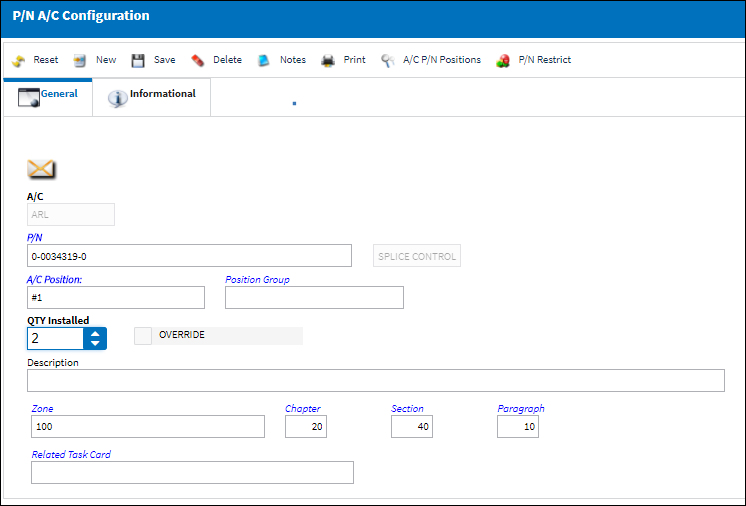
The following options/information is available in this window:
_________________________________________________________________________
A/C
The individual Aircraft tail number.
P/N
The Part Number reference for the aircraft part.
A/C Position
The position of the part on the A/C.
Position Group
The position of the group on the A/C which restricts the installation of two or more both way interchangeable parts in 'matching' groups. If an attempt is made to install parts in 'matching' groups, the system will display an information box informing the user that intermixing is not allowed. The user will not be able to continue with the install transaction.
QTY Installed
The quantity of the installed part.
Override checkbox
Check to have this record omitted when loading an A/C Template with the Template  button (Load P/N Positions/ Omit Override checkbox must be checked).
Zone
The zone of the installed part.
Description
A description of the installed part.
Chapter
The ATA chapter/section/paragraph, as applicable.
Related Task Card
The Task Card / Job Card that details the scheduled maintenance work.
_________________________________________________________________________
Download Online Help
Print
|
©1997-2018 Trax USA Corp. All rights reserved. This manual may not be copied, photocopied, reproduced, translated, or converted to any electronic or machine-readable form, in whole or in part, without prior written approval from Trax USA Corp. |
 |