 Download Online Help
 Print
|
|
|
|
|


P/N Software Configuration, General Tab
The P/N Software Configuration, General tab allows the user to create, delete, import, revise, and view the effectivity for A/C Type/Series.
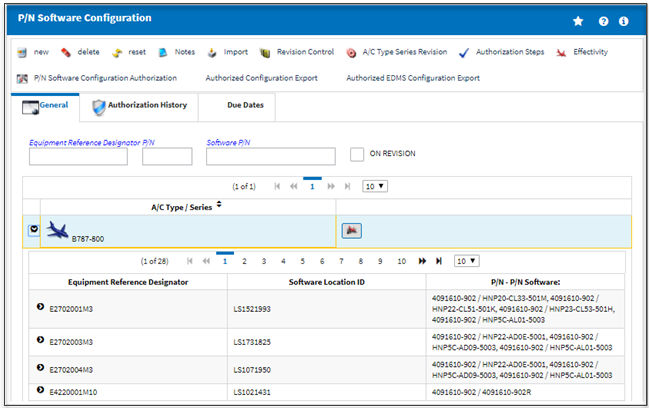
The following options/information is available in this window:
_________________________________________________________________________
A/C Type/Series
The aircraft Type and Series / Fleet assignment.
Expand All  button
Select the Expand All button to expand the P/N Software Configuration assembly.
Collapse All  button
Select the Collapse All button to collapse the P/N Software Configure assembly.
P/N Software Configuration On A/C  button
Select the P/N Software Configuration On A/C button to view installed configuration on a specified aircraft. This information is loaded through the 'As Flying' import in the Manufacturer Data Import window of the Engineering module. Selecting this button lists the ERD, SLID, and Serial Number for each software part installed on the aircraft. For additional information, refer to the P/N Software Configuration On A/C Button, via P/N Software Configuration.
Equipment Reference Designator (ERD)
The Aircraft Position ERD (Equipment Reference Designator) reference. This is the physical position on the aircraft where the hardware part is installed. This field is part of the 787Software program used to define the ERD for software parts.
Software Location ID (SLID)
The Software Location Identification (SLID) code. The SLID is where the software for the part is loaded onto the hardware part's ERD location. One ERD may have multiple SLIDs as a hardware part may have multiple software components. Each SLID has a transaction code via the Settings Module. SLIDs are typically loaded into the system through the 'A/C Authorized Software Configuration' Manufacturer Data Import but they may also be created manually.
P/N
The Part Number reference for the aircraft part.
P/N Software
The software part that is installed on the aircraft for the hardware part.
Revision
The revision of the P/N Software Configuration.
Description
The description of the part number software.
Override checkbox
When this checkbox is selected, it indicates that the P/N Software Configuration is only effective to some aircraft. When it is deselected, it indicates that the P/N Software Configuration is effective to all aircraft. This checkbox is informational only and cannot be selected/deselected in this window.
_________________________________________________________________________
Download Online Help
Print
|
©1997-2018 Trax USA Corp. All rights reserved. This manual may not be copied, photocopied, reproduced, translated, or converted to any electronic or machine-readable form, in whole or in part, without prior written approval from Trax USA Corp. |
 |