 Download Online Help
 Print
|
|
|
|
|


P/N Software Configuration
The P/N Software Configuration functionality allows users to keep track of Boeing's 787 software infrastructure. This functionality helps manage hardware and software authorizations, inventory availability, current installations, authorizations, revisions, and up-to-date compliance records. The system's P/N Software Configuration has been designed for Boeing-specific tools and schema in order to effectively integrate the 787's software necessities with classic system maintenance procedures.
The P/N Software Configuration is the link between the hardware part and the software position for that part. Software parts are made up of two main components: the physical hardware (part) that is installed on the aircraft and that part's software which is loaded against that part. Both of these components have P/N Master records. The P/N software Configuration window lists each components' Equipment Reference Designator (ERD: the hardware position on the aircraft) and Software Location ID (SLID: the digital location where the software is loaded against the hardware part). Each ERD can have multiple SLIDs, as one hardware part may require multiple types of software. Further, each SLID can contain multiple softwares.
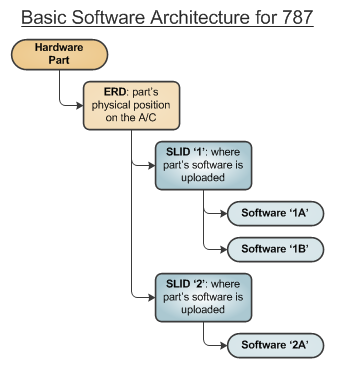
The P/N Software Configuration window displays the software infrastructure as configured on the particular A/C Type/Series. From this window, users are allowed to delete, import, revise existing, and create new P/N Software Configurations.
The data that composes this configuration is loaded into the system through two Manufacturer Data Imports. The A/C Authorized Software Configuration import is provided by the manufacturer and create a master template of the software configurations for the A/C; the As Flying import loads the aircraft's actual installed Serial Numbers. Each import should only be run once: at implementation of the aircraft's software configuration. All other edits to the configuration should be done via revisions.
The following tabs and buttons are available.
P/N Software Configuration Tabs |
P/N Software Configuration Buttons |
|
Due Dates Tab |
|
 New button
 Delete button
 Reset button

 Import button


 Authorized Configuration Export button
Additional functionality is described in the following:
 P/N Software Process
The following chart outlines the different processes for implementing, configuring, and utilizing the P/N Software Configuration functionality for the Boeing 787.
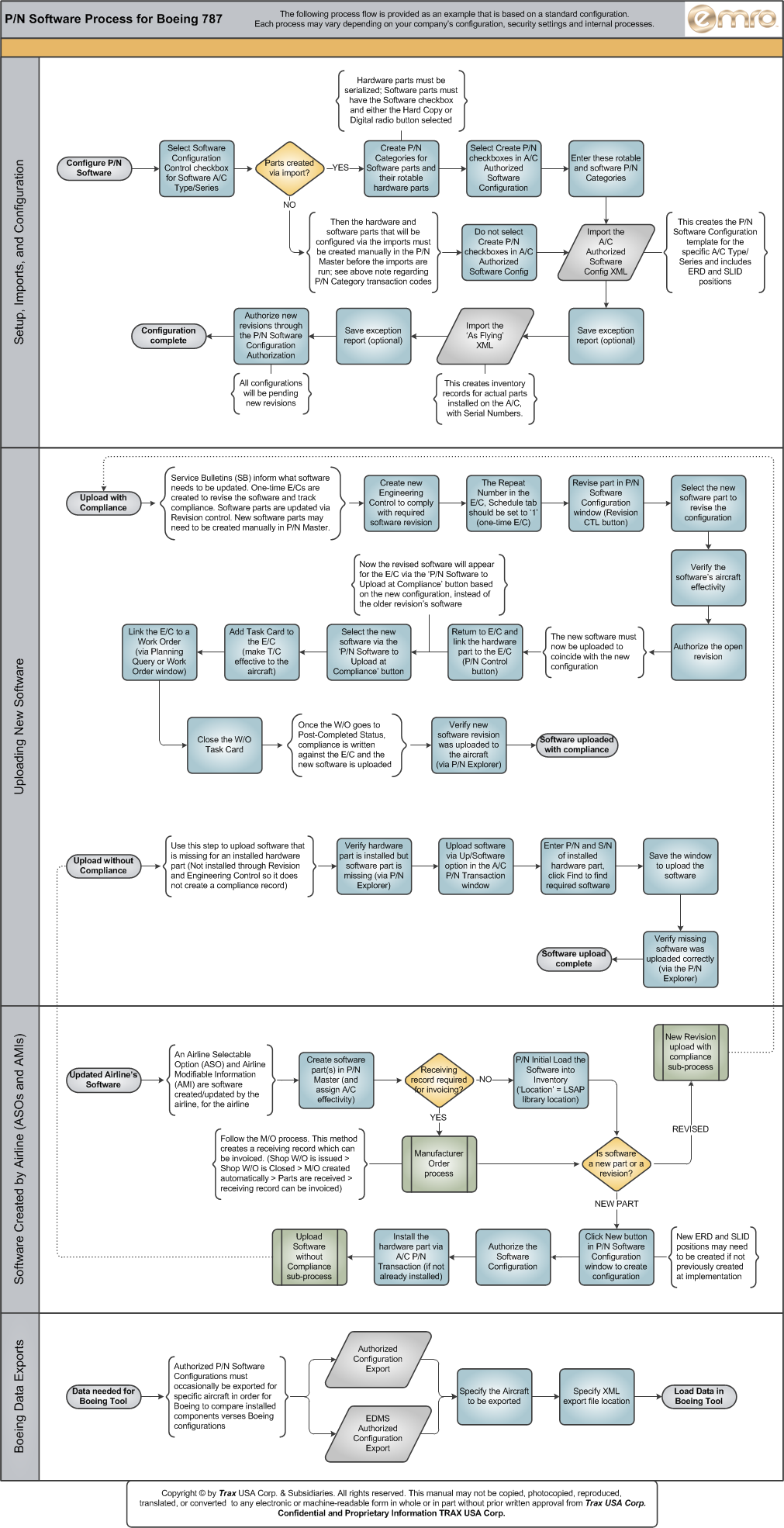
 This feature is security controlled via the Security Explorer/ Settings/ Update/ P/N Software Configuration. For additional information, refer to the Security Explorer, via the System Administration Training Manual.
This update window is also available in query mode where users can view the records provided in this window but cannot create new records or edit existing data. Refer to this module's Query menu.
Download Online Help
Print
|
©1997-2018 Trax USA Corp. All rights reserved. This manual may not be copied, photocopied, reproduced, translated, or converted to any electronic or machine-readable form, in whole or in part, without prior written approval from Trax USA Corp. |
 |