 Download Online Help
 Print
|
|
|
|
|


A/C Catalog
The A/C Catalog window is designed to link cabin Defects with the specific parts requiring attention. When a defect is found, certain circumstances (e.g., damage to a video screen, a tear in a seat's armrest, a missing lavatory placard, etc.) can be linked to the parts needing attention as reported through the defect. These circumstances are created for specified sub-sections of a particular main section of the aircraft cabin. The different sections, sub-sections, and circumstances can be added and/or removed through the New  button and the Delete
 button, respectively.
 Note: This feature is compatible with the CabinLog iOS application, a separate Trax product. For more information, contact the appropriate system administrator at sales@trax.aero.
 This window is security controlled via the Security Explorer/ Settings/ Update/ A/C Catalog. For additional information, refer to the Security Explorer section of the System Administration Training Manual.
After the A/C Catalog has been created, it can be used in the CabinLog application to specify defects, therefore creating Defect Reports, in the aircraft cabin. Within the Trax system, along with the A/C Type Series Seat Configuration or individual eMRO A/C Seat Configuration having been created, the defects specified in this window can be added to an aircraft cabin through the eMRO Seat Mapping function, thus creating a corresponding Defect Report. For more information, refer to the Defect Report Process.
Additionally, the A/C Catalog can be brought into the system through an import. For more information, refer to the Import button, via A/C Catalog.
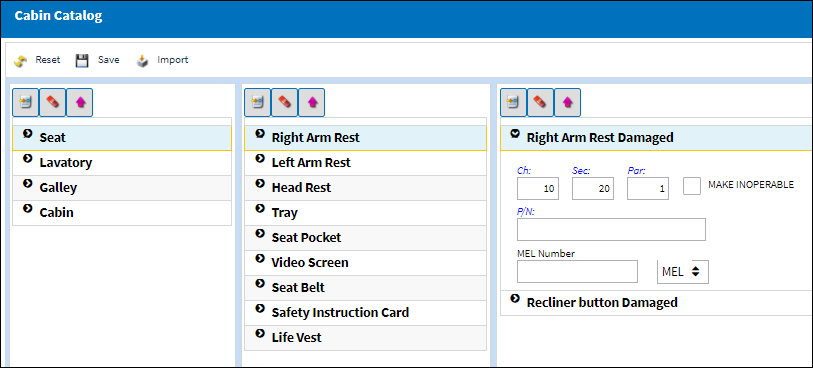
The following options/information is available in this window:
_________________________________________________________________________
Chapter / Section / Paragraph
The ATA chapter/section/paragraph, as applicable.
Make Inoperable checkbox
Indicates that the P/N cannot be utilized for operations until the defect has been resolved.
P/N
The Part Number reference for the aircraft part.
MEL Number
The Minimum Equipment List number. Specify either MEL, CDL, or GMM with the appropriate radio buttons.
MEL radio button - Indicates that the MEL Number that has been specified is for a Minimum Equipment List to be utilized for the part being inoperative.
CDL radio button - Indicates that the MEL Number that has been specified is for a Configuration Deviation List to be utilized for the part being missing.
GMM radio button - Indicates that the MEL Number that has been specified is for a General Maintenance Manual to be utilized for general operating and maintenance procedures.
_________________________________________________________________________
Download Online Help
Print
|
©1997-2018 Trax USA Corp. All rights reserved. This manual may not be copied, photocopied, reproduced, translated, or converted to any electronic or machine-readable form, in whole or in part, without prior written approval from Trax USA Corp. |
 |