 Download Online Help
 Print
|
|
|
|
|


The Seat Configuration  button allows for the creation of the layout of the Aircraft Cabin. This can be conducted for the three main sections of an Aircraft with as many rows and width as necessary for four general objects that can be found in an Aircraft Cabin. Creating the Seat Configuration sets the format for the A/C Type/Series, but can be overridden for individual Aircraft through the Override Seat Configuration button, via Aircraft Master. After creating the Seat Configuration, this feature can be utilized in multiple ways. Along with the setup of the A/C Catalog, the Seat Mapping can be conducted to assign Defects to specific objects of the Aircraft Cabin. Also, with the same configuration and associations of the A/C Catalog, the Seat Mapping of Defects can be conducted during a flight through the offline CabinLog
 application. For more information regarding the application separate from eMRO, contact the appropriate administrator.
Note: This feature is compatible with the CabinLog and QuickTurn iOS applications, a separate TRAX product. For more information, contact the appropriate system administrator at sales@trax.aero.
Another option for creating the Seat Configuration is to bring the information into the system through an import. For more information, refer to the Import  button, via A/C Type/Series Seat Configuration.
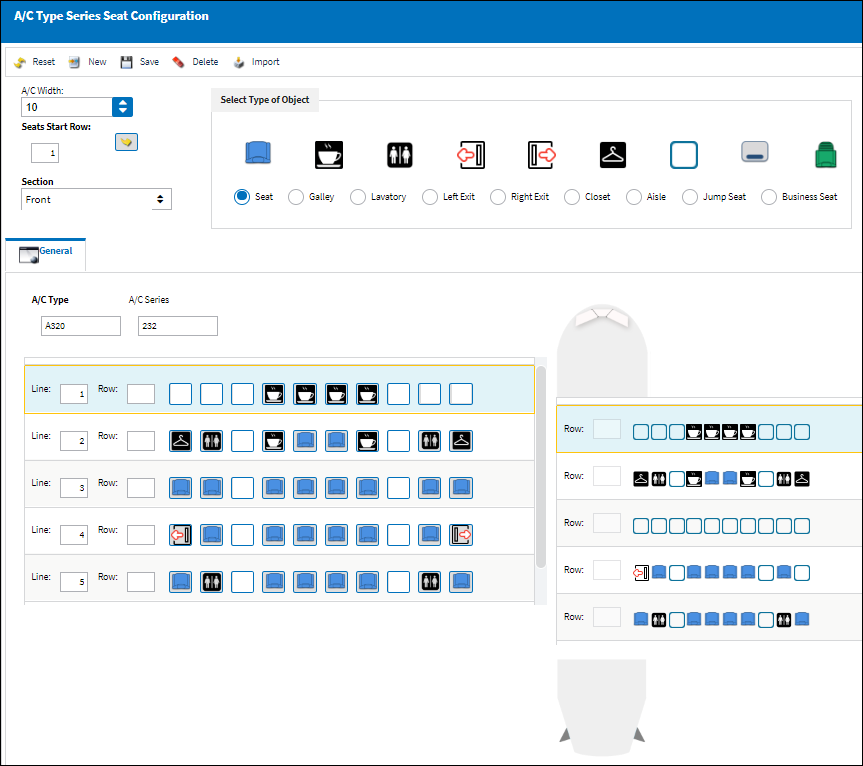
The following options/information is available in this window:
_________________________________________________________________________
A/C Width
The amount of columns to be applied to the row, or line.
Seats Start Row
Indicates where the actual seat numbers begin. For example, the first row may contain they galley, or lavatory, therefore row 1 doesn't really start at row 1.
Section
The region of the Aircraft Cabin to which the Seat Configuration is being created for.
Type of Object radio buttons
The general features that the Aircraft Cabin can be separated into. After the Lines and columns are specified, the Type of Object is assigned through selecting the appropriate radio button and then selecting the necessary features' spot to be associated. The Types of Objects to be chosen from include:
- Seat
- Galley
- Lavatory
- Left Exit
- Right Exit
- Closet
- Aisle
- Jump Seat
- Business Seat
_________________________________________________________________________
Download Online Help
Print
|
©1997-2018 Trax USA Corp. All rights reserved. This manual may not be copied, photocopied, reproduced, translated, or converted to any electronic or machine-readable form, in whole or in part, without prior written approval from Trax USA Corp. |
 |