 Download Online Help
 Print
|
|
|
|
|


The A/C Type & Series Revision  button allows the user to apply a revision for an entire A/C Type & Series.
From the P/N Software Configuration window, be sure that the desired A/C Type/Series is selected.
Select the A/C Type & Series Revision button.
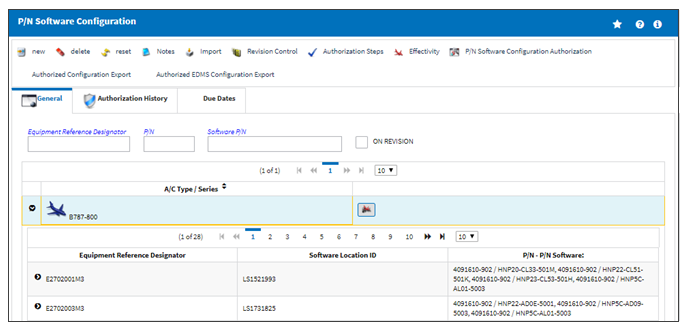
The system displays the Revision Control window. Populate the Description field and select the Save  button.
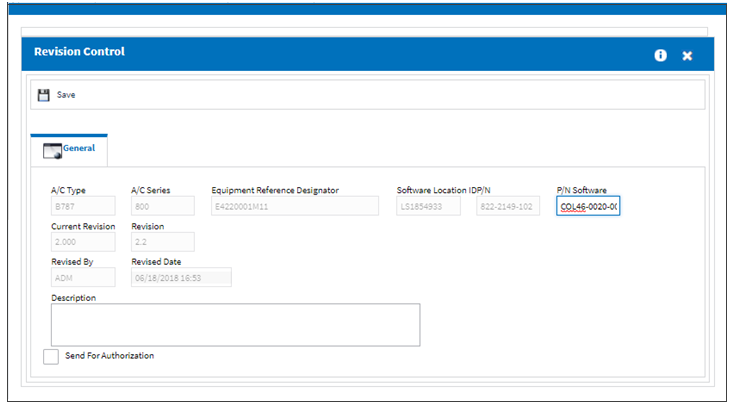
The following options/information is available in this window:
_________________________________________________________________________
A/C Type/Series
The aircraft Type and Series / Fleet assignment.
Current Revision
The current revision number of the P/N Software Configuration.
Revision
The new revision number of the P/N Software Configuration once this window is saved.
Revised By
The user who created this revision.
Revised Date
The date the revision was revised.
Description
The description of the part number software.
Send For Authorization checkbox
Select this checkbox to send the entire A/C Type/Series for authorization. If this checkbox remains deselected, once the Revision is saved, the user will have to manually release the A/C Type/Series for authorization and accept it.
_________________________________________________________________________
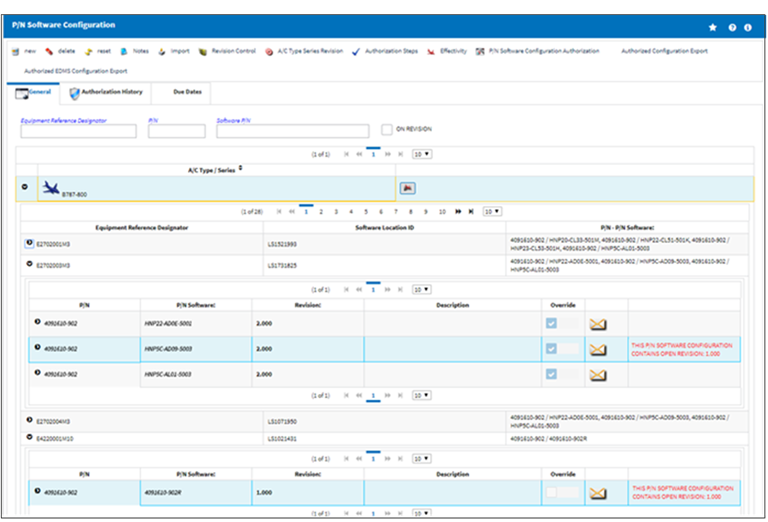
After saving the record, every P/N Software Configuration for the B737-700 A/C Type/Series is now under revision:
Download Online Help
Print
|
©1997-2018 Trax USA Corp. All rights reserved. This manual may not be copied, photocopied, reproduced, translated, or converted to any electronic or machine-readable form, in whole or in part, without prior written approval from Trax USA Corp. |
 |