 Download Online Help
 Print
|
|
|
|
|


For many of the order types, the vendor tab is available. This tab is automatically populated with the vendor's mailing address and information upon entering the vendor code on the General tab.
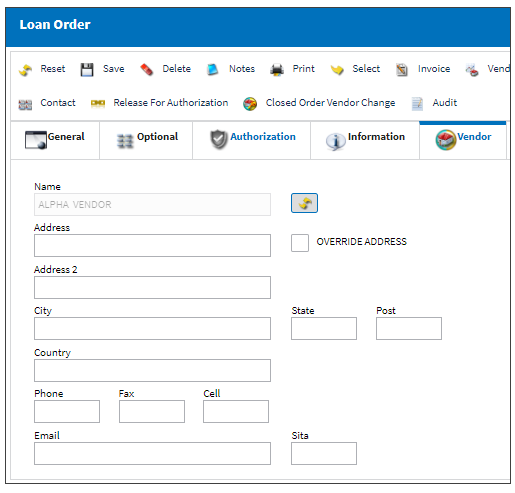
The following options/information is available in this window:
_________________________________________________________________________
Name
The name of the vendor who was selected in the vendor field will appear here as defined in the Vendor Master. The name will auto populate by default when the Vendor code in the Order Header, General tab is entered.
Address
Contact's address. The address of the vendor as defined in the Vendor Master. The address will auto populate by default when the Vendor code in the Order Header, General tab is entered.
Override Address checkbox
When this checkbox is selected, the user may override the address information being populated from the Setting's Master information and enter free text information.
City/State
Contact's city/state. The city/state of the vendor as defined in the Vendor Master. The city/state will auto populate by default when the Vendor code in the Order Header, General tab is entered.
Postal Code
Contact's postal reference (zip/ post code). The Postal Code/Zip Code of the vendor as defined in the Vendor Master. The city/state will auto populate by default when the Vendor code in the Order Header, General tab is entered.
Country
Contact's country. The country of the vendor as defined in the Vendor Master. The country will auto populate by default when the Vendor code in the Order Header, General tab is entered.
Phone
Contact's telephone number.
Fax
Contact's facsimile number.
Cell
The cellular number for the contact.
Contact electronic mail address.
Sita
The SITA identification.
_________________________________________________________________________
Download Online Help
Print
|
©1997-2018 Trax USA Corp. All rights reserved. This manual may not be copied, photocopied, reproduced, translated, or converted to any electronic or machine-readable form, in whole or in part, without prior written approval from Trax USA Corp. |
 |