 Download Online Help
 Print
|
|
|
|
|


The Repair Order Detail, Warranty tab will be displayed as follows:
_________________________________________________________________________
Open status warranties

Closed status warranties
No warranty information
_________________________________________________________________________
These will alert you that the Warranty agreement (provision) can be applied to the part.
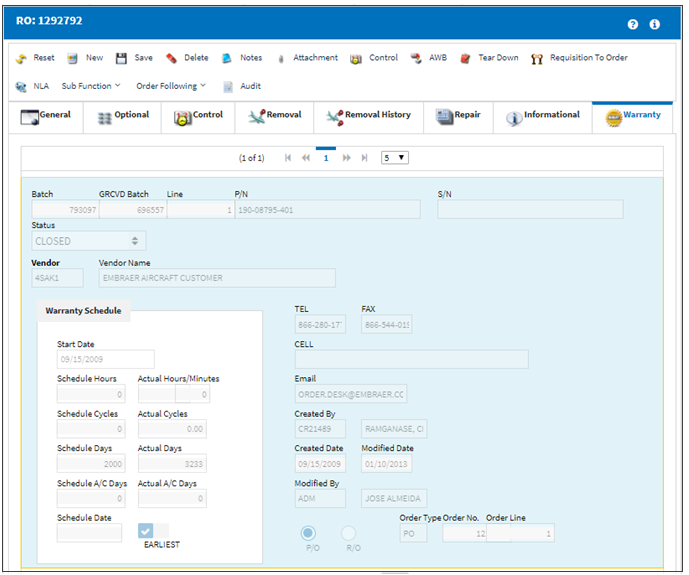
The following options/information is available in this window:
_________________________________________________________________________
Batch
The batch number that is associated with a part when introduced/received into the system.
Goods RCVD Batch
The original batch number when the part was initially introduced/received into inventory.
Warranty Line
The warranty line item of the part that requires modification/update of Warranty information.
P/N
The Part Number reference for the aircraft part.
S/N
The Serial Number for the specific serialized part.
Status
The current status of the Warranty. Only Open status warranties are considered as under Warranty. If the status is closed, the part is no longer covered by that particular warranty.
Note: Once the Actual meets the Schedule the Warranty will automatically go to Closed Status. Please refer to the Earliest checkbox field within this table for additional information.
Vendor
The system code for the service/part provider.
Phone
Contact's telephone number.
Fax
Contact's facsimile number.
Cell
The cellular number for the contact.
Sita
The SITA identification.
Contact electronic mail address.
Created By
The user who created the record.
Created Date
The date the record was created.
Modified By
The user who last modified the record.
P/O or R/O radio button
Select one of these two radio buttons that applies to the batch's type (Purchase Order or Repair Order).
Order/Line
Type of Order. By order type, certain receiving and financial behaviors will be assigned to the order at receiving of the various Order Types. These order types exist under the Orders or Customer Orders Modules exclusively. All Order Types are Hard Coded into the programming syntax. The specific Line item of the Order. Each Line item could represent a different part included in the same order.
Warranty Schedule/Start Date
The warranty schedule for the part/start date.
Warranty Schedule/Start Date
The warranty schedule for the part/start date.
Warranty Schedule Hours
Number of scheduled hours for the part to be installed on an aircraft (if applicable).
Warranty Schedule Cycles
Number of scheduled cycles for the part to be installed on an aircraft (if applicable).
Calendar Day checkbox
Check to indicate that calendar days will be counted for the warranty schedule instead of installed days.
Warranty Schedule Days
Number of scheduled days for the part to be installed on an aircraft (if applicable).
Warranty Schedule Date
The warranty date for the part (if applicable).
Warranty Actual Hours
Actual hours installed on an aircraft (if applicable).
Warranty Actual Cycles
Actual cycles installed on an aircraft (if applicable).
Warranty Actual Days
Actual Days installed on an aircraft (if applicable). Here you can change any of the Warranty information as necessary using the Hours, Cycles, Days, and Date fields.
Earliest checkbox
If selected, the first warranty limit will close the warranty. If de-selected, the warranty will remain open until all warranty limits are met.
Note: This checkbox may be defined per vendor on the Vendor Master, Warranty Information Tab.
_________________________________________________________________________
Download Online Help
Print
|
©1997-2018 Trax USA Corp. All rights reserved. This manual may not be copied, photocopied, reproduced, translated, or converted to any electronic or machine-readable form, in whole or in part, without prior written approval from Trax USA Corp. |
 |