Download Online Help Print

Previous Topic

Next Topic

Book Contents

Book Index

Warranty Claim Order

Warranty Claim Orders are a tool for the warranties department to track warranty claims against a specific vendor and issue a warranty claim to the vendor. These claims may be for a specific part number, E/C, W/O, Task Card, or a Service Order.

The following tabs and buttons are available at the header level.

Warranty Claim Order Header Tabs

Warranty Claim Order Header Buttons

General Tab

Optional Tab

Authorization Tab

Information Tab

Vendor Tab

Terms and Condition Tab

but_reset_sm Reset button

but_new_small New button

but_save_small Save button

but_delete Delete button

but_notes_small Notes button

but_print (small) Print button

but_select_small Select button

but_invoice_header_small_new Invoice button

but_vendor_performance_sm Vendor Performance button

but_contact_sm Contact button

but_release for authorization (small2) Release For Authorization

but_closed_order_vendor_change_small Closed Order Vendor Change button

but_audit_sm Audit button

For information on the options in the detail level, refer to Warranty Claim Order Detail.

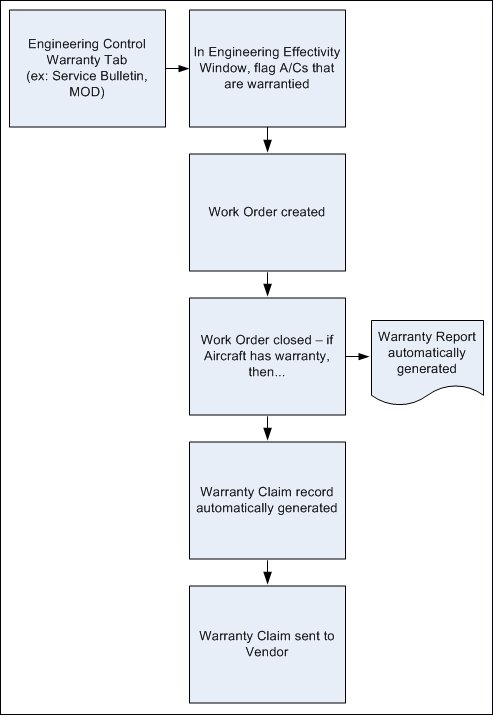
The following flowchart shows how the user arrives at having a Warranty Claim:

ORD_WC Process Flow

Warranty Management Process Flow

In This Section

Warranty Claim Order Header, General Tab

Warranty Claim Order Header, Optional Tab

Warranty Claim Order Header, Authorization Tab

Warranty Claim Order Header, Information Tab

Warranty Claim Order Header, Vendor Tab

Warranty Claim Order Header, Terms and Conditions Tab

Warranty Claim Order Header Buttons

Warranty Claim Order Detail

See Also

Orders Creation/Update

Orders Creation/Update, General Tab

Orders Creation/Update, Other Tab

Orders Creation/Update, Requisition Tab

Notes Button, via Orders Creation/Update

Print Button, via Orders Creation/Update

AWB Button, via Orders Creation/Update

Receiving Discrepancy Button, via Orders Creation/Update

Contract Order

Exchange Order

Loan Order

Manufacture Order

Purchase Order

Repair Order

Service Order

Transfer Order

Top of Page Download Online Help Print