 Download Online Help
 Print
|
|
|
|
|


Orders Creation/Update, General Tab
The Orders Creation/Update, General Tab allows users to create and query for Orders of the following types:
- Blanket/Contract Orders
- Exchange Orders
- Loan Orders
- Manufacture Order
- Purchase Orders
- Repair Orders
- Outside Services Order
- Transfer Orders
To create a new Order, select the New  button. To query for existing records, use the query fields to specify a range of Orders and select the Find
 button:
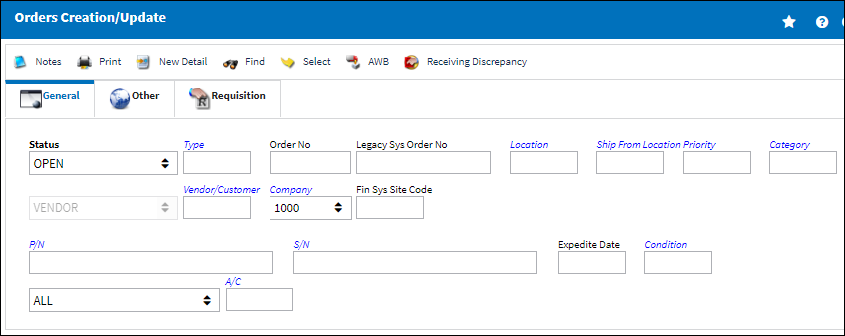
The following options/information is available in this window:
_________________________________________________________________________
Status
The current status of the order.
Type
The Type of Order which are as follows:
C/O - Contract Order
E/C - Exchange order
L/O - Loan Order
M/O - Manufacturer Order
X/O - Exchange Order Out
P/O - Purchase Order
R/O - Repair Order
S/V - Service Order
T/O - Transfer Order
W/C - Warranty Claim Order
Order No
The type of order and the order number for the transaction.
Legacy Sys Order No
The legacy number related to the order. The legacy number is typically identified and used by customers during implementation to cross reference their old systems order number to the new systems order number.
Note: Does not apply to C/O, M/O or W/C order types.
Location
The Location for maintenance events, inventory stores, orders, transactions, or training events.
Ship From Location
Location from which order has been shipped.
Priority
The priority placed on the transaction (e.g., routine, AOG, etc.). For additional information and functionality, refer to the Priority transaction code via the Orders Transaction Codes.
Category
The appropriate category for this transaction. This also works with the Authorization Process as defined against the Order Type.
Vendor/Customer
The vendors are defined in the Vendor Master. All vendors must have the required criteria (i.e. supplier, service, etc) to be used against the particular order type. Otherwise, the below message may be received stating that the user will not be able to save the order with that particular vendor.
The customer the order is being placed with requiring the items.
Company
The company the order is being created for.
Note: For more information, refer to the Multi Company Functionality.
Financial Sys Site Code
The order's financial system site code.
P/N
The Part Number reference for the aircraft part.
S/N
The Serial Number for the specific serialized part.
Expedite Date
The accelerated delivery date of this Order; rushed order based part requirement and order priority. Expedite Date may be defaulted as defined in the Order Priority System Tran Code.
Condition
The condition of the part.
Inventory Type drop down
The type of inventory the item is registered as in the system. The available options are All, General, GSE and Maintenance Inventory. All is set as the default.
A/C
The individual Aircraft tail number.
_________________________________________________________________________
Download Online Help
Print
|
©1997-2018 Trax USA Corp. All rights reserved. This manual may not be copied, photocopied, reproduced, translated, or converted to any electronic or machine-readable form, in whole or in part, without prior written approval from Trax USA Corp. |
 |