 Download Online Help
 Print
|
|
|
|
|


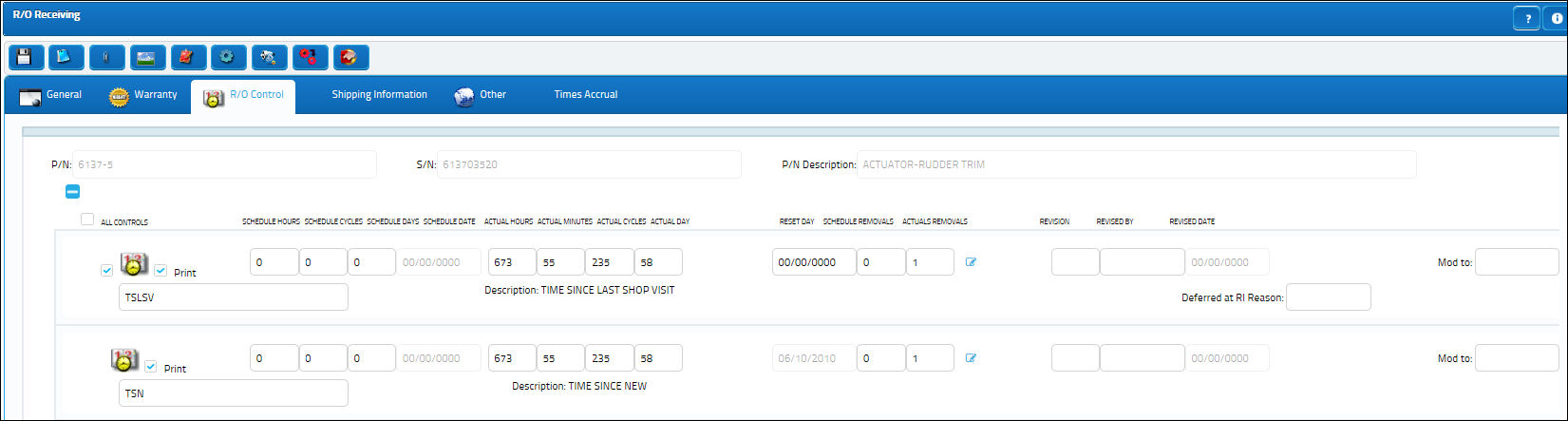
The R/O Control tab displays the time control information for parts that have P/N controls and/or E/C's associated. The R/O Control tab is used to update P/N Control  and P/N E/C
 schedule information. Below is a list of the fields and their respective functions.
Note: The switch  ROCTLRI determines whether this tab appears in either Order Receiving or Receiving Inspection window. If set to Yes, the system will reset the part control for repair orders after receiving inspection. The R/O Control Tab will appear via the Receiving Inspection option, not the Order Receiving option. If set to NO, the R/O Control Tab will appear via the R/O Receiving window.
The following options/information is available in this window:
_________________________________________________________________________
Expand  button/Collapse
 button
Select the Expand button to expand the P/N line for a tree view of all associated Controls and relevant information. Select the Collapse button to collapse the tree.
P/N
The Part Number reference for the aircraft part. Please note that any additional Part Numbers which may appear on this tab may be NLA to the NHA which appears on the airOrder Detail, General tab. ALL NLA component controls will appear under the appropriate P/N S/N.
S/N
The Serial Number for the specific serialized part. Please note that any additional Part Numbers which may appear on this tab may be NLA to the NHA which appears on the airOrder Detail, General tab. ALL NLA component controls will appear under the appropriate P/N S/N.
P/N Description
The description of the part.
Select checkbox
Check to make the time control effective to that part number. Once selected, the option to edit the reset date of that particular time control and/or the removal actuals become available (if applicable).
Control
This is the Part Number with the time control.
Schedule Hours
The number of hours allotted for a specific time control schedule. The schedule figure is set up via the Settings/Update/P/N Control button.
Schedule Cycles
The number of cycles allotted for a specific time control schedule. The schedule figure is set up via the Settings/Update/P/N/P/N Control button.
Schedule Days
The number of days allotted for a specific time control schedule. The schedule figure is set up via the Settings/ Update/P/N/P/N Control button.
Actual Hours
The number of actual accumulated hours against the P/N Control schedule.
Actual Cycles
The number of actual accumulated cycles against the P/N Control schedule.
Actual Days
The number of actual accumulated days against the P/N Control schedule.
Reset Date
The last reset date of the P/N Control.
Removal Schedule
The removal schedule field is used to track component removals (i.e. a wheel assembly) where a certain number of removals should occur before an overhaul needs to be performed.
Removal Actual
The number of times the component has been removed from an aircraft. The removal actuals figure is automatically adjusted with each A/C P/N transaction.
Calendar Control
Select to activate calendar control on this part. Calendar selected items are “days by the calendar” regardless of whether installed on an aircraft or not. If calendar control is selected, the system will block the other time parameters for that entry by graying out the appropriate fields.
Note: The switch ROCTLRI determines whether this tab appears in either Order Receiving or Receiving Inspection window. If set to Yes, the system will reset the part control for repair orders after receiving inspection. The R/O Control Tab will appear via the Receiving Inspection option, not the Order Receiving option. If set to NO, the R/O Control Tab will appear via the R/O Receiving window.
Select checkbox
Check to make the time control effective to that part number. Once selected, the option to edit the reset date of that particular time control and/or the removal actuals become available (if applicable).
Control
The Engineering Control that specifies aircraft or component scheduled maintenance intervals.
Schedule Hours
The number of hours allotted for a specific time control schedule. The schedule figure is set up via the Settings/Update/P/N Control button.
Schedule Cycles
The number of cycles allotted for a specific time control schedule. The schedule figure is set up via the Settings/Update/P/N/P/N Control button.
Schedule Days
The number of days allotted for a specific time control schedule. The schedule figure is set up via the Settings/ Update/P/N/P/N Control button.
Actual Hours
The number of actual accumulated hours against the P/N Control schedule.
Actual Cycles
The number of actual accumulated cycles against the P/N Control schedule.
Actual Days
The number of actual accumulated days against the P/N Control schedule.
Reset Date
The last reset date of the P/N Control.
Removal Schedule
The removal schedule field is used to track component removals (i.e. a wheel assembly) where a certain number of removals should occur before an overhaul needs to be performed.
Removal Actual
The number of times the component has been removed from an aircraft. The removal actuals figure is automatically adjusted with each A/C P/N transaction.
_________________________________________________________________________
Additional Functionality:
Note: If the Actuals are greater than the Schedule limit, but the proration Actuals are less than the Schedule limit, the system will use the Proration Actuals in RO Receiving.
Note the Actuals in the P/N Inventory Control for the following P/N.
The Prorated Part still displays time remaining even if the Actuals do not:
The part is placed on an RO. Even if the time shows no remaining, it now considers the prorating Actuals and allows the part to be received:
The system allows the part to be received as shown below:
Download Online Help
Print
|
©1997-2018 Trax USA Corp. All rights reserved. This manual may not be copied, photocopied, reproduced, translated, or converted to any electronic or machine-readable form, in whole or in part, without prior written approval from Trax USA Corp. |
 |