 Download Online Help
 Print
|
|
|
|
|


The Repair Order Receiving Detail, Other tab is used to enter relevant information related to the order being received.
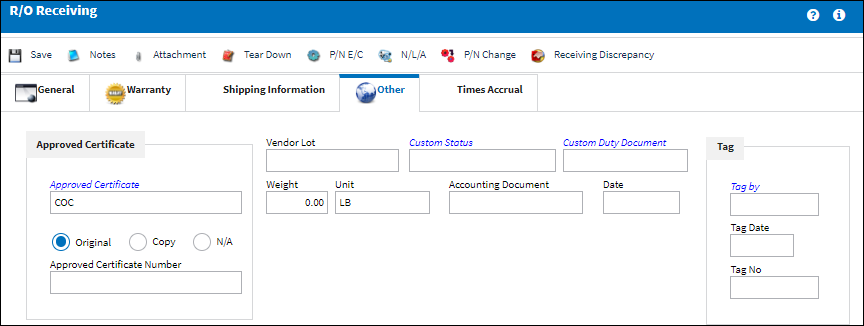
The following options/information is available in this window:
_________________________________________________________________________
Approved Certificate
The type of certificate approving the part (ie. Form 1, EASA etc.). The user may choose from a pre-defined transaction code, or enter the Approval Certificate manually.
 APCERTVAL - (Approved Certification validation at Order Receiving). If set to Yes, the system will not validate an Approved Certificate in the Order Receiving window that is not registered in the System Transaction Codes. If set to No, the system will validate an Approved Certificate in the Order Receiving window that is not registered in the System Transaction Codes.
Original radio button - Select this radio button to indicate that the certificate is an original.
Copy radio button - Select this radio button to indicate that the certificate is a copy.
Approved Certificate Copy - The type of certificate copy.
Note: Depending on the setting of the Switch RIAPCRMN, this field will or will not be mandatory.
N/A radio button - Select this radio button to indicate that the certificate is not available.
Approved Certificate Number
The Approved Certificate Number. This is a free text field.
Vendor Lot
By checking the Lot Control box via the Part Number Master/Inventory Tab, the user is able to enter vendor lot numbers when the part is received. This will assist in determining if the part is part of a vendor lot. This information can usually be found on the packaging when the part is received from the manufacturer.
Note: If the received component is lot controlled, the lot number must be entered before receiving.
Custom Status
Customs status that applies to the part in the transaction, as applicable.
Custom Duty Document
Document used to verify that the part was accepted by customs.
Weight
The weight of the component being received. This information is being pulled from the Optional Tab of the P/N Master.
Unit
The unit of weight for the component being received. This information is being pulled from the Optional Tab of the P/N Master.
_________________________________________________________________________
Download Online Help
Print
|
©1997-2018 Trax USA Corp. All rights reserved. This manual may not be copied, photocopied, reproduced, translated, or converted to any electronic or machine-readable form, in whole or in part, without prior written approval from Trax USA Corp. |
 |