 Download Online Help
 Print
|
|
|
|
|


The Warranty Information tab allows users to view the P/Ns current warranty status and schedule. Once the warranty actual time has surpassed the warranty scheduled time, the warranty status will change to close.
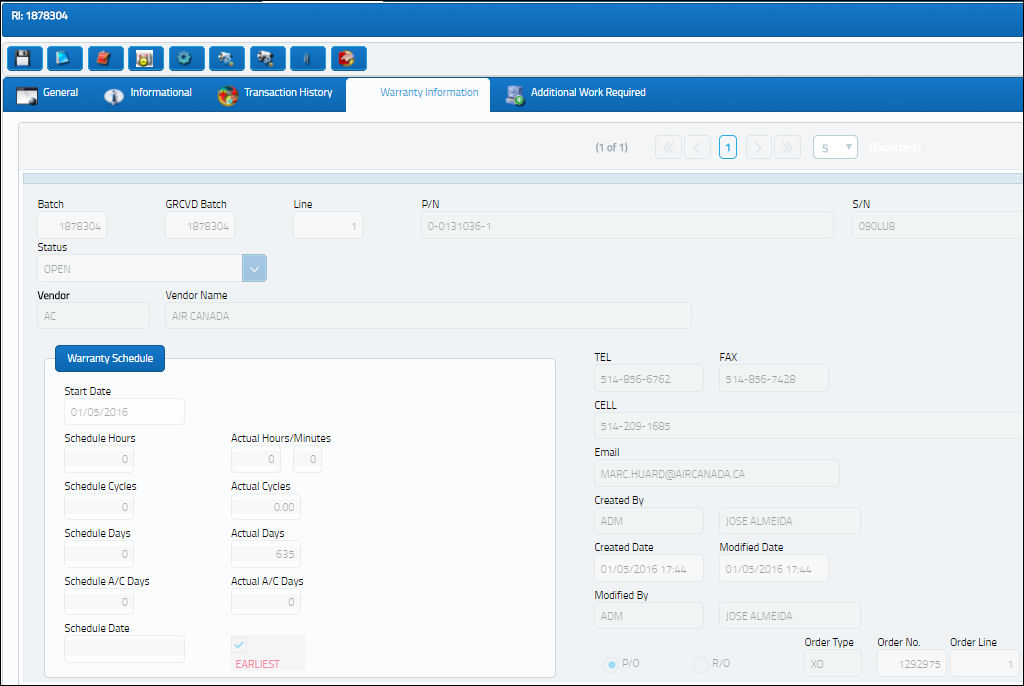
The following options/information is available in this window:
_________________________________________________________________________
Batch
The batch number that is associated with a part when introduced/received into the system.
GRCVD Batch
The original batch number when the part was initially introduced/received into inventory.
Batch Line Number
The goods received batch line number of the component under warranty.
P/N
The Part Number reference for the aircraft part.
S/N
The Serial Number for the specific serialized part.
Status
The warranty status.
Vendor
The system code for the service/part provider.
Phone
Contact's telephone number.
Fax
Contact's facsimile number.
Cell
Contact electronic mail address.
Warranty Schedule
The warranty schedule information related.
Start Date
The start date of the warranty schedule.
Schedule
The vendor or manufacturer provided limits for the warranty.
Schedule Hours / Cycles / Days
Number of scheduled hours, cycles, and days for the part to be installed on an aircraft.
Schedule A/C Days
The installed A/C days warranty for the part.
Schedule Date
The warranty expiration date for the part.
Actual
The actual warranty information is based upon the accumulation of the A/C flight hours, cycles, and A/C installed days actuals. The actuals' warranty information can be overridden here as required.
Actual Hours
Actual hours installed on an aircraft.
Actual Cycles
Actual cycles installed on an aircraft.
Actual A/C Days
Actual days installed on an aircraft.
Earliest checkbox
If the Schedule Hours, Schedule Cycles, Schedule Days, and Schedule Date fields are filled, checking the Earliest checkbox will make the warranty become due at whichever time comes first.
If the Schedule Hours, Schedule Cycles, Schedule Days, and Schedule Date fields are filled, de-selecting the Earliest checkbox will make warranty due for the latest schedule occurrence.
Created By
The user who created the record.
Created Date
The date the record was created.
Modified By
The user who last modified the record.
Modified Date
The date the record was last modified.
P/O radio button
The P/O order type of the attached order.
R/O radio button
The R/O type of the attached order.
Order
The order number attached to the respective warranty information.
Line
The order line item attached to the respective warranty information.
_________________________________________________________________________
Download Online Help
Print
|
©1997-2018 Trax USA Corp. All rights reserved. This manual may not be copied, photocopied, reproduced, translated, or converted to any electronic or machine-readable form, in whole or in part, without prior written approval from Trax USA Corp. |
 |