
 Share
Share
 Print
Print
|
|
|
|
|


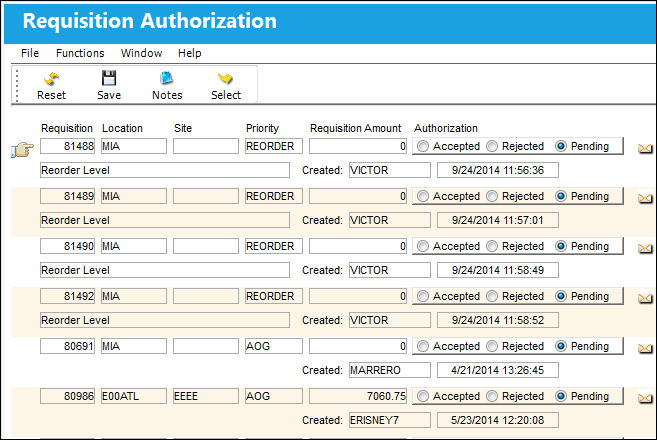
Requisition Authorization Queue
Requisitions pending authorization will appear. Only the Requisitions that fall within your financial limit will appear in your queue.
The Recommended  icon indicates that the requisition is recommended for purchase.
Confirm that the Hand  pointer is pointing to the record with which you want to work by clicking on the record. You may click on the Select
  button or double-click the item to view detailed data on the record.
There are three requisition authorization statuses available, as see below:

By default any requisitions requiring authorization will have a status of ‘Pending.'
To authorize the requisition and pass the requisition to the procurement (purchasing) department the authorizer of the requisition must select the ‘Accepted’ radio button.
To reject the requisition and place the requisition status to ‘Cancel,' removing it from the authorization queue, the authorizer of the requisition must select the ‘Rejected’ radio button.
System notifications may be configured to notify the assigned buyer or the requisition creator as to the authorization status change of the requisition.
Click on the Save  button to authorize the selected items.
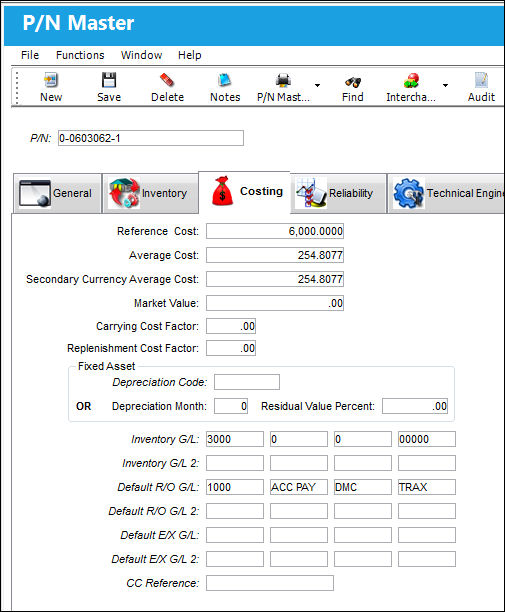
The amount of the requisition is automatically calculated based on the average price times the quantity required. This value is entered/auto-populated in Settings/ Update/ PN Master/ Costing Tab:
Once authorized, the requisition may be printed (automatically if System Printer Controls as defined) and the requisitions are released to the purchasing department where they may assigned to a buyer.
Share
Print
|
©1997-2026 Trax USA Corp. All rights reserved. This manual may not be copied, photocopied, reproduced, translated, or converted to any electronic or machine-readable form, in whole or in part, without prior written approval from Trax USA Corp. |
 |