
 Share
Share
 Print
Print
|
|
|
|
|


Sales Order Return, Information Tab
The Information tab allows the user to view the information regarding the creation and most recent modification of the record.
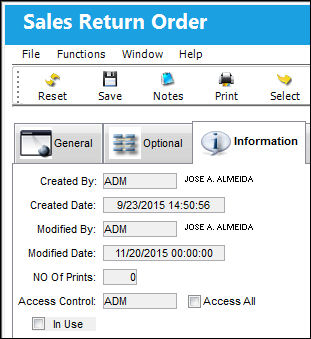
The following information/options are available in this window:
_____________________________________________________________________________________
Created By
The user who created the record.
Created Date
The date the record was created.
Modified By
The user who last modified the record.
Modified Date
The date the record was last modified.
NO Of Prints
The number of times the count was performed.
Access Control
The user who has access to the order.
Access All checkbox
Select this checkbox to give access to all users to the order.
In Use checkbox
This checkbox indicates that the Order is currently 'In Use.' When it is marked as 'In Use,' the Unlock button is available. If the user attempts to issue an order that is in use, an information box will appear indicating the user of such. This checkbox is informational only.
Re-Assign Order  button
Select this button to re-assign an order to another user. Once the Order has been re-assigned, it will leave the original users Order window and will appear in the new users Order window.
_____________________________________________________________________________________
Share
Print
|
©1997-2026 Trax USA Corp. All rights reserved. This manual may not be copied, photocopied, reproduced, translated, or converted to any electronic or machine-readable form, in whole or in part, without prior written approval from Trax USA Corp. |
 |