 Download Online Help
 Print
|
|
|
|
|


Registration Change, via A/C Registration Change/Hold/Release
'Registration Change' is used to change the A/C tail number. The system will locate all the current and historical data regarding the A/C in question, and change the aircraft registration number. Please be prepared for a waiting period (an average aircraft with some history could take thirty minutes and a large aircraft with extensive history could take hours). The window appears as follows when 'Registration Change' is selected.
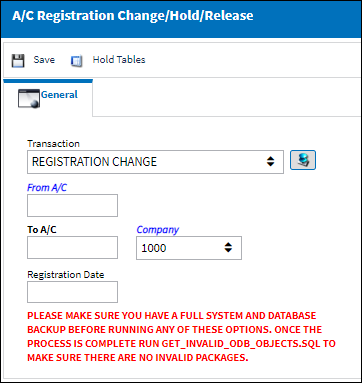
The following options/information is available in this window:
_________________________________________________________________________
From A/C
The current A/C registration.
To A/C
The new registration that the 'From A/C' will change to.
Company
The aircraft the company belongs to.
Registration Date
The date to be associated with the registration change.
Change Archive to Hold  button
Select this button to change an aircraft that has been archived to 'Hold' status. For additional information, refer to the Change Archive to Hold Button via A/C Registration Change of the Technical Records Training Manual.
_________________________________________________________________________
Note: A/C Registration Change is a change in the A/C Registration Number. All A/C related records will then have the new Registration Number. Whenever there is an A/C placed on hold for any reason, the A/C records are frozen, and therefore no transactions can be performed on that A/C or its records.
Download Online Help
Print
|
©1997-2018 Trax USA Corp. All rights reserved. This manual may not be copied, photocopied, reproduced, translated, or converted to any electronic or machine-readable form, in whole or in part, without prior written approval from Trax USA Corp. |
 |