 Download Online Help
 Print
|
|
|
|
|


A/C Release, via A/C Registration Change/Hold/Release
'A/C Release' is used after the A/C has been placed on 'Hold.' It will release the A/C back into the system and allow transactions to be viewed and performed against it. Once this task is performed, all data that was moved to the “_HD” tables (via the A/C Hold task) will be returned to their original tables in the system.
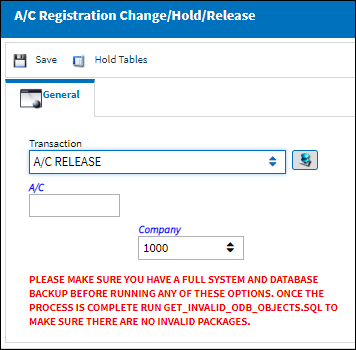
The following options/information is available in this window:
_________________________________________________________________________
A/C
The A/C that will be released from 'Hold' status. Only aircraft currently on 'Hold' status will appear in the list.
Change Archive to Hold  button
Select this button to change an aircraft that has been archived to 'Hold' status. For additional information, refer to the Change Archive to Hold Button via A/C Registration Change of the Technical Records Training Manual.
Company
The aircraft the company belongs to.
_________________________________________________________________________
All records will be returned as they were at the time the hold transaction was performed.
Download Online Help
Print
|
©1997-2018 Trax USA Corp. All rights reserved. This manual may not be copied, photocopied, reproduced, translated, or converted to any electronic or machine-readable form, in whole or in part, without prior written approval from Trax USA Corp. |
 |