
 Share
Share
 Print
Print
|
|
|
|
|


Task Card Discrepancy
The Task Card Discrepancy feature allows the user to enter and review discrepancies of the Work Order Task Card by the mechanic or shift leader working on a Task Card and enter a resolution. The reviewed discrepancy will be displayed in Production/Update/W/O Task Card Discrepancy Close for either closing or rejecting the resolution.

The discrepancies are entered during the Task Card closing process in the Production module (i.e. in Task Card Manual Closing).
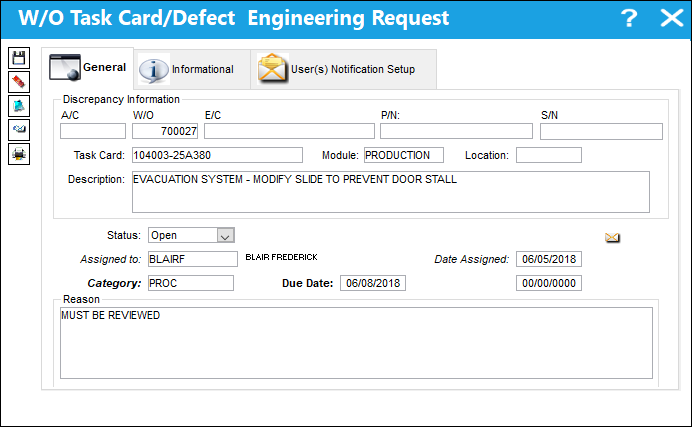
From the Work Order Task Card Window, select the Work Order Task Card Discrepancy  button. TRAX displays the Work Order Task Card/Defect Engineering Request Window. Populate all mandatory information and select the Save
  button. The Save prompt appears. Select OK.
Go to Engineering/Update/Task Card Discrepancy.
TRAX displays the W/O Task Card/Defect Engineering Request Review Window.
Only discrepancies assigned to the user currently logged into TRAX will show up in Task Card Discrepancy. Go to Task Card Discrepancy Supervisor to view all discrepancies.
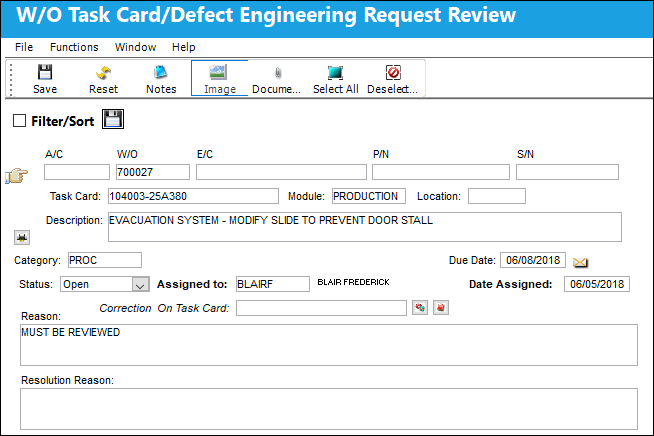
The following information/options are available in this window:
_____________________________________________________________________________________
A/C
The individual aircraft tail number.
W/O
The work order number that the Task Card with the discrepancy is on.
E/C
The Engineering Control that specifies aircraft or component scheduled maintenance intervals.
P/N
The Part Number reference for the aircraft part. This is the affected part number.
S/N
The Serial Number for the specific serialized part. This is the serial number affected.
Task Card
The Task Card / Job Card that details the scheduled maintenance work.
Module
The system module that the discrepancy was created in: Technical Records (via Defect Report), Production (via Production W/O Task Card), GSE (via GSE W/O Task Card), Shop (via Shop W/O Task Card).
Location
The Location for maintenance events, inventory stores, orders, transactions, or training events. The location where the Task Card discrepancy was entered.
Description
The description of the Task Card. This field will be auto-populated once a Task Card is selected from the Task Card drop-down field.
Category
The discrepancy category as entered by the reporting user.
Status
The status of the Engineering Request discrepancy (Open, Under Review, Reviewed, Rejected, Closed).
Assigned To
The person that the discrepancy is assigned to.
Date Assigned
The date when the discrepancy was assigned to the user.
Close Date
The date when the discrepancy is closed. This field is only available when the discrepancy is in 'Reviewed' Status.
Correction On Task Card
The Task Card the discrepancy is to be corrected on.
When Engineering Switch  TCDISCAUTH is set to Yes, this field is not available until the T/C Discrepancy is Authorized. For more information refer to Switch TCDISCAUTH via the Engineering Training Manual.
Attach to W/O  button
By selecting this button, the Task Card will be attached to the above Work Order.
When Engineering Switch TCDISCAUTH is set to Yes, this button is not available until the T/C Discrepancy is Authorized.
Quick Attach N/R to W/O  button
This button allows users to create a Non-Routine Task Card to be attached to the above Work Order. The discrepancy can then be corrected on this N/R Task Card. System Notifications can be set up to notify a user when the Task Card is attached to the W/O. For more information refer to System Notification via the Settings Training Manual.
When Engineering Switch TCDISCAUTH is set to Yes, this button is not available until the T/C Discrepancy is Authorized.
Reason
The reason as to why the discrepancy is being reported.
Resolution Reason
The resolution for the discrepancy.
_____________________________________________________________________________________
Once the resolution reason is entered and the discrepancy status is set to Reviewed, TRAX will send the discrepancy back to the Production module, where the responsible person can view the resolution and either close or reject the resolution. In case of rejection, the discrepancy will be displayed in Task Card Discrepancy again for further processing. Please note that the Task Card Discrepancy program is for informational purposes only, and will not stop the normal working process. The W/O Task Card Discrepancy Close Supervisor allows the same functionality, but shows all discrepancies that were entered, not only those assigned to the person currently logged into TRAX.
For additional functionality, refer to the following buttons:
Share
Print
|
©1997-2026 Trax USA Corp. All rights reserved. This manual may not be copied, photocopied, reproduced, translated, or converted to any electronic or machine-readable form, in whole or in part, without prior written approval from Trax USA Corp. |
 |