
 Share
Share
 Print
Print
|
|
|
|
|


System Notification
The System Notification module allows the system administrator to configure who will receive messages when general transactions occur throughout the system (e.g., when the weight of an A/C has been modified).
System Notifications can also be set up via System Transaction Codes via the Notification  button. Notifications set up in transaction codes are used to send messages when specific transactions occurs (e.g., when a Task Card with a certain Category is complied with, authorized, deleted). For information regarding the System Transaction Code notifications, refer to Transaction Code Notifications by module, via System Notification of the Settings Training Manual.
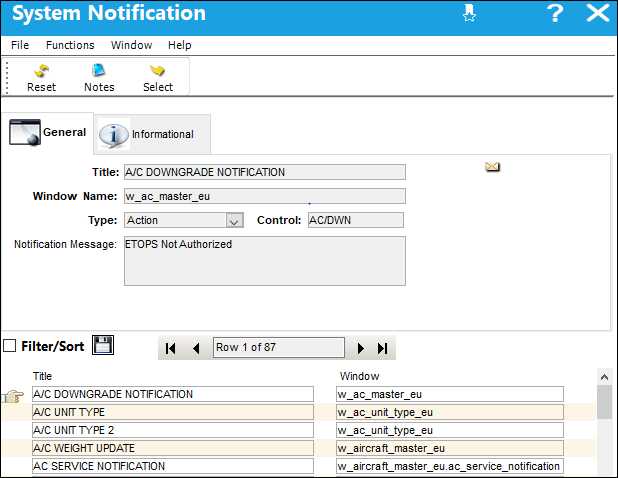
The System Notification, Informational Tab and Notes  button are available to view or include information relevant to the record.
For additional information, refer to Setup - System Notification via System Notification, of the Settings Training Manual. For examples on the utilization of system notifications, refer to the System Generation Notification Examples.
 System Notification Creation Process.
Go to Settings/ Update/ System Notification.
The following System Notifications can be found in TRAX:
Release |
Notification |
Description/Message |
Trigger |
Window of Trigger |
|---|---|---|---|---|
|
A/C DOWNGRADE NOTIFICATION |
ETOPS Not Authorized. |
An aircraft has been downgraded to an ETOPS aircraft through the ETOPS Downgrade button in the |
w_ac_controller_panel |
|
A/C OUT OF SERVICE. NOTES |
Out of service date / AC / Status / Station / Confidence LVL / Estimate Release / Notes / Reason (defect description or WO TC description depending on what is generating the NOGO) / Part estimated arrival. |
When the notes in the A/C Out Of Service window have been updated and saved (via Defect Report and Production W/O). |
w_defect_reports_eu |
|
A/C UNIT TYPE |
Oil Consumption Level has been placed on the user's queue. |
With Switch |
w_ac_actual_flights_eu |
|
A/C UNIT TYPE 2 |
Oil Consumption Level has been placed on the user's queue. |
With Switch |
w_ac_actual_flights_eu |
|
A/C WEIGHT UPDATE |
The weight value has been modified. |
Weight values are modified through the Update A/C Weight Values |
w_aircraft_master_eu |
|
A/C SERVICE NOTIFICATION |
A/C Service Flight Status Change Notification. |
Changing the Flight Service radio button to In Service, Pending, or Out of Service from the W/O or Defect Report window. |
w_wo_eu w_defect_reports_eu |
|
AIRBORNE ADD COUNTER SERVICE |
An Airborne Add Counter Message has been received. |
The total A/C Hours for aircraft selected through the Transfer Via Airborne checkbox of the A/C Master, Optional 1 tab has been received from the TRX Configuration Interface.
|
w_aircraft_master_eu |
|
AIRCRAFT WEIGHT AND BALANCE NOTIFICATION |
Weight and Balance Check Task Card.
|
A Weight and Balance Check Task Card is created, indicated through the Weight and Balance checkbox, via the Task Card, Optional 1 tab. |
w_task_card_eu |
|
AUDIT COMPLETE NOTIFICATION |
The Audit is Authorized and ready for sign-off. |
The Audit has been placed in Authorized Status in the Audit Creation/Following window. |
w_audit_log_eu |
|
AUDIT SEND NOTIFICATION |
QA Notification. |
A Q/A Forecasting has been conducted. |
w_qa_forecasting_sel |
|
BOGUS PARTS RECEIVE NOTIFICATION |
S/N Previously Reported Stolen/Bogus. |
Order Receiving is being conducted for a P/N S/N previously reported stolen/bogus. |
w_(order type)_receiving_eu |
|
CONCESSION REGISTRY NOTIFICATION |
Concession Registry Creation/Update. |
A new Concession Registry is created or a Concession Registry is updated through the Update Concession |
w_concession_registry_eu |
|
CONTRACT ORDER CREATION NOTIFICATION |
Contract Order Creation Notification. |
A new Contract Order is created. |
w_co_order_header_eu |
|
CUSTOMER AUTHORIZATION ACCEPTED |
Customer Contract Authorized. |
A Customer Contract Authorization has been accepted through selecting the Accepted Authorization Status radio button, via the Customer Authorization. |
w_customer_authorization_eu |
|
CUSTOMER AUTHORIZATION REJECTED |
Customer Contract Rejected. |
A Customer Contract Authorization has been rejected through selecting the Rejected Authorization Status radio button, via the Customer Authorization. |
w_customer_authorization_eu |
|
CUSTOMER INVOICE CHECKED NOTIFICATION |
Customer Invoice has been completely checked. |
Send Notification once an Invoice has been posted in the Customer Invoice Authorization Invoice window. |
w_customer_invoice_authorization_eu |
|
DEFECT ASR NOTIFICATION |
ASR Defect. |
With Switch |
w_defect_reports_eu |
|
DEFECT GMM INTERFACE FAILURE NOTIFICATION |
The Defect GMM Interface has failed. |
The Defect Report GMM Messaging Interface has stopped functioning correctly.
|
w_defect_reports_eu |
|
DEFERRED TASK CARD ALERTS |
Work Order Task Card has been deferred. |
The Status of a Work Order Task Card has been changed to Defer.
|
w_wo_task_card_update |
|
EO DUE DATE ANTERIOR WO DUE DATE |
EC XXX due date is anterior to WO XXX due date. |
When an E/C is added to a W/O and the E/C's Due Date is before the W/O's Schedule/Completion Date. |
w_wo_engineering_order_eu |
|
INTERCHANGEABILITIES |
Interchangeability Interface. |
P/N Interchangeability One Way Interface.
|
w_pn_interchangeable_one_way_eu |
|
INVENTORY EXPIRED |
Inventory Expired. Batches will be moved to an US status. |
With Switch |
w_inventory_expire_sel |
|
IR CATEGORY NOTIFICATION |
IR Category Notification. |
Create a new IR, or Incident Report, or update an existing IR from a Defect Report with the specified IR Category Transaction Code for which the notification is set up. |
w_ir_eu |
|
LOAN PART REMOVAL NOTIFICATION |
Loan Part Removal Notification. |
A loaned part is removed from an aircraft through the A/C P/N Transaction. With Switch |
w_ac_pn_transaction_history_eu |
|
LOAN PART REPLACEMENT RECEIVE NOTIFICATION |
Repair Receive Notification. |
The replacement for a loaned part is received. |
w_pn_inventory_ri_eu |
|
MATERIAL ISSUE |
A material issue message has been received. |
The part(s) issued to a W/O or E/C has been received. |
w_material_issue_eu |
|
MATERIAL MASTER |
Material Master Interface. |
An Exception occurs in the Material Master Interface.
|
w_pn_master_eu |
|
MEL ALERT CLEAR |
This system notification is not supported by the system. |
N/A |
w_ac_controller_panel |
|
MEL ALERT CREATE |
This system notification is not supported by the system. |
N/A |
w_ac_controller_panel |
|
MEL/CDL ALERT |
Changes have been made to the MEL. |
An existing record in the MEL Master has been updated. |
w_mel_master_eu |
|
MEL CREATION NOTIFICATION |
MEL XXX already created on A/C XXX. |
When the same MEL number is applied to the same A/C within a set number of Hours, Cycles, or Days, as configured in the notification details. |
w_defect_reports_eu |
|
NEW AUTOMATIC TRANSFER ORDER |
Notification will be sent when automatic transfer order is created from main location. |
Automatic Transfer Order is created. |
w_ro_order_header_eu |
|
NEW INVOICE NOTIFICATION |
Open Invoice Notification. |
A new Invoice is created. |
w_invoice_header_eu |
|
NEW PO |
New Purchase Order. |
A new Purchase Order is created. |
w_order_header_eu |
|
NON INVENTORY REQUISITION |
A Non Inventory Part Requisition was just created. |
A Requisition is created for a Non-Inventory part. |
w_requisition_detail_eu |
|
NOTIFICATION QUANTITY REQUIRED |
Quantity required >= Quantity installed. |
The quantity required for a part is greater than or equal to the quantity installed. |
w_ac_pn_transaction_history_auto |
|
NOTIFICATION SHOP REORDER |
Reorder for W/O Component that goes below minimum inventory level. |
A Reorder Level is reached and conducted for a Work Order. |
w_notification_shop_reorder |
|
NOTIFICATION WHEN AN RTV IS DONE |
An RTV is done. |
A Return to Vendor is conducted. |
w_pn_rtv |
|
ON HOLD INVOICE NOTIFICATION |
On Hold Invoice Notification. |
An Invoice is placed in an On Hold Status. |
w_invoice_order_eu |
|
OPS IMPACT |
EC XXX has been added to the WO XXX. |
When an E/C has the Flt Ops Affected Notification checkbox selected (via the E/C, Other tab) and the E/C is added to a W/O. |
w_wo_engineering_order_eu |
|
ORDER RECEIVED |
Order received. |
The Order Receiving has been conducted. |
w_order_received_eu |
|
ORDER RECEIVED 2 |
Order received. |
The Order Receiving has been conducted for an Order that matches a specific Terms Transaction Code for which the notification has been set up. |
|
|
OUT OF SERVICE NOTIFICATION
|
An A/C is placed Out of Service. |
A Work Order is Completed/Post Completed or its Defect is Closed and Switch |
w_ac_controller_panel_ac |
|
OUT OF SERVICE NOTIFICATION
|
An A/C is placed Out of Service. |
An Out of Service notification is initiated when an A/C's Flight Status is updated to Out of Service. |
w_ac_controller_panel_ac |
|
OUT OF SERVICE UPDATE NOTIFICATION
|
An Out of Service A/C is updated with new information. |
An Out of Service Update notification is initiated when changes are made to an A/C within the General and Narrative tabs of the Out of Service window. |
w_ac_controller_panel_ac |
|
P&S SHOP PN SHIPPED NOTIFICATION |
Packing and Shipping Shop Part Shipped. |
An Owned part shipped, indicated through Packing and Shipping record placed in Shipped Status. |
w_packing_shipping_header_eu |
|
P/N Control Notification |
Updated P/N Control. |
A notification, email or SMS is sent to a user in the event of a change in the P/N Control. |
w_pn_control_eu |
|
P/N S/N INV. TRANSACTION HISTORY |
A P/N S/N has been received. A duplicate P/N S/N exists in Inventory Transaction History. |
A P/N S/N that exists in Inventory Transaction History is being received. |
w_(order type)_receiving_eu |
|
PART ISSUED |
Part Issued has reached or surpassed allowable schedule %. |
A Manual Issue is conducted for a part that has reached, or surpassed, its allowable schedule percentage. |
w_inventory_transaction_manual_issue_eu |
|
PART INSTALLED CTRL OVERDUE |
PN control XXX is overdue. |
When a P/N Control becomes overdue on a part while the part is installed on an A/C. |
w__ac_pn_transaction_history_eu |
|
PART ISSUED AC DIFFERENT |
This part was requisitioned for A/C XXX. |
When a part is issued to a different A/C than the A/C it was requisitioned for. |
w_inventory_transaction_manual_issue_eu |
|
PART REMOVAL NOTIFICATION |
Part associated with an open defect Removal Notification. |
A/C P/N Transaction for the removal of a part associated with an open Defect Report. |
w_ac_pn_transaction_history_eu |
|
PART REMOVAL RECURRENT NOTIFICATION |
PN Recurrent Alert: PN <the partnumber> was removed from <acreg>. |
Based on a parts recurrent levels set up in the P/N Master Reliability tab, a notification will be sent that includes the P/N and the registration of the A/C the part was removed from. |
w_ac_pn_transaction_history_eu |
|
PART RETURN |
A Part Return acknowledgment message has been received. |
An Exception occurs in a Part Return from the TRX Interface.
|
w_system_part_removal_eu |
|
PASSWORD RESET |
A code has been sent to you, please check your phone or email. |
The User's Password has been changed in the User's Security window from the Security Explorer with the Allow Password Recovery checkbox selected. The notification alerts the user to retrieve a code to complete the password reset. |
w_security_signon |
|
PICKLIST NOTIFICATION |
Picklist has been created/modified. |
A new Picklist has been created or an existing Picklist has been updated. |
w_picklist_header_eu |
|
PN_AUTHORIZATION_REJECTED |
Authorization has been rejected and the P/N Deleted. |
The Authorization of a newly created P/N has been rejected, and the P/N is subsequently deleted. |
w_pn_authorization_eu |
|
PRODUCTION W/O STATUS FROM GEN TO OPEN |
W/O Status changed from Generation to Open. |
The Status of a Work Order is changed from Generation to Open. |
w_wo_eu |
|
PRODUCTION W/O SCHEDULE DATE/TIME CHANGE |
W/O Schedule Changed. |
A W/O Schedule Start/Completion Date/Time is changed. |
w_wo_eu |
|
PURCHASE ORDER CREATED |
New PO. |
A new Purchase Order is created. |
w_order_header_eu |
|
RECEIVED PART WITH EFFECTIVE EO |
Received part with effective EO. |
A notification can be sent when a new part or NLA is received into Inventory that is associated to an 'Open' or 'Pending' Engineering Control with the specified ATA Chapter. The message is sent once the P/N enters inventory via Order Receiving, Receiving Inspection, or P/N Initial Load.
For more information refer to the Received Part With Effective EO Notification example. |
receiving_part_ec_eff |
|
RECEIVING AGED PARTS WITH EFFECTIVE E/C |
Receiving aged parts with an Effective Engineering Control |
A Receiving Order has aged parts with an Effective Engineering Control. |
w_receiving_aged_parts_w_eff_ec |
|
RECURRENT ALERT |
Recurrent Alert Authorization. |
A new Recurrent Alert is created. |
w_recurrent_items_eu |
|
REQUISITION CRITICAL |
A CRITICAL Requisition has been placed in your queue. |
A new Requisition has been created with a Critical Priority. |
w_requisition_header_eu |
|
REQUISITION RECEIVED |
Requisition has been received. |
Requisition has been received. Notification can be sent to Creator, Buyer, and Authorizer, as needed, per Switches |
w_requisition_received |
|
RETURN FOR OPEN EX |
Potential Core for an E/X has been returned to stock. For preventing any kind of latency, please perform necessary action. |
When a part is returned to stock and an open E/X or X/O exists for the part, if ‘NO’ is selected at the ‘P/N Exists for Exchange’ prompt, then this notification is sent to the necessary users to complete the order. |
w_ex_order_detail_eu |
|
RETURN TO LHT NOTIFICATION |
A P/N S/N was returned to LHT. |
A P/N S/N is returned to the LHT (supplier) through the Return to LHT
|
w_inventory_transaction_return_to_lht |
|
RETURN TO SERVICE |
The Flight Status for an A/C is changed to In Service |
A Return to Service notification is initiates when an A/C's Flight Status is changed from Out of Service to In Service. |
w_ac_controller_panel_ac |
|
RETURN TO STOCK IF SOS |
Return to Stock if the Part is flagged as SOS. |
A Return to Stock is conducted for a Part that has the SOS Eligible Part checkbox selected in the P/N Master, Inventory tab. |
w_inventory_transaction_return_stock_sel |
|
RO/TPW SHOP WO NOTIFICATION |
TPW Repair Order created. |
A new Repair Order for a part associated with a Third Party Work Order has been created. |
w_ro_order_detail_eu |
|
RO WARRANTY STATUS NOT CHECKED NOTIFICATION |
P/N is under Warranty with no Warranty Status specified. |
A new Repair Order is created for a part under Warranty, but with no Warranty Status specified. |
w_ro_order_detail_eu |
|
SHOP W/O POSTCOMPLT |
Shop Work Order in POSTCOMPLT Status. |
A Shop Work Order is placed in Post Completion Status. |
w_wo_closing_shop |
|
SHOP W/O SCHEDULE DATE/TIME CHANGE |
Shop W/O Schedule Changed. |
A Shop W/O Schedule Start/Completion Date/Time is changed. |
w_wo_shop_eu |
|
SHOP W/O STATUS FROM GEN TO OPEN |
Shop W/O Status changed from Generation to Open. |
The Status of a Shop Work Order is changed from Generation to Open. |
w_wo_shop_eu |
|
SKILL EXPIRATION NOTIFICATION |
Your skill will expire on (date). |
Sent to the Employee the amount of specified Lead Days, and Frequency, before the Expiration Date specified in the Employee Skill. |
w_employee_skill_eu |
|
STATION P/N REMOVAL |
P/N has been removed for station. |
An A/C P/N Transaction has been conducted at the user's specified Station. |
w_ac_pn_transaction_history_eu |
|
SURPLUS SALES ORDER NOTIFICATION |
World Part Locator - Surplus Sales Order. |
A purchase is placed by a customer for one of the parts being sold via the Surplus Sales functionality of the World Part Locator system. The notification indicates that a Sales Order has been created. |
w_surplus_sales_eu |
|
SYSTEM CODE NOTIFICATION |
A system code field has been changed. |
A System Configuration Switch has been changed from Yes to No or No back to Yes. |
w_system_tran_config |
|
TASK CARD REVISED NOTIFICATION |
Task Card has been revised. |
A Task Card that is linked to an Open or Generation Work Order is revised. The notification includes the Task Card, Revision Number, and affected Work Orders. |
w_task_card_authorization_eu |
|
TASK CARD UPDATE NOTIFICATION |
Task Card/Non-Routine Task Card Status changed. |
A Task Card or Non-Routine Task Card's Status has been changed from Closed to any other Status. |
w_wo_task_card_update |
|
TC DISCREPANCY NOTIFICATION |
New T/C has been attached to the W/O. |
A new W/O Task Card is created as a Discrepancy of an existing W/O Task Card. |
w_wo_task_card_discrepancy_sel |
|
TEAR DOWN NOTIFICATION |
Tear Down Report Received. |
A Tear Down Report is created/edited/reviewed to be received with an item during Receiving Inspection. |
w_pn_inventory_ri_eu |
|
TRAXDOC IMPORT STATUS NOTIFICATION |
Traxdoc Import running on the PKG has finished. |
TRAX Database job on the PKG for a TRAX Doc Import has completed. |
w_traxdoc_import_detail_progress |
|
TRAXDOC LOAD COMPLETED NOTIFICATION |
Traxdoc Loading Process has been completed. |
A TraxDoc record has been loaded into the system. |
w_traxdoc_eu |
|
TVF DT TRAINING MANAGER |
Please complete your Recurrent Training to prevent being locked out of TRAX. |
A supervisor will automatically be carbon copied on notifications for skill expiration. |
w_training_employee_completion |
|
UNFULFILLED EX P/N REMOVAL NOTIFICATION |
Exchange Part Removed Notification. |
An exchanged part is removed from an aircraft through the A/C P/N Transaction. |
w_ac_pn_transaction_history_eu |
|
VENDOR APPROVAL REQUEST NOTIFICATION |
World Part Locator - Request Approval For Vendor Supplier Status. |
The Request Vendor Approval button is selected in the World Part Locator window. This button is selected to have a vendor record created/modified in order for Purchase Orders to be placed for the vendor. |
w_world_part_locator_eu |
|
VENDOR STATUS CHANGE |
Vendor Status was changed. |
When a Vendor's status has been changed. |
w_vendor_master_eu |
|
W/O CLOSING NOTIFICATION |
The following W/Os are now Closed: (Work Order Number). |
After all Work Order Task Cards have been completed and Closed, and the Work Order is Closed. |
w_wo_closing |
|
WO E/C AUTO SCHEDULE |
The E/C has been auto scheduled. |
An E/C has been auto scheduled. |
w_wo_ec_auto_schedule |
|
W/O P/N E/C OR CONTROL NOTIFICATION |
W/O P/N E/C or Control Removal Notification. |
A part with a W/O P/N E/C or with a Control is removed from an aircraft through the A/C P/N Transaction. |
w_ac_pn_transaction_history_eu |
|
W/O TASK CARD BUST APPROVAL |
W/O Task Card bust Approval Notification. |
A W/O Task Card bust request has been approved via the W/O Tasks Bust Authorization Explorer window or the W/O Task Card Bust Authorization window. Note: The Location and Site fields are mandatory when setting up this system Notification. |
w_wo_task_card_bust_aut |
|
W/O TASK CARD BUST INITIAL |
W/O Task Card bust request Notification. |
A bust request has been made for a W/O Task Card. Note: The Location and Site fields are mandatory when setting up this system Notification. |
w_wo_task_card_bust_sel |
|
W/O TASK CARD BUST REJECTION |
W/O Task Card bust Rejection Notification. |
A W/O Task Card bust request has been rejected via the W/O Tasks Bust Authorization Explorer window or the W/O Task Card Bust Authorization window. Note: The Location and Site fields are mandatory when setting up this system Notification. |
w_wo_task_card_bust_aut |
|
W/O TASK CARD REJECTION |
W/O Task Card Rejection Notification. |
An Inspector rejects an Item's completed work through the Reject |
w_wo_task_card_work_eu_individual_tc |
|
W/O TASK CARD / DEFECT ENGINEERING REQUEST |
W/O Task Card / Defect Engineering Request Notification Group. |
A W/O Task Card/Defect Engineering Request is created through selecting a W/O Task Card Discrepancy from a W/O Task Card. |
w_wo_task_card_discrepancy_sdi |
|
WARRANTY CLAIM NOTIFICATION |
Warranty Claim Notification. |
A new Warranty Claim Order is created and received. |
w_wc_receiving_eu |
|
WMS DISCREPANCY |
A discrepancy has occurred in WMS processing. |
An error occurs for the Warehouse Management System. |
w_wms_discrepancy |
|
WMS PART ACCEPT |
A discrepancy has occurred in the WMS Part Accept. |
An error occurs during the accepting from the Warehouse Management System. |
w_wms_part_accept |
|
WMS PICK REQUEST |
A discrepancy has occurred in WMS Pick Request. |
An error occurs for a pick request from the Warehouse Management System. |
w_wms_pick_request |
|
WO EC TRANSFER IP |
Production E/C structure does not match the E/C structure in Engineering. |
When transferring Parent E/Cs, if the structure of the Parent E/C from the WO being transferred from does not match with the structure from the one in Engineering, a notification can be triggered. |
w_ec_transfer_compare_sdi |
|
WO TASK CARD MISSING ITEMS |
W/O is missing Task Card Items. |
Task Card Items are not brought over to a Work Order. |
w_wo_task_card_eu |
|
WPL ERROR NOTIFICATION |
An error occurs during receiving/sending WPL messages. |
An error occurs when a message is sent/received to/from a vendor. |
w_world_part_locator_eu |
|
WPL INVOICE MESSAGE |
An invoice is sent to/received from WPL. |
An error occurs when an invoice is sent/received to/from a vendor. |
w_world_part_locator_eu |
|
WPL PO MESSAGE |
A P/O message is sent to-received from WPL. |
A Purchase Order is created directly through the World Part Locator window or from various windows where a PO can be created (i.e. Purchase Order Detail, Buyer Queue, etc.). |
w_world_part_locator_eu |
 A/C Controller Panel.

 button in the A/C Master, Other 2 tab.
 This notification is applicable through use of the TRX Configuration
  button and its Interface; therefore, is only available for customers using this Interface. For more information on the TRX Interface, refer to the
 button.



 button via Inventory Transaction.
 button of the Company Profile window. For more information, refer to the TRAX Material Integration Functionality document and consult a TRAX Interface administrator.
 button.
Share
Print
button.
Share
Print
|
©1997-2026 Trax USA Corp. All rights reserved. This manual may not be copied, photocopied, reproduced, translated, or converted to any electronic or machine-readable form, in whole or in part, without prior written approval from Trax USA Corp. |
 |