
 Share
Share
 Print
Print
|
|
|
|
|


A/C Catalog

The A/C Catalog window is designed to link cabin Defects with the specific parts requiring attention. When a defect is found, certain issues (e.g., damage to a video screen, a tear in a seat's armrest, a missing lavatory placard, etc.) can be linked to the parts needing attention as reported through the defect. These issues are identified for components located in one of the designated cabin areas. The cabin area has been broken down into four specific areas: Cabin, Galley, Lavatory and Seat. Once an area has been selected, a component may be selected and then an issue can be identified. Components and issues can be added and/or removed by using the New  button and the Delete
  button, respectively.
Note: All eMobility customers that use Trax are required to use the Visual Check web app for all their A/C Catalog and/or LOPA-related configurations.
 This feature is compatible with the CabinLog iOS application, a separate Trax product. For more information, contact the appropriate system administrator at sales@trax.aero.
 This window is security controlled via the Security Explorer/ Settings/ Update/ A/C Catalog. For additional information, refer to the Security Explorer section of the System Administration Training Manual.
After the A/C Catalog has been created, it can be used in the CabinLog application to specify defects, therefore creating Defect Reports, in the aircraft cabin. Within the Trax system, along with the A/C Type Series Seat Configuration or individual A/C Seat Configuration having been created, the defects specified in this window can be added to an aircraft cabin through the Seat Mapping function, thus creating a corresponding Defect Report. For more information, refer to the Defect Report Process.
Additionally, the A/C Catalog can be brought into the system through an import. For more information, refer to the Import button, via A/C Catalog.
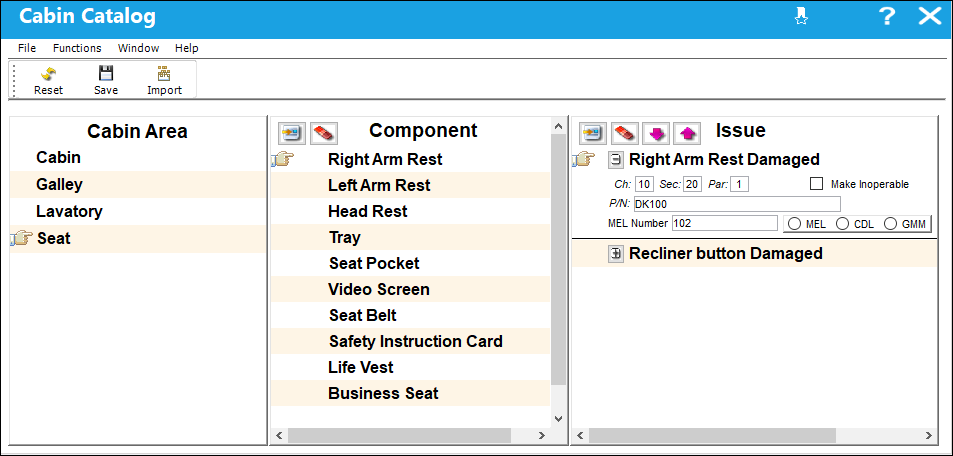
The following information/options are available in this window:
_____________________________________________________________________________________
Chapter / Section / Paragraph
The ATA chapter/section/paragraph, as applicable.
Make Inoperable checkbox
Indicates that the P/N cannot be utilized for operations until the defect has been resolved.
P/N
The Part Number reference for the aircraft part.
MEL Number
The Minimum Equipment List number. Specify either MEL, CDL, or GMM with the appropriate radio buttons.
MEL radio button - Indicates that the MEL Number that has been specified is for a Minimum Equipment List to be utilized for the part being inoperative.
CDL radio button - Indicates that the MEL Number that has been specified is for a Configuration Deviation List to be utilized for the part being missing.
GMM radio button - Indicates that the MEL Number that has been specified is for a General Maintenance Manual to be utilized for general operating and maintenance procedures.
_____________________________________________________________________________________
Share
Print
|
©1997-2026 Trax USA Corp. All rights reserved. This manual may not be copied, photocopied, reproduced, translated, or converted to any electronic or machine-readable form, in whole or in part, without prior written approval from Trax USA Corp. |
 |