
 Share
Share
 Print
Print
|
|
|
|
|



The Seat Configuration  button from the A/C Type/Series window allows users to create the layout (a seat map) of Aircraft Cabins. This can be conducted for the three main sections of an Aircraft with as many rows and width as necessary for four general objects that can be found in an Aircraft Cabin. Creating the Seat Configuration through this window sets the format for the A/C Type/Series, but this layout can be overridden for individual Aircraft through the Override Seat Configuration button, via Aircraft Master. After creating the Seat Configuration, this feature can be utilized in multiple ways. Along with the setup of the A/C Catalog, the Seat Mapping can be conducted to assign Defects to specific objects of the Aircraft Cabin. Also, with the same configuration and associations of the A/C Catalog, the Seat Mapping of Defects can be conducted during a flight through the offline CabinLog
  application. For more information regarding the application separate from Trax, contact the appropriate administrator.
Note: All eMobility customers that use Trax are required to use the Visual Check web app for all their A/C Catalog and/or LOPA-related configurations.
This feature is compatible with the CabinLog, QuickTurn, and visualCheck iOS applications, which are separate eMobility products. For more information, contact sales@trax.aero.
This window is designed to configure Layout of Passenger Accommodations (LOPA) designs for each Type/Series.
Another option for creating the Seat Configuration is to bring the information into the system through an import. For more information, refer to the Import  button, via A/C Type/Series Seat Configuration.
Once the seat configuration has been completed and saved, the user can utilize the preview area to view the seat configuration for the entire aircraft. This feature makes it possible for the user to scroll up and down to view the configuration for the front, middle and rear of the aircraft.
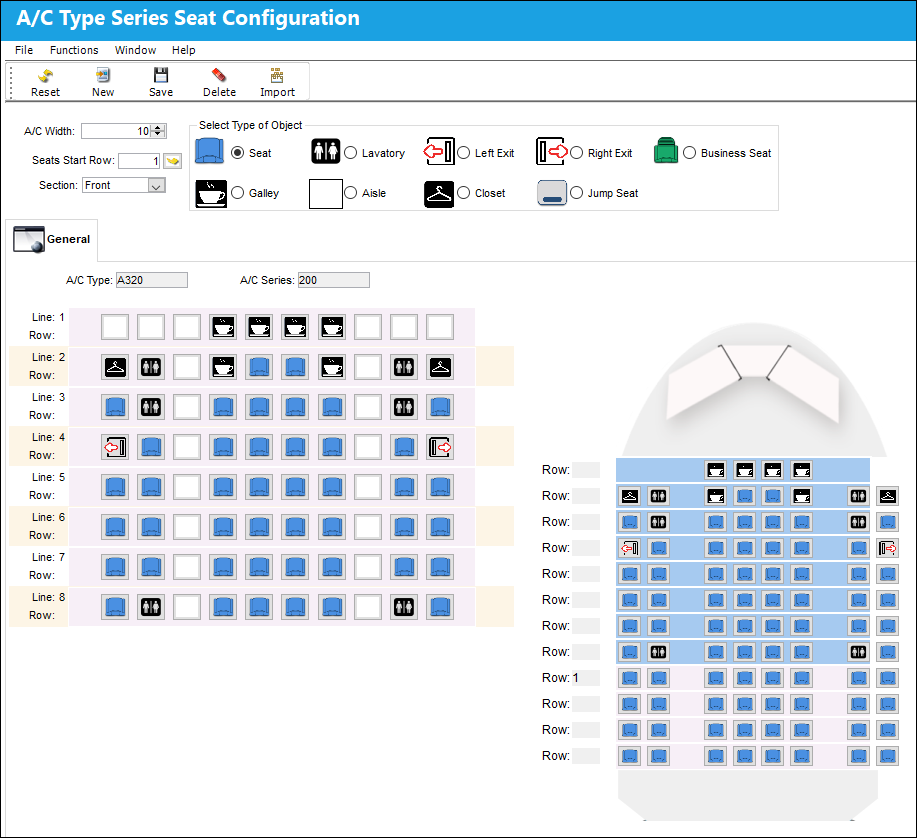
The following information/options are available in this window:
_____________________________________________________________________________________
A/C Width
The amount of columns to be applied to the row, or line.
Seats Start Row
Indicates where the actual seat numbers begin. For example, the first row may contain they galley, or lavatory, therefore row 1 doesn't really start at row 1.
Section
The region of the Aircraft Cabin to which the Seat Configuration is being created for.
Type of Object radio buttons
The general features that the Aircraft Cabin can be separated into. After the Lines and columns are specified, the Type of Object is assigned through selecting the appropriate radio button and then selecting the necessary features' spot to be associated. The Types of Objects to be chosen from include:
- Seat
- Galley
- Lavatory
- Aisle
- Left Exit
- Closet
- Right Exit
- Jump Seat
- Business Seat
_____________________________________________________________________________________
Share
Print
|
©1997-2026 Trax USA Corp. All rights reserved. This manual may not be copied, photocopied, reproduced, translated, or converted to any electronic or machine-readable form, in whole or in part, without prior written approval from Trax USA Corp. |
 |