
 Share
Share
 Print
Print
|
|
|
|
|


Select the Type Series Change  button to change the A/C Type/Series information of the currently selected Type/Series to a different Type/Series.
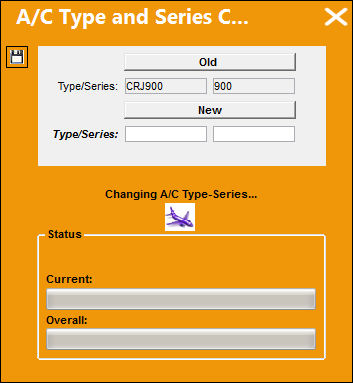
When an Aircraft Type/Series is changed, many tables throughout the entire database will be updated to reflect the new Type/Series information (Inventory records, A/C P/N Transaction records, Work Order records, Engineering Control records, etc.). Further, utilizing this button places a heavy burden on system resources because the change affects tables throughout the entire system. It is recommended that this button be used with extreme caution.
This transaction will take some time for the database to be fully updated with the Type/Series change. Therefore, prior to performing the Type/Series change, all users must be removed from the system. Any updates made to records while this change is taking place could cause issues. To temporarily remove system access from users, refer to the Temporary Remove System Access Button from the Security Explorer window. Once the Type/Series change is finalized, user access can be restored through the Restore Temporary Remove System Access Button.
The following information/options are available in this window:
_____________________________________________________________________________________
Old Type/Series
The currently selected aircraft's Type/ Series.
New Type/Series
Enter the new A/C Type/ Series.
_____________________________________________________________________________________
All P/N Software Configurations associated to the Old Type/Series will be carried over to the New Type/Series.
Share
Print
|
©1997-2026 Trax USA Corp. All rights reserved. This manual may not be copied, photocopied, reproduced, translated, or converted to any electronic or machine-readable form, in whole or in part, without prior written approval from Trax USA Corp. |
 |