
 Share
Share
 Print
Print
|
|
|
|
|


The Intelli Forms  button allows the user to create form records and upload images for individual A/C Type Series as required. The forms can then be used to map dents associated to defects in the Dent Mapping window at a later time. For additional information, refer to Dent Mapping via the Technical Records Training Manual.
Select the New  button to create a new form record. Populate all mandatory and desired information.
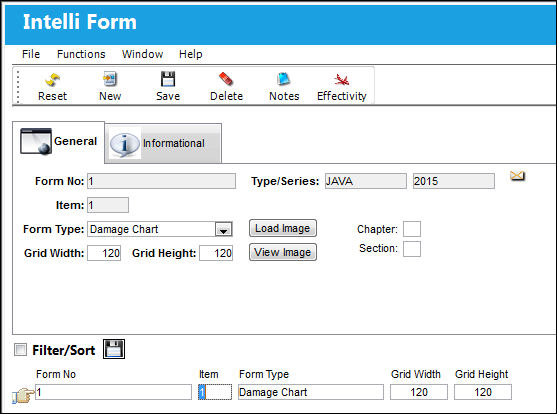
The following information/options are available in this window:
_____________________________________________________________________________________
Form No.
The form number.
Type/Series
The Aircraft Type and Series/Fleet assignment.
Item
The item number.
Form Type
Choose the form type:
- Damage Chart
- Cockpit
Load Image  button
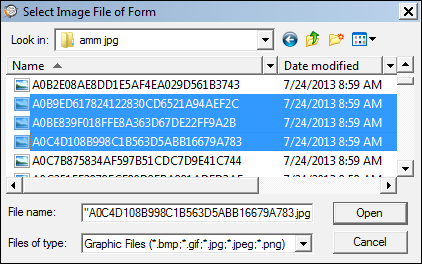
Select the Load Image button to search for a file to be associated with the record.
 Users may now load multiple images at the same time in jpeg, bmp, png and jiff format.
Chapter/ Section
Populate a Chapter/ Section checkbox to make the image(s) effective to a specific aircraft. When the user queries for an aircraft, chapter and section in the Query Area via the Dent Mapping window, only the images set up with the same chapter/ section will appear in the Image Area. If the Chapter/Section is not setup via the Intelli Form window, images for all chapter/ sections will appear. For additional information, refer to the Dent Mapping section via the Technical Records Training Manual.
Grid Width/Height
The grid width/height of the form. This is the number of horizontal and vertical columns specified in the background table of the Work Area, via Dent Mapping. The grid dimensions will determine how large/small a dent will appear in a form. The smaller the dimensions (ie. 8x8, the larger the dent.
The standard width/height is 80x80.
View Image  button
Select the View Image button to view the file that has been associated with the record via the button.
_____________________________________________________________________________________
The following can be utilized for additional functionality:
Share
Print
|
©1997-2026 Trax USA Corp. All rights reserved. This manual may not be copied, photocopied, reproduced, translated, or converted to any electronic or machine-readable form, in whole or in part, without prior written approval from Trax USA Corp. |
 |