
 Share
Share
 Print
Print
|
|
|
|
|


The Temporary Remove System Access  option removes access from all users as soon as the option is selected. Essentially, the users' Status checkboxes in their Security profiles are de-selected. After logging off of TRAX, users will not be allowed back into the database until access is reinstated by an administrator. This option is useful when administrators are performing upgrades to the database and all users are required to be temporarily removed. For information on how to terminate individual user TRAX sessions, refer to the Logged In Users Button.
This option should only by used by administrators for security purposes.
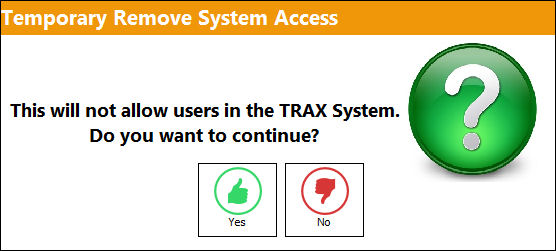
The below prompt will pop up after selecting the Temporary Remove System Access button. Select Yes to remove access.
Once selected, access is removed from all users except for the administrator who selected the button.
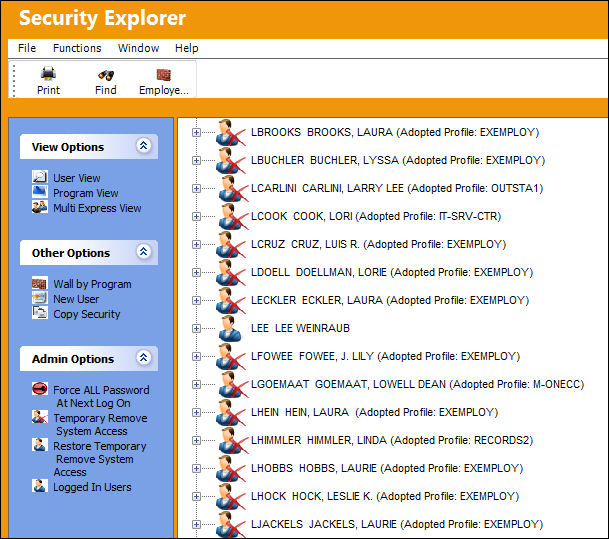
To restore access to all users, select the Restore Temporary Remove System Access option from the Security Explorer window.
The same functionality found in this button can also be found in the Security, Global Authorization Restrictions Tab.
Share
Print
|
©1997-2026 Trax USA Corp. All rights reserved. This manual may not be copied, photocopied, reproduced, translated, or converted to any electronic or machine-readable form, in whole or in part, without prior written approval from Trax USA Corp. |
 |