
 Share
Share
 Print
Print
|
|
|
|
|


The Global Restriction tab of the Security window is used to temporarily disable all usernames except for the administrator who is removing access (in other words, the user who's disabling all other users). This feature can be used by a TRAX Administrator when performing maintenance or updates to the System. Users without access will not be able to log into TRAX.
This tab is only available when the Update User  button is selected from the Security Explorer. However, the buttons in this tab are also available in the Security Explorer main page, to the left of the screen.
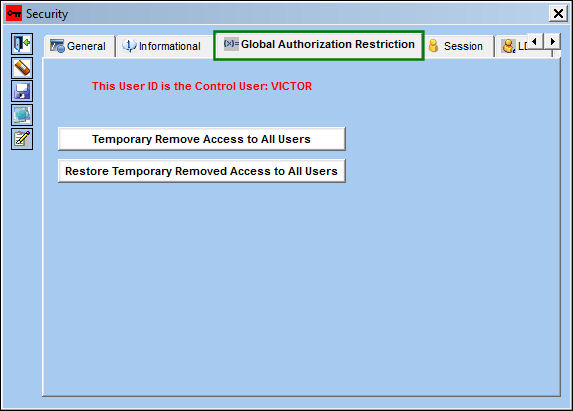
The text displayed in red indicates that the User ID is the Control User who may temporarily remove or restore TRAX modular access to all users.
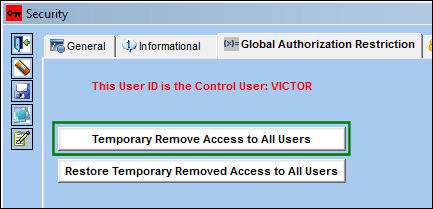
To temporarily remove access to all users, select the Temporary Remove Access to All Users button. Once selected, the Save prompt appears. Select OK.
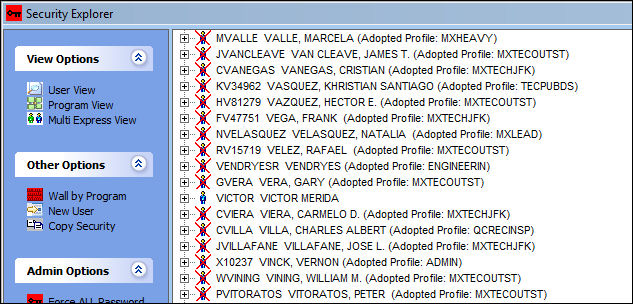
Once the button is selected, all users Statuses become inactive except for the user who removed access.
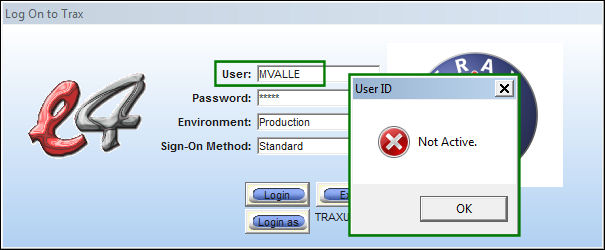
When a user with no access tries to log onto TRAX, they receive the following error message.
To restore temporarily removed access to all users, select the Restore Temporary Removed Access to All Users button.
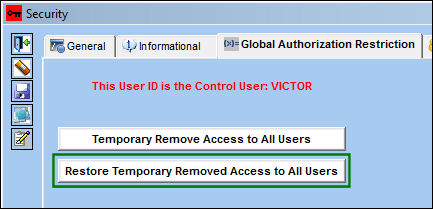
Once selected, all user Statuses will be made active.
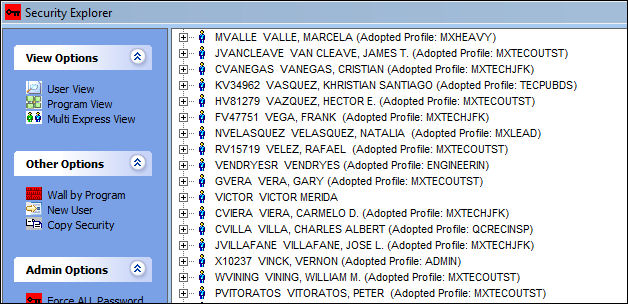
This same functionality can also be found in the Admin Options section of the Security Explorer. For more information refer to the Temporary Remove System Access Button and the Restore Temporary Remove System Access Button.
Share
Print
|
©1997-2026 Trax USA Corp. All rights reserved. This manual may not be copied, photocopied, reproduced, translated, or converted to any electronic or machine-readable form, in whole or in part, without prior written approval from Trax USA Corp. |
 |