
 Share
Share
 Print
Print
|
|
|
|
|


From the Update User option of the Security Explorer window, users can select the Security Detail Audit  button to view the security controls that were updated. This audit window also contains the Modify By and Modified Date/time information.
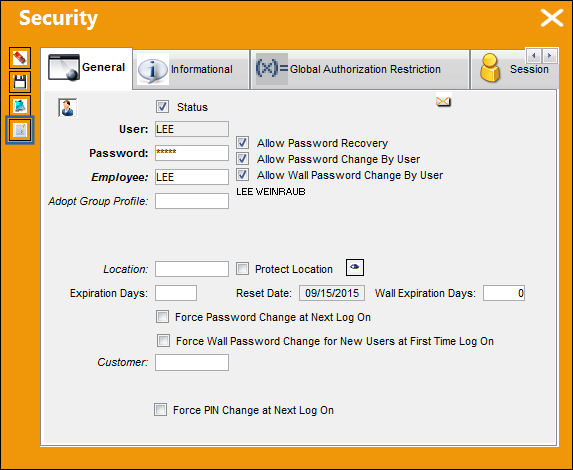
For example, select the Update User option by right-clicking on an employee in the Security Explorer window. The following Security window appears. Select the Security Detail Audit button.
The Security Detail Audit window appears.
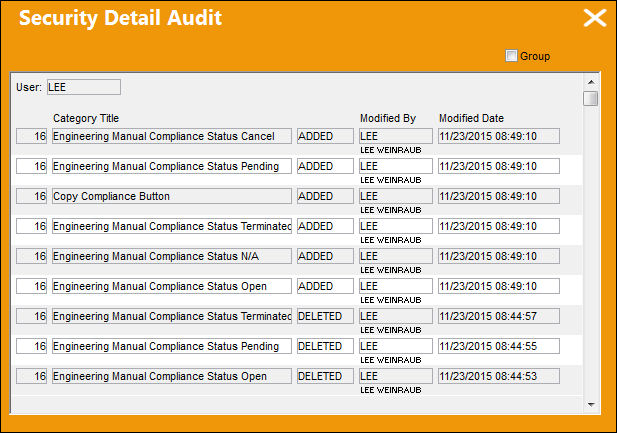
The following information/options are available in this window:
_____________________________________________________________________________________
User
The Users being audited.
Category Title
The functionality that had its security was updated for the user.
Security Status
States whether security was 'ADDED' or 'DELETED' for the user.
Modified By
The user who last modified the record.
Modified Date
The date the record was last modified.
_____________________________________________________________________________________
This information can be filtered by selecting the Group checkbox in the upper-right hand corner of the window. When selected, the information will be broken down by module instead of most current modified date. The Expand  / Collapse
  buttons are available to edit the display.
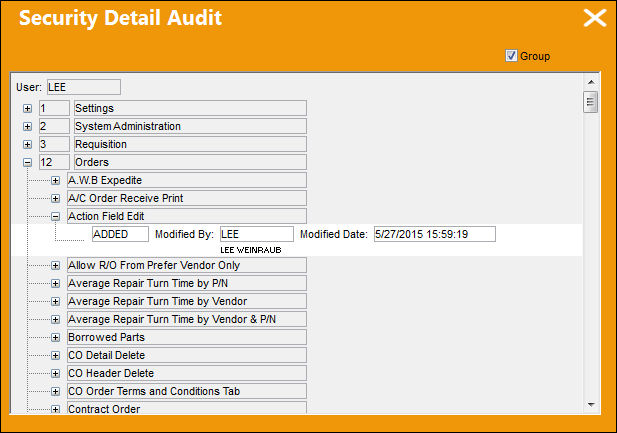
If the Group checkbox is deselected, the information will be displayed by most current modified date (as displayed in the first screenshot). This checkbox is deselected by default.
Share
Print
|
©1997-2026 Trax USA Corp. All rights reserved. This manual may not be copied, photocopied, reproduced, translated, or converted to any electronic or machine-readable form, in whole or in part, without prior written approval from Trax USA Corp. |
 |