
 Share
Share
 Print
Print
|
|
|
|
|


Security Explorer
The Security Explorer is used by TRAX administrators to restrict or grant system access to their users. To reach the window go to System Administration / Explorer / Security Explorer. When new users are created, security limitations are among the first priorities administrators will apply. The Security Explorer allows users to be set up with the specific functionalities required for them to carry out their daily tasks. Access to various windows, tabs, buttons, and Wall passwords as well as sign-on functionalities are applied from this window.
To apply the necessary security levels, users must first understand the Log On process. For information regarding the different Log On methods refer to the System Administration topic Logging Into TRAX.
When opened, the Security Explorer is displayed as follows:
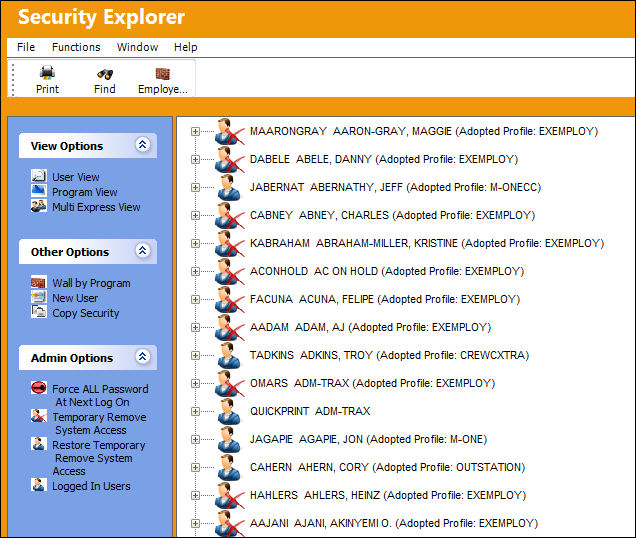
The functionality found in the Security Explorer can be applied through various methods. Security access can be applied by individual user or security for a specific window can be applied to groups of people at a time; the same is true for Wall Password setup. The Security Explorer has features/layouts that are part of Classic TRAX functionality as well as newer methods for creating and designating security controls.
The layout of the Security Explorer can be broken down into three sections: View Options, Other Options, and Admin Options. Each of the three sections contain their own sub-views and functionality. By default, for example, the User View from the View Options section is displayed when the window is opened (above). Several of the functions found in this classic section/view can be performed through other Options in the window.
Because similar functions can be applied through different methods, all of the functionalities and information available in the Security Explorer can be broken down as follows:
- Security Explorer Icons - Highlights the informational icons seen throughout the Security Explorer.
- Updating/Creating User Profiles - Specifies how User and Group Profiles are created and managed.
- Applying Security Access - Includes all different methods for applying security controls to users and/or groups.
- Applying Wall Passwords - Includes all different methods for applying Wall Password controls for users.
- Miscellaneous Admin Features - Lists extra options administrators have for controlling current system access.
Share
Print
|
©1997-2026 Trax USA Corp. All rights reserved. This manual may not be copied, photocopied, reproduced, translated, or converted to any electronic or machine-readable form, in whole or in part, without prior written approval from Trax USA Corp. |
 |