
 Share
Share
 Print
Print
|
|
|
|
|


System Transaction Configuration (Switches)
The System Transaction Configuration Explorer option allows for the setting of all system configuration settings (“switches”) for the system. These switches can be updated and changed as required. The option will allow you to graphically access and set up the system configuration.
This Explorer gives access to the configuration information on the system by using ‘trees’. Basic point and click functionality gives easy access to the required data. To print a window, click on the Print button and the current window will print.
To run a report of all records within the System Transaction Configuration Explorer, go to System Administration/ Print/ System Transaction Prints.
Go to System Administration/ Explorer/ System Transaction Configuration.
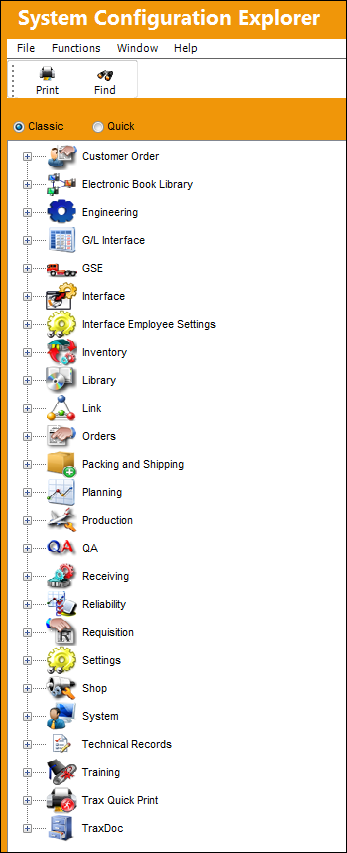
Double click any of the modules to view the available options.
Configuration switches available for that module will appear as shown below:
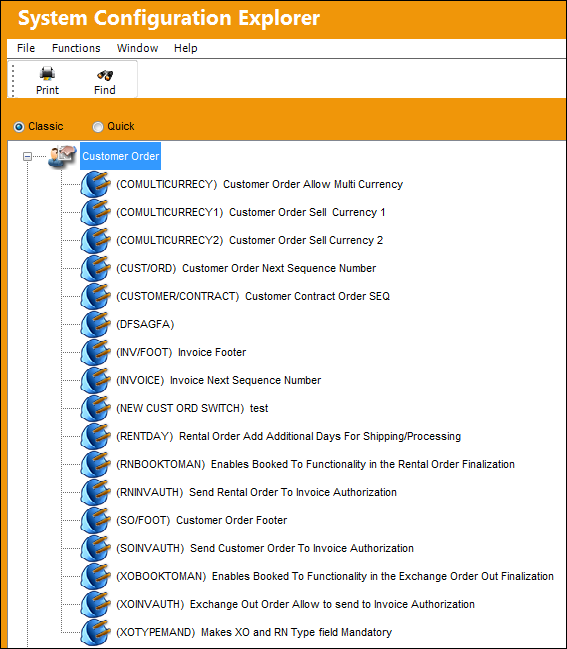
 Share
Print
Share
Print
|
©1997-2026 Trax USA Corp. All rights reserved. This manual may not be copied, photocopied, reproduced, translated, or converted to any electronic or machine-readable form, in whole or in part, without prior written approval from Trax USA Corp. |
 |