Publication Date: 8/17/2026 Share Print

Previous Topic

Next Topic

Book Contents

Book Index

Defect Report Process

Defects are considered to be unscheduled maintenance events. This is the opposite of a Work Order which is a scheduled maintenance event. Defects are usually created last minute before an aircraft takes off.

Discrepancies occurring during line operations are recorded in the operator’s logbook system, which may include separate Maintenance and Cabin Logs. Commonly, operators consolidated these logs into one log referred to as the Aircraft Logbook. This log is used to record discrepancies encountered during operation of the airplane and the actions taken to correct the discrepancies. The aircraft logbook is reviewed and cleared. At a minimum, malfunctions affecting airworthiness are either repaired or deferred under the Minimum Equipment List (MEL).

Within the system, the Defect Report is the electronic equivalent of the Aircraft Logbook. This option allows the user to enter the aircraft Defect discrepancies into the system. Defect Reports could help correct a wide range of discrepancies affecting the aircraft, including: simple repairs, work which is necessary to keep the aircraft airworthy without incurring a flight delay or cancellation, and the removal and replacement of line replacement units (LRU).

Defect Reports can be deferred and closed at a later date. Part number transactions can be carried out with the entry of a Defect Report.

The Defect option can be accessed from the A/C Actual Flight Entry option.

The data entered against Defect Reports, combined with P/N removals, is the basis for Reliability reports on the system.

Note: This program can be wall security protected. The user will then have to enter their wall password before being able to enter a new defect report.

To activate this feature, go to System Administration/ Update/ Control Panel/ Technical Records/ Defect Report. Select the Wall checkbox to enable the wall password protection. For additional information regarding the wall password and how to set it up, refer to Security Explorer, Wall by Program via the System Administration Training manual.

The Defect Report process is designed to allow users to visualize the entire procedure for creating a Defect Report.
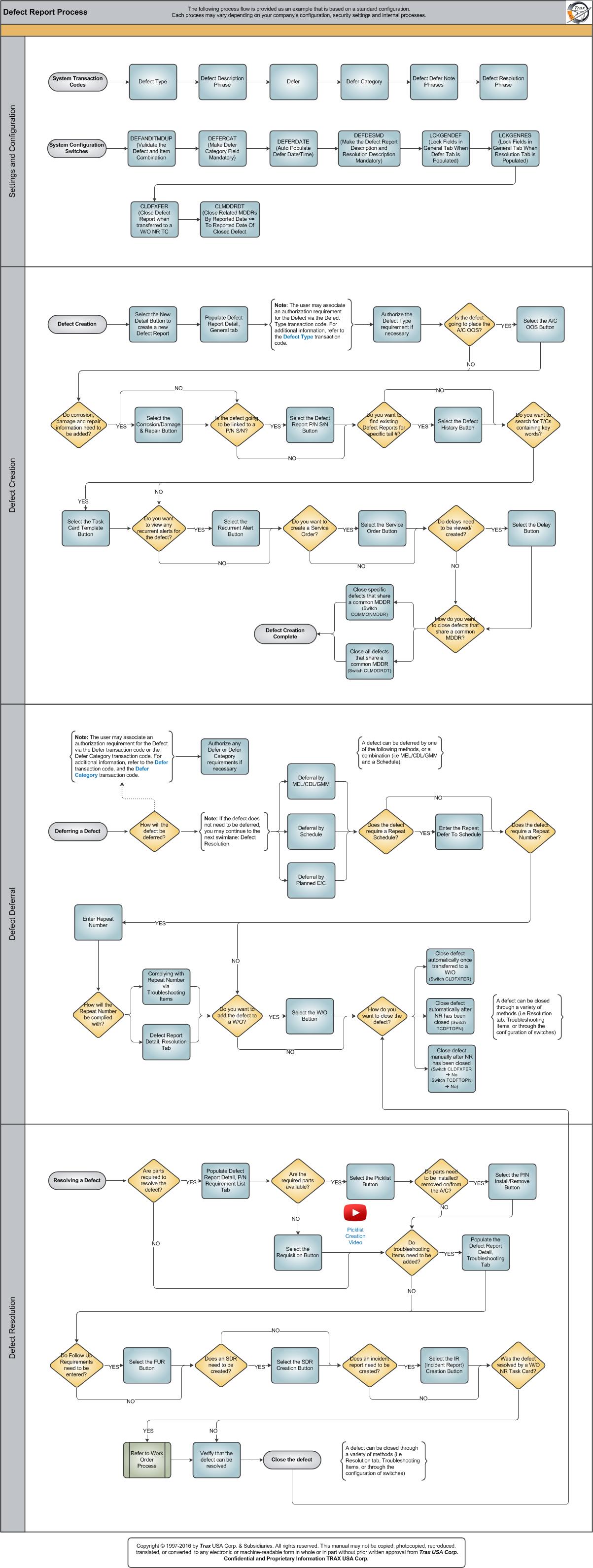
Click on the steps to see details!

System Transaction CodesDefect Description PhraseDefer CategoryDefect Defer Note PhrasesSystem Configuration SwitchesDEFANDITMDUPDEFERCATDEFERDATEDEFDESMDLCKGENDEFLCKGENRESCLDFXFERCLMDDRDTDefect CreationNew Detail ButtonDefect Report Detail, General tabDefect TypeA/C OOS ButtonCorrosion/Damage & Repair ButtonDefect Report P/N S/N ButtonDefect History ButtonTask Card Template ButtonRecurrent Alert ButtonService Order ButtonDelay ButtonDeferring a DefectDeferral by MEL/CDL/GMMDeferral by ScheduleDeferral by Planned E/CRepeat Defer To ScheduleRepeat NumberResolution tabSelect the W/O ButtonClose defect once transferred to a W/OClose defect after NR is closedClose defect manuallyResolving a DefectP/N Requirement List TabRequisition ButtonPicklist ButtonP/N Install/Remove ButtonTroubleshooting TabFUR ButtonSDR Creation ButtonIncident Report Creation ButtonDefect Resolution PhraseComplying with Repeat Number via Troubleshooting ItemsClose specific defects that share a common MDDRClose all defects that share a common MDDRPicklist Creation VideoWork Order ProcessDeferAuthorization RequirementsDeferDefer CategoryDefect TypeAuthorization Requirements

Each step in the process chart is explained in further detail throughout the following documentation. The procedural sections are broken down into the following categories:

See Also

PROCESS FLOWS

Aircraft Actual Flight (Manual Entry) Process

Aircraft Initial P/N Load Process

Aircraft Return and Archiving Process

Aircraft Units Process

APU Process

Assembly Management

Concession Registry Process

Consigned Inventory Process

Contract Order Process

Customer Creation Process

Delete E/C and P/N Control Compliance Process

Dent Mapping Process

Employee and Skill Creation Process

Engineering Control Process

Engineering Pending Release Process

ETOPS Process

Exchange Order Out Process

Exchange Order Process

Fault Code Report Process

Flight Accumulation Process

Ground Service Equipment (GSE) Process

Helicopter Process

Importing a File Process

Interactive Planner Overview

Internal Component Repair (Shop) Process

Kit Management

Library and Read & Sign Process

Loan Order Process

Location Creation Process

Man Hours Schedule Planning Process

Managed A/C Process

MEL Process

MEL Authorization Process

Missing Parts Process

Monthly Financial Procedures

New Aircraft Process

Order Invoice Process

P/N Control - General Configuration

P/N Control - Life Limited Parts (LLP)

P/N Control - Proration Process

P/N Initial Load Process

P/N Pool Agreement Process

P/N Remove/Install Process

P/N Software Configuration

Packing and Shipping Process

Part Number Creation Process

Physical Inventory Process

Picklist and Requisition Process

Printer Setup and Configuration

Purchase Order Process

Quality Assurance Process

R/O Capability Employee Rating Process

Receiving Process

Recurrent Item Alert (Reliability) Process

Rental Order Process

Re-Order Level Process

Repair Order Process

Repair Order Following Process

Return to Stock Process

Return To Vendor Process

Sales Order Process

Scrap Process

Security Explorer Process

Service Order and Power By The Hour Process

Skill Master Process

Standard Authorization Process

Supply Chain Process

System Notification Creation Process

Task Card Creation Process

Task Card Discrepancy Process

Third Party Work Order Process

Tool Management

Training Process

Transfer Order Process

TRAX General Process Flow

TraxDoc Process

Vendor Contract Process

Vendor Creation Process

W/O Task Card Assignment and Workshop Process

Warehouse Management

Warranty Management

Work Order Process

Work Order Reservation Control Process

Work Turnover Process

Top of Page Publication Date: 8/17/2026 Share Print