Publication Date: 8/17/2026 Share Print

Previous Topic

Next Topic

Book Contents

Book Index

P/N Initial Load Process

The P/N Initial Load option is used to enter a part that has no prior history within the system. For example, when a part is removed from an older aircraft that was set up in the system, but the individual parts from the aircraft were not set up. This option will also allow you to load parts to inventory from manual records. The part number must be created in the system first (Settings/Update/Part Number Master). Additional information may be required (according to P/N settings), such as time control or lower assembly information.

The P/N Initial Load process is designed to allow users to visualize the entire procedure for loading a Part Number into the system.
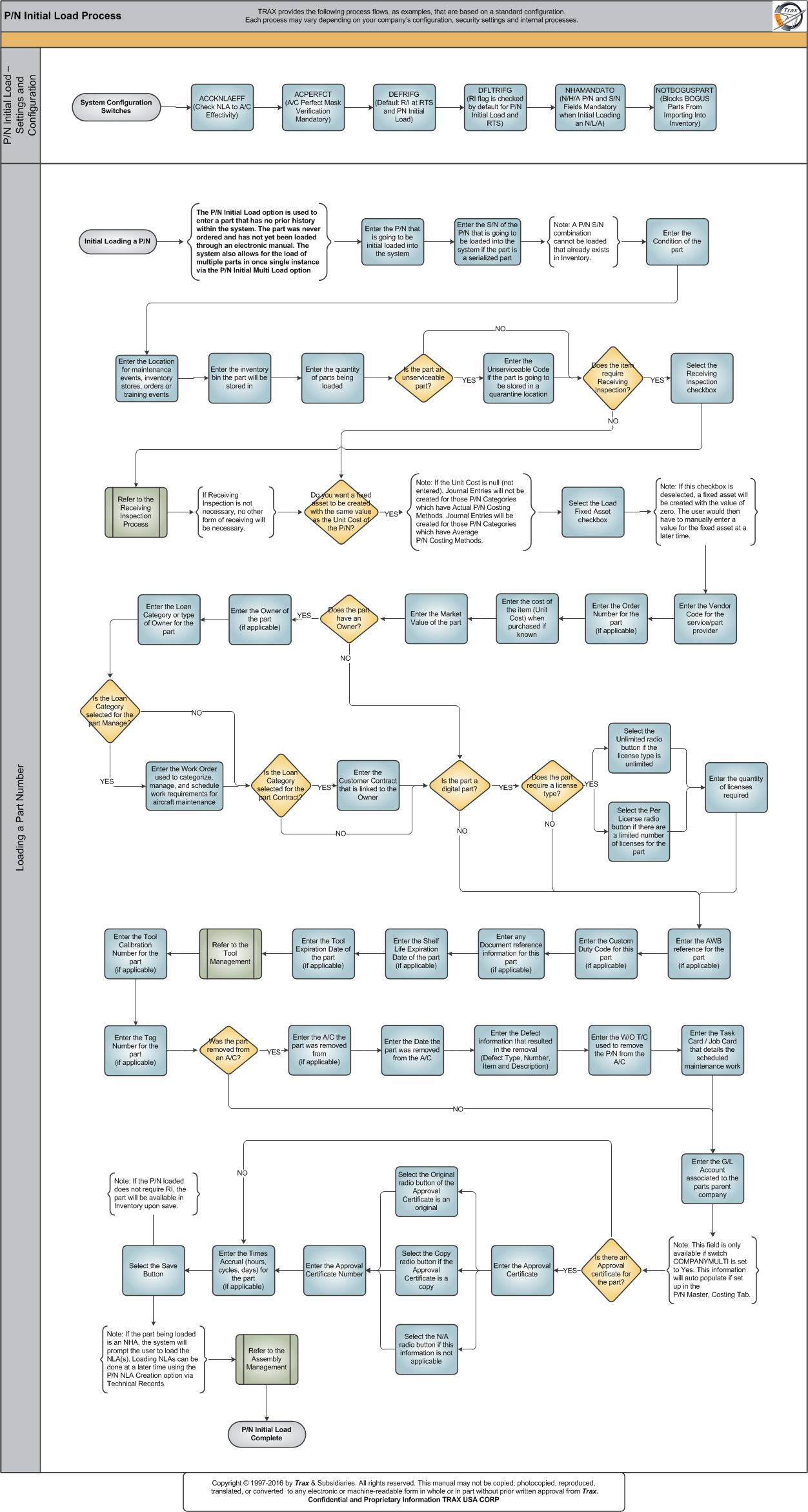
Click on the steps to see details!

ACCKNLAEFFACPERFCTDEFRIFGDFLTRIFGNHAMANDATONOTBOGUSPARTEnter the P/N that is going to be initial loadedEnter the S/N of the P/N that is going to be loadedEnter the Condition of the partEnter the Location for maintenance events etc.Enter the inventory bin the part will be stored inEnter the quantity of parts being loadedEnter the Unserviceable Code of the partSelect the Receiving Inspection checkboxEnter the Vendor Code for the service/part providerEnter the Order Number for the partEnter the cost of the itemEnter the Market Value of the partEnter the Owner of the partEnter the Loan Category or type of Owner for the partEnter the Work OrderEnter the Customer ContractSelect the Unlimited radio buttonSelect the Per License radio buttonEnter the quantity of licenses requiredEnter the AWB reference for the partEnter the Custom Duty Code for the partEnter any Document reference information for this partEnter the Shelf Life Expiration Date of the partEnter the Tool Expiration Date of the parEnter the Tool Calibration NumberEnter the Tag NumberEnter the A/C the part was removed fromEnter the Date the part was removed from the A/CEnter the Defect information for the part removalEnter the W/O T/C used to remove the P/N from the A/CEnter the Task Card / Job Card detailsEnter the G/L AccountSelect the Save ButtonEnter the Times AccrualEnter the Approval CertificateSelect the Original radio buttonSelect the Copy radio buttonSelect the N/A radio buttonEnter the Approval Certificate NumberSelect the Load Fixed Asset checkboxReceiving Inspection SubprocessTool ManagementAssembly ManagementSystem Configuration SwitchesInitial Loading a P/N

Each step in the process chart is explained in further detail throughout the following documentation. The procedural sections are broken down into the following categories:

See Also

PROCESS FLOWS

Aircraft Actual Flight (Manual Entry) Process

Aircraft Initial P/N Load Process

Aircraft Return and Archiving Process

Aircraft Units Process

APU Process

Assembly Management

Concession Registry Process

Consigned Inventory Process

Contract Order Process

Customer Creation Process

Defect Report Process

Delete E/C and P/N Control Compliance Process

Dent Mapping Process

Employee and Skill Creation Process

Engineering Control Process

Engineering Pending Release Process

ETOPS Process

Exchange Order Out Process

Exchange Order Process

Fault Code Report Process

Flight Accumulation Process

Ground Service Equipment (GSE) Process

Helicopter Process

Importing a File Process

Interactive Planner Overview

Internal Component Repair (Shop) Process

Kit Management

Library and Read & Sign Process

Loan Order Process

Location Creation Process

Man Hours Schedule Planning Process

Managed A/C Process

MEL Process

MEL Authorization Process

Missing Parts Process

Monthly Financial Procedures

New Aircraft Process

Order Invoice Process

P/N Control - General Configuration

P/N Control - Life Limited Parts (LLP)

P/N Control - Proration Process

P/N Pool Agreement Process

P/N Remove/Install Process

P/N Software Configuration

Packing and Shipping Process

Part Number Creation Process

Physical Inventory Process

Picklist and Requisition Process

Printer Setup and Configuration

Purchase Order Process

Quality Assurance Process

R/O Capability Employee Rating Process

Receiving Process

Recurrent Item Alert (Reliability) Process

Rental Order Process

Re-Order Level Process

Repair Order Process

Repair Order Following Process

Return to Stock Process

Return To Vendor Process

Sales Order Process

Scrap Process

Security Explorer Process

Service Order and Power By The Hour Process

Skill Master Process

Standard Authorization Process

Supply Chain Process

System Notification Creation Process

Task Card Creation Process

Task Card Discrepancy Process

Third Party Work Order Process

Tool Management

Training Process

Transfer Order Process

TRAX General Process Flow

TraxDoc Process

Vendor Contract Process

Vendor Creation Process

W/O Task Card Assignment and Workshop Process

Warehouse Management

Warranty Management

Work Order Process

Work Order Reservation Control Process

Work Turnover Process

Top of Page Publication Date: 8/17/2026 Share Print