Publication Date: 8/17/2026 Share Print

Previous Topic

Next Topic

Book Contents

Book Index

Warehouse Management

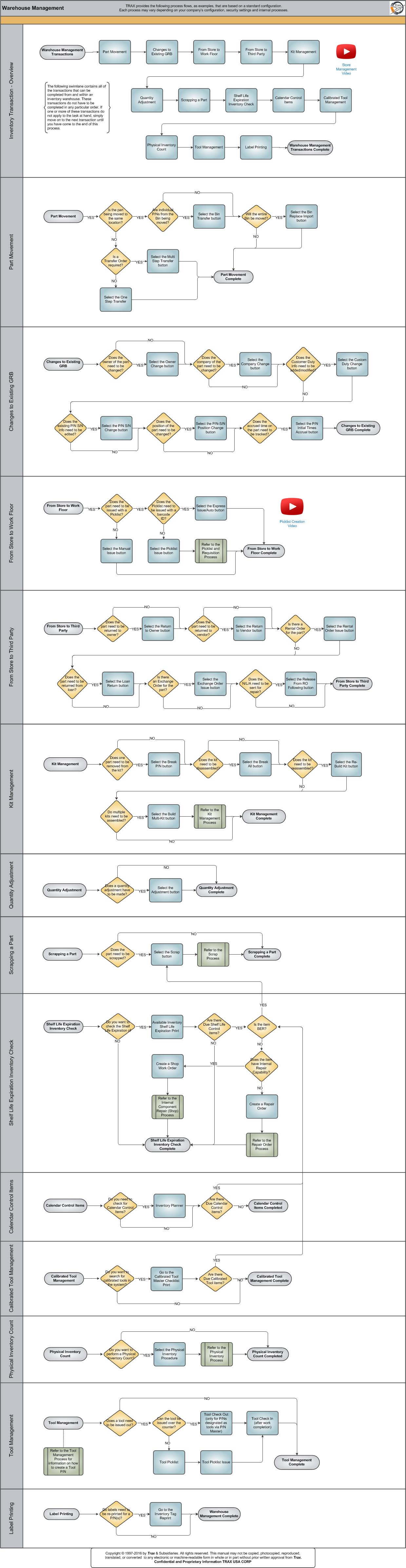
There are many steps involved in the warehouse management of parts. Parts can be moved from one location to another, from the store to the work floor where maintenance must be done, or from the store to a third party who has a need for a part. Parts must also undergo certain checks that help to maintain and preserve the day-to-day functioning of parts and tools. Such checks include the shelf life expiration date of a part as well as a calibration check for calibrated tools. Specific prints for these checks are available in the TRAX system and are explained in detail in this process flow. There are a number of additional transactions that can and must be completed via an inventory warehouse. The following process is designed to help users conceptualize each step and their importance in TRAX.

The Warehouse Management process is designed to allow users to visualize every aspect of Warehouse Management.
Click on the steps to see details!

Part MovementSelect the One Step Transfer buttonSelect the Multi Step Transfer buttonChange to Exisitng GRBSelect the Owner Change buttonSelect the Company Change buttonSelect the Custom Duty Change buttonSelect the P/N S/N Change buttonSelect the P/N S/N Position Change buttonSelect the P/N Initial Times Accrual buttonFrom Store to Work FloorSelect the Picklist Issue buttonSelect the Manual Issue buttonSelect the Express Issue buttonFrom Store to Third PartyReturn to Owner Select the Return To Vendor buttonSelect the Rental Order Issue buttonSelect the Loan Return buttonSelect the Exchange Order Issue buttonSelect the Release From RO Following buttonKit ManagementSelect the Break P/N buttonSelect the Break All buttonSelect the Re-Build Kit buttonSelect the Build Multi Kit buttonQuantity AdjustmentSelect the Adjustment buttonSelect the Available Inventory Shelf Life Expiration PrintInventory PlannerTool ManagementTool Check OutTool Check InTool PicklistTool Picklist IssueSelect the Scrap buttonSelect the Bin Replace Import buttonBin TransferCalibrated Tool ManagementGo to the Calibrated Tool Master Checklist PrintInventory Tag ReprintStore Management VideoKit ManagementPicklist and Requisition ProcessScrap ProcessPart MovementChanges to Existing GRBFrom Store to Work FloorFrom Store to Third PartyKit ManagementQuantity AdjustmentScrapping a PartShelf Life Expiration Inventory CheckCalendar Control ItemsCalibrated Tool ManagementWarehouse Management TransactionsPhysical Inventory CountTool ManagementLabel PrintingPicklist Creation VideoScrapping a PartShelf Life Expiration Inventory CheckInternal Component Repair (Shop) ProcessRepair ProcessCalendar Control ItemsPhysical Inventory ProcessPhysical Inventory CountTool ManagemnetLabel PrintingCreate a Shop Work OrderCreate a Repair OrderSelect the Physical Inventory Count option

Each step in the process chart is explained in further detail throughout the following documentation. The procedural sections are broken down into the following categories:

See Also

PROCESS FLOWS

Aircraft Actual Flight (Manual Entry) Process

Aircraft Initial P/N Load Process

Aircraft Return and Archiving Process

Aircraft Units Process

APU Process

Assembly Management

Concession Registry Process

Consigned Inventory Process

Contract Order Process

Customer Creation Process

Defect Report Process

Delete E/C and P/N Control Compliance Process

Dent Mapping Process

Employee and Skill Creation Process

Engineering Control Process

Engineering Pending Release Process

ETOPS Process

Exchange Order Out Process

Exchange Order Process

Fault Code Report Process

Flight Accumulation Process

Ground Service Equipment (GSE) Process

Helicopter Process

Importing a File Process

Interactive Planner Overview

Internal Component Repair (Shop) Process

Kit Management

Library and Read & Sign Process

Loan Order Process

Location Creation Process

Man Hours Schedule Planning Process

Managed A/C Process

MEL Process

MEL Authorization Process

Missing Parts Process

Monthly Financial Procedures

New Aircraft Process

Order Invoice Process

P/N Control - General Configuration

P/N Control - Life Limited Parts (LLP)

P/N Control - Proration Process

P/N Initial Load Process

P/N Pool Agreement Process

P/N Remove/Install Process

P/N Software Configuration

Packing and Shipping Process

Part Number Creation Process

Physical Inventory Process

Picklist and Requisition Process

Printer Setup and Configuration

Purchase Order Process

Quality Assurance Process

R/O Capability Employee Rating Process

Receiving Process

Recurrent Item Alert (Reliability) Process

Rental Order Process

Re-Order Level Process

Repair Order Process

Repair Order Following Process

Return to Stock Process

Return To Vendor Process

Sales Order Process

Scrap Process

Security Explorer Process

Service Order and Power By The Hour Process

Skill Master Process

Standard Authorization Process

Supply Chain Process

System Notification Creation Process

Task Card Creation Process

Task Card Discrepancy Process

Third Party Work Order Process

Tool Management

Training Process

Transfer Order Process

TRAX General Process Flow

TraxDoc Process

Vendor Contract Process

Vendor Creation Process

W/O Task Card Assignment and Workshop Process

Warranty Management

Work Order Process

Work Order Reservation Control Process

Work Turnover Process

Top of Page Publication Date: 8/17/2026 Share Print