Publication Date: 8/17/2026 Share Print

Previous Topic

Next Topic

Book Contents

Book Index

Engineering Control Process

The Engineering module is used to manage Engineering Controls (E/Cs) and Task Cards for aircraft, as well as individual components. This includes reporting on Aircraft AD/SB status and compliance history.

Engineering requirements can be loaded both manually and electronically into the system. The system allows the user to track ADs, SBs and modifications for aircraft and their components, including revision control and multiple schedules. Task Cards with work requirements can also be created in this module, as well be scheduled alongside routine aircraft work. Manufacturers' electronic documentation can be loaded, viewed and printed online (for example, AMM pages for inclusion with work packages).

Information from the Engineering module is used in many other areas of the system. The Planning module is very much dependant on information from the Engineering Controls. Reports and queries can easily be produced to interrogate the Engineering information stored in the system. Reports regarding compliance and cost are readily available for the Aviation Authorities and management. Information from Engineering is fed through to the Production system, for calculating ground times for inspections and creating work packs for aircraft.

The following process flow is a general guide for the configuration, creation, linking and compliance of the Engineering Control life cycle. This life cycle may vary depending on each TRAX user and their company's customized protocols.
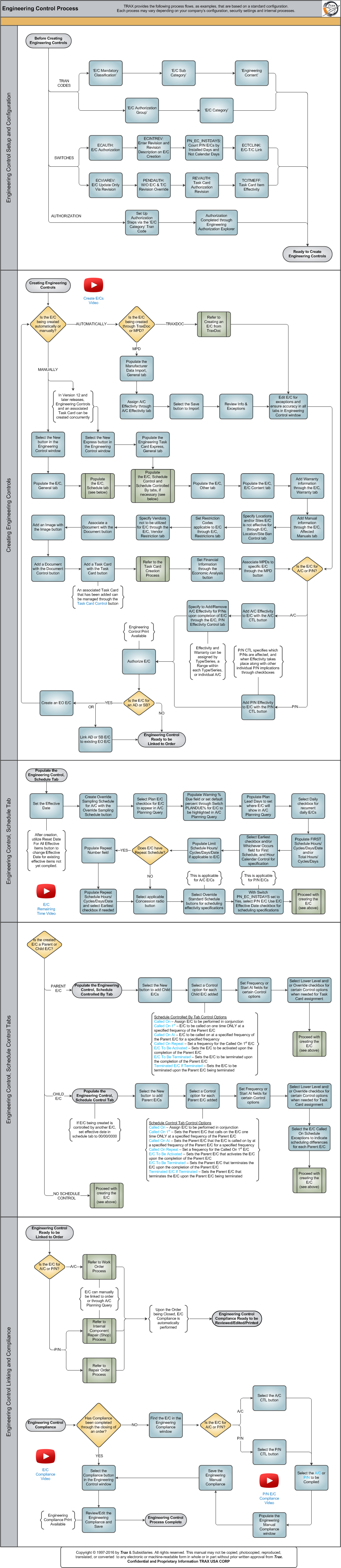
Click on the steps to see details!

Engineering Control Setup and ConfigurationE/C Mandatory ClassificationE/C Sub CategoryE/C ContentE/C Authorization GroupE/C CategoryECAUTHECINTREVPN_EN_INSTDAYSECTCLINKECVIAREVPENDAUTHREVAUTHTCITMEFFAuthorization Steps Button, via E/C CategoryEngineering Authorization ExplorerReady to Create Engineering ControlsCreating Engineering ControlsCreate E/Cs VideoIs the E/C being created automatically or manually?Is the E/C being created through TraxDoc or MPD?TraxDoc ProcessImporting the MPD File, General TabImporting the MPD File, A/C Effectivity TabSelect the Save Button to ImportInfo & Exceptions ReportEdit E/C for Exceptions and Ensure AccuracyCreating an E/CEngineering Control, General TabRefer to Engineering Control, Schedule TabRefer to Engineering Control, Schedule Control and Schedule Controlled By TabsEngineering Control, Other TabEngineering Control, E/C Content TabEngineering Control, Warranty TabEngineering Control, Affected Manuals TabEngineering Control, Location/Site Ban Control TabEngineering Control, Restrictions TabEngineering Control, Vendor Restrictions TabDocument ButtonImage ButtonDocument Control ButtonTask Card ButtonTask Card Control ButtonEconomic Analysis ButtonMPD ButtonIs the E/C for A/C or P/N?A/C CTL ButtonEngineering Control, P/N Effectivity Control TabP/N CTL ButtonAuthoriza E/CIs the E/C for an AD or SB?Create an EO E/CLink AD or SB E/C to Existing EO E/CReady for Engineering Control ComplianceEngineering Control, Schedule Tab SubprocessEngineering Control, Schedule TabOverride Sampling Schedule ButtonEngineering Control, Schedule TabPLANDUE%Engineering Control, Schedule TabEngineering Control, Schedule TabDoes the E/C have a Repeat Schedule?Engineering Control, Schedule TabEngineering Control, Schedule TabE/C Remaining Time VideoOverride Standard Schedule (E/C) ButtonPN_EC_INSTDAYSProceed with Creating the E/CEngineering Control, Schedule Control Tabs SubprocessEngineering Control, Schedule Controlled By TabProceed with Creating the E/CCalled On Control OptionCalled On 1st Control OptionCalled On At Control OptionCalled On Repeat Control OptionE/C To Be Activated Control OptionE/C To Be Terminated Control OptionTerminated E/C If Terminated Control OptionAbout the Lower Level and Override CheckboxesEngineering Control, Schedule Control TabAbout the Lower Level and Override CheckboxesEngineering Control, Schedule Control TabProceed with Creating the E/CProceed with Creating the E/CCalled On Control OptionCalled On 1st Control OptionCalled On At Control OptionCalled On Repeat Control OptionE/C To Be Activated Control OptionE/C To Be Terminated Control OptionTerminated E/C If Terminated Control OptionEngineering Control Linking and ComplianceEngineering Control Linking and ComplianceIs this an A/C E/C or a P/N E/C?Work Order ProcessInternal Component Repair (Shop) ProcessRepair Order ProcessEngineering Control Compliance Ready to be Reviewed/Edited/PrintedHas Compliance been completed through the closing of an order?Compliance ButtonEngineering ComplianceEngineering Manual ComplianceIs the E/C for an A/C or a P/N?A/C CTL ButtonP/N CTL ButtonA/C E/C ComplianceP/N E/C ComplianceEngineering Manual ComplianceEngineering Manual ComplianceEngineering Control Process CompleteE/C Compliance VideoP/N E/C Compliance VideoNew Express ButtonTask Card Creation Process

The following sections are the primary elements covered in this process flow:

See Also

PROCESS FLOWS

Aircraft Actual Flight (Manual Entry) Process

Aircraft Initial P/N Load Process

Aircraft Return and Archiving Process

Aircraft Units Process

APU Process

Assembly Management

Concession Registry Process

Consigned Inventory Process

Contract Order Process

Customer Creation Process

Defect Report Process

Delete E/C and P/N Control Compliance Process

Dent Mapping Process

Employee and Skill Creation Process

Engineering Pending Release Process

ETOPS Process

Exchange Order Out Process

Exchange Order Process

Fault Code Report Process

Flight Accumulation Process

Ground Service Equipment (GSE) Process

Helicopter Process

Importing a File Process

Interactive Planner Overview

Internal Component Repair (Shop) Process

Kit Management

Library and Read & Sign Process

Loan Order Process

Location Creation Process

Man Hours Schedule Planning Process

Managed A/C Process

MEL Process

MEL Authorization Process

Missing Parts Process

Monthly Financial Procedures

New Aircraft Process

Order Invoice Process

P/N Control - General Configuration

P/N Control - Life Limited Parts (LLP)

P/N Control - Proration Process

P/N Initial Load Process

P/N Pool Agreement Process

P/N Remove/Install Process

P/N Software Configuration

Packing and Shipping Process

Part Number Creation Process

Physical Inventory Process

Picklist and Requisition Process

Printer Setup and Configuration

Purchase Order Process

Quality Assurance Process

R/O Capability Employee Rating Process

Receiving Process

Recurrent Item Alert (Reliability) Process

Rental Order Process

Re-Order Level Process

Repair Order Process

Repair Order Following Process

Return to Stock Process

Return To Vendor Process

Sales Order Process

Scrap Process

Security Explorer Process

Service Order and Power By The Hour Process

Skill Master Process

Standard Authorization Process

Supply Chain Process

System Notification Creation Process

Task Card Creation Process

Task Card Discrepancy Process

Third Party Work Order Process

Tool Management

Training Process

Transfer Order Process

TRAX General Process Flow

TraxDoc Process

Vendor Contract Process

Vendor Creation Process

W/O Task Card Assignment and Workshop Process

Warehouse Management

Warranty Management

Work Order Process

Work Order Reservation Control Process

Work Turnover Process

Top of Page Publication Date: 8/17/2026 Share Print