
 Share
Share
 Print
Print
|
|
|
|
|


W/O Task Card Assignment and Workshop Process
The Work Order Task Card Assignment window allows planners to assign work to available employees who are stationed at the appropriate location with the required skill. The employees can then sign-in and manage their workload through the Work Order Task Card Assignment Workshop.
The Work Order Task Card Assignment Workshop window allows employees to manage their workloads as assigned to them by their supervisors. The Workshop provides a one-stop resource for mechanics and inspectors to sign onto the system, and then start, stop, and complete work along the numerous other options available for handling their assignments. Multiple employees can access the same window due to Wall Password protection, which allows workers to each sign on from the same workstation. These users can then view and manage their workloads and apply various useful functions.
The following process flow is a general guide for the configuration, assignment, and workshop of the W/O Task Card Assignment and Workshop Process. This life cycle may vary depending on each TRAX user and their company's customized protocols.
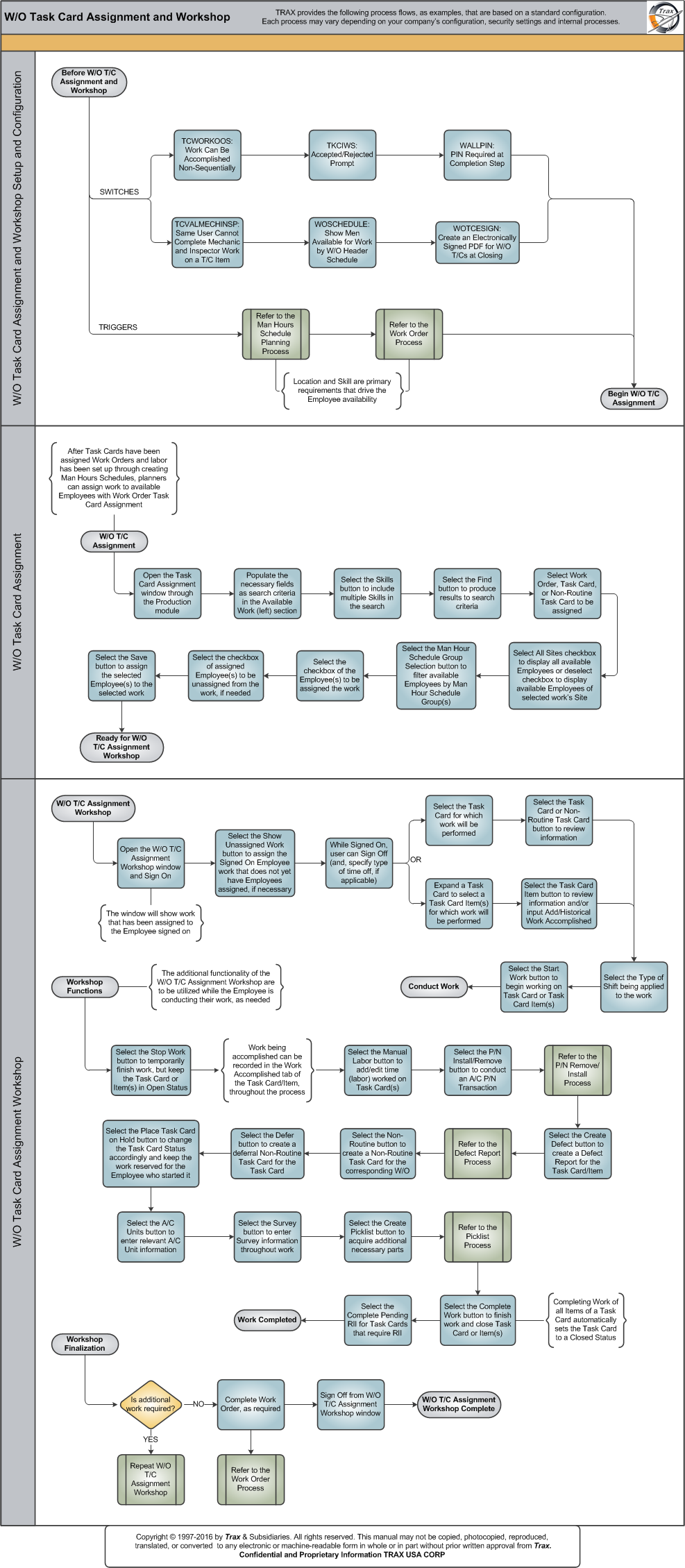
The following sections are the primary elements covered in this process flow:
- W/O Task Card Assignment and Workshop Setup and Configuration
- W/O Task Card Assignment
- W/O Task Card Assignment Workshop
Share
Print
|
©1997-2026 Trax USA Corp. All rights reserved. This manual may not be copied, photocopied, reproduced, translated, or converted to any electronic or machine-readable form, in whole or in part, without prior written approval from Trax USA Corp. |
 |