Publication Date: 8/17/2026 Share Print

Previous Topic

Next Topic

Book Contents

Book Index

TraxDoc Process

The TraxDoc module in TRAX is used to create documents that can be viewed throughout many different locations in TRAX. These documents can range from basic PDF files or images to OEM data. With TraxDoc, large OEM data files can be uploaded to automatically create parts, Task Cards, and any other forms of data provided by a manufacturer. TraxDoc security and authorization are set up through TraxDoc-specific settings and windows. TraxDoc data also has its own revision control process that helps users keep track of their OEM data.
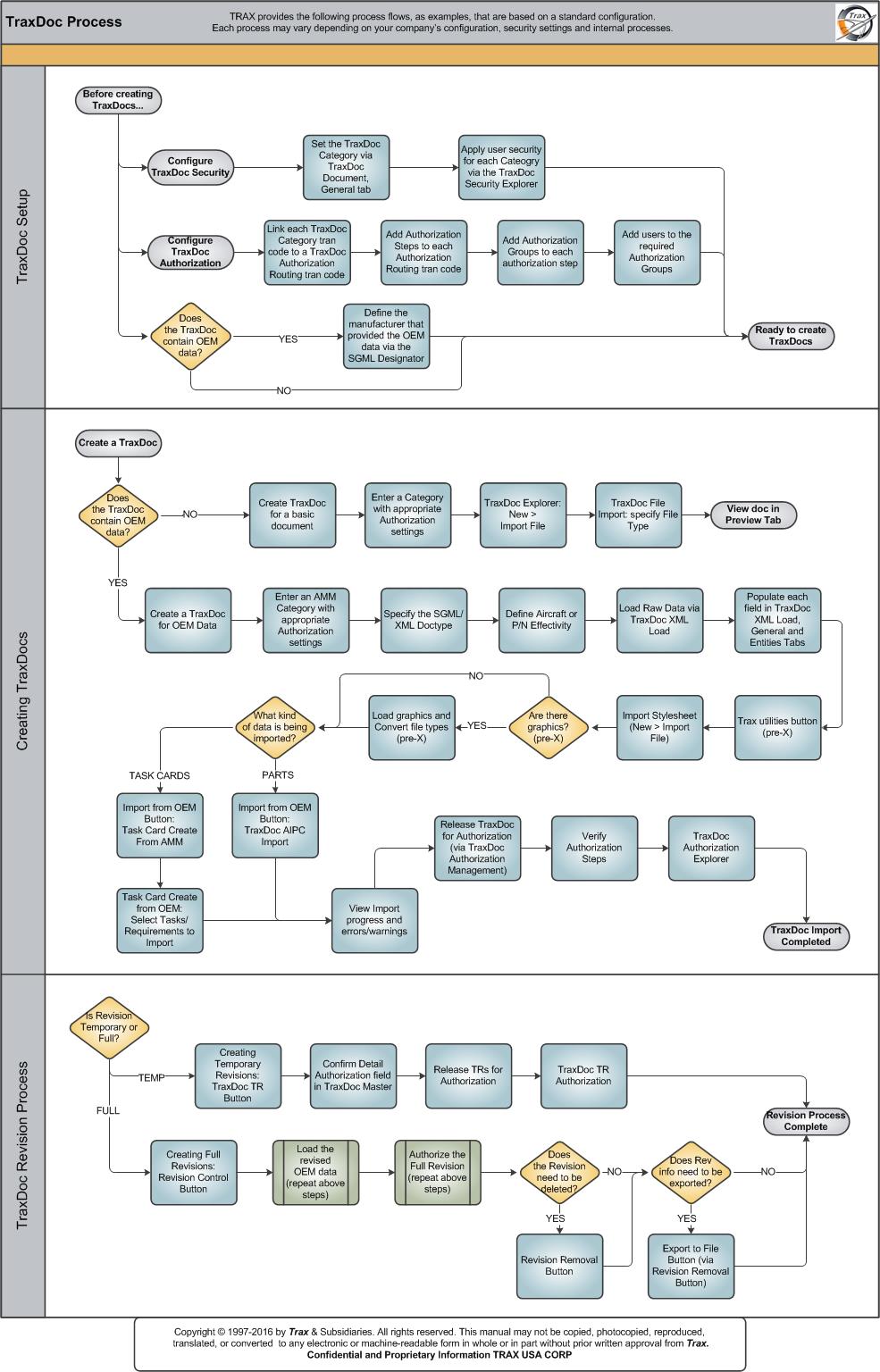
Click on the steps to see details!

Before Creating TraxDocs...Configuring TraxDoc SecurityTraxDoc Category (Security)Apply User Security via the TraxDoc Security ExplorerConfiguring TraxDoc AuthorizationTraxDoc Category (Authorization)TraxDoc Authorization Routing StepsAssignint TraxDoc Authorization GroupsDoes TraxDoc contain OEM Data?Define SGML DesignatorReady to Create TraxDocsCreating TraxDocsDoes the TraxDoc contain OEM data?Create a TraxDoc for a Basic DocumentEnter a Category with appropriate Authorization settingsTraxDoc Explorer: New button - Import File ButtonView document in Preview TabCreate a TraxDoc for OEM DataEnter a Category with appropriate Authorization SettingsSpecify SGML/XML DocTypeDefine Aircraft and/or P/N EffectivityUpload Raw Data via TraxDoc XML LoadLoad XML Button [X[, via the TraxDoc Explorer TabImport a StylesheetWhat kind of data is being imported?Task Card Create from AMMSelect Tasks/Requirements to ImportTraxDoc AIPC ImportView import progress and errors/warningsRelease TraxDoc for authorizationVerify Authorization StepsTraxDoc Authorization ExplorerTraxDoc Import CompletedIs the Revision Temporary or Full?Creating Temporary Revisions (TraxDoc TR Button)Confirm Detail Authorization fieldRelease TRs for AuthorizationTraxDoc TR AuthorizationCreating Full Revisions (Revision Control Button)Load the Revised OEM DataAuthorize the Full RevisionDoes the revision need to be deleted?Revision Removal ButtonRevision Process CompleteDoes the Revision need to be exported?Export to File Button, via Revision Removal ButtonTrax Utilities ButtonAre there graphics? (pre-X)Load Graphics (pre-X)

Each step in the process chart is explained in further detail throughout the following documentation. The procedural sections are broken down into the following categories:

See Also

PROCESS FLOWS

Aircraft Actual Flight (Manual Entry) Process

Aircraft Initial P/N Load Process

Aircraft Return and Archiving Process

Aircraft Units Process

APU Process

Assembly Management

Concession Registry Process

Consigned Inventory Process

Contract Order Process

Customer Creation Process

Defect Report Process

Delete E/C and P/N Control Compliance Process

Dent Mapping Process

Employee and Skill Creation Process

Engineering Control Process

Engineering Pending Release Process

ETOPS Process

Exchange Order Out Process

Exchange Order Process

Fault Code Report Process

Flight Accumulation Process

Ground Service Equipment (GSE) Process

Helicopter Process

Importing a File Process

Interactive Planner Overview

Internal Component Repair (Shop) Process

Kit Management

Library and Read & Sign Process

Loan Order Process

Location Creation Process

Man Hours Schedule Planning Process

Managed A/C Process

MEL Process

MEL Authorization Process

Missing Parts Process

Monthly Financial Procedures

New Aircraft Process

Order Invoice Process

P/N Control - General Configuration

P/N Control - Life Limited Parts (LLP)

P/N Control - Proration Process

P/N Initial Load Process

P/N Pool Agreement Process

P/N Remove/Install Process

P/N Software Configuration

Packing and Shipping Process

Part Number Creation Process

Physical Inventory Process

Picklist and Requisition Process

Printer Setup and Configuration

Purchase Order Process

Quality Assurance Process

R/O Capability Employee Rating Process

Receiving Process

Recurrent Item Alert (Reliability) Process

Rental Order Process

Re-Order Level Process

Repair Order Process

Repair Order Following Process

Return to Stock Process

Return To Vendor Process

Sales Order Process

Scrap Process

Security Explorer Process

Service Order and Power By The Hour Process

Skill Master Process

Standard Authorization Process

Supply Chain Process

System Notification Creation Process

Task Card Creation Process

Task Card Discrepancy Process

Third Party Work Order Process

Tool Management

Training Process

Transfer Order Process

TRAX General Process Flow

Vendor Contract Process

Vendor Creation Process

W/O Task Card Assignment and Workshop Process

Warehouse Management

Warranty Management

Work Order Process

Work Order Reservation Control Process

Work Turnover Process

Top of Page Publication Date: 8/17/2026 Share Print