Publication Date: 8/17/2026 Share Print

Previous Topic

Next Topic

Book Contents

Book Index

Order Invoice Process

The purpose of the Link module is to allow the entry, update, and reporting of received invoices related to orders that have been placed through the system. It allows for the confirmation of order fulfillment, price match of order to invoice and accuracy of invoicing. Any discrepancies are processed via an exception queue.

Note: This module does not contain Accounts Payable functionality.

Order types that are routinely invoiced are as follows:

  • Purchase Order
  • Exchange Order
  • Loan Order
  • Repair Order
  • Service Order

Once an invoice is received (from a vendor or outside source), it may be entered into the system via the Link module. The entry of this invoice is for a number of purposes (i.e. traceability of stock cost and value).

It should be noted that this functionality is not an Accounts Payable system and does not provide Accounts Payable functionality. The Link module is a recording and reporting system, and has the capability of feeding the recorded information into a separate A/P system via a program interface. The transfer to an A/P system is done via G/L Interface/Update/Invoice Transfer to A/P. Please refer to the G/L Training Manual for more information.

Invoices for parts can be entered before the parts have a receiving record. Reports can also be produced to show parts that have arrived and are not yet invoiced (Orders/ Print/Invoice Print).

Multiple currencies are supported. For example, a part can be purchased in one currency, received and converted into two supported system currencies, and then invoiced in another currency. Fluctuations in currency value are taken care of by adjustment journal entries following invoicing.
If an invoice has been posted, it may not be re-opened, deleted, or modified. However, if an invoice is on ‘Hold’ status, it may be re-opened, deleted, or modified. Once a particular invoice is posted, a new invoice must be created and the Credit/Debit Memo functionality must be used to make any adjustments to that invoice.

If the user receives an invoice for an order and the quantity of parts received does not match the quantity of parts on the order, the user will use the Order – ADD functionality to adjust and account for the transaction. If an order has already been paid (via an invoice) and posted, the user can make adjustments to the transaction with the Memo functionality.

The following process flow is a general guide for the configuration, creation, management, and authorization of the Order Invoice life cycle. This life cycle may vary depending on each TRAX user and their company's customized protocols.
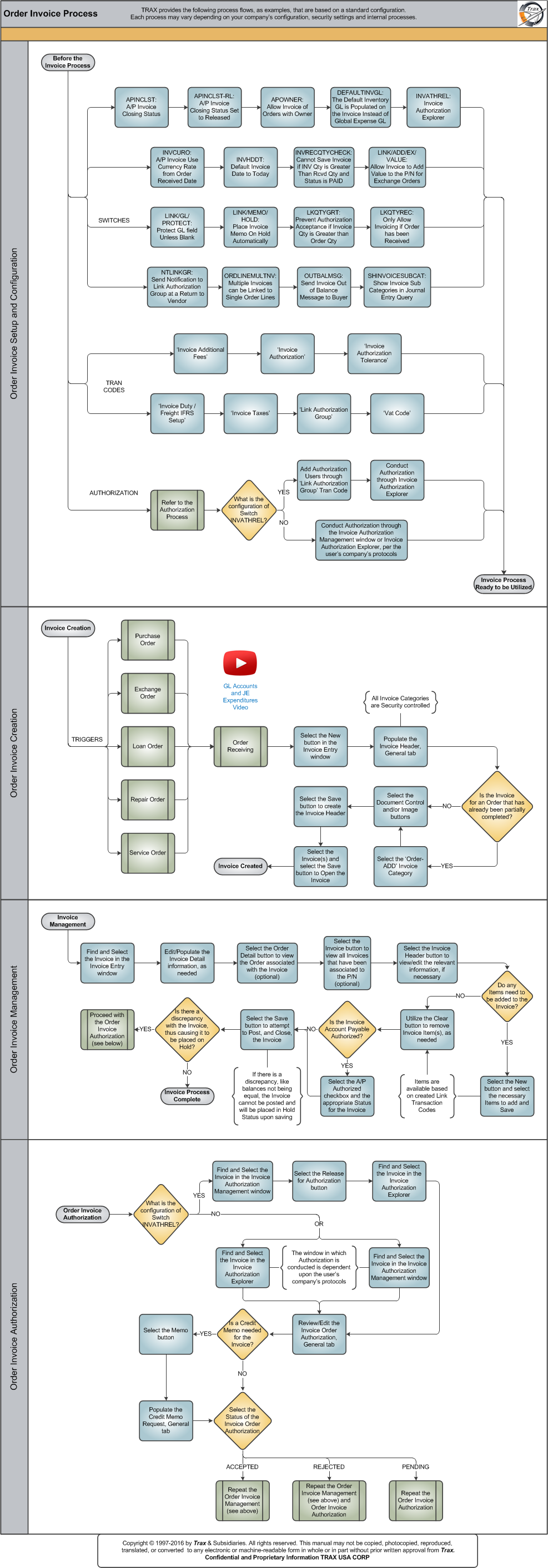
Click on the steps to see details!

Order Invoice Setup and ConfigurationAPINCLSTAPINCLST-RLAPOWNERDEFAULTINVGLINVATHRELINVCUROINVHDDTINVRECQTYCHECKLINK/ADD/EX/VALUELINK/GL/PROTECTLINK/MEMO/HOLDLKQTYGRTLKQTYRECNTLINKGRORDLINEMULTINVOUTBALMSGSHINVOICESUBCATInvoice Additional FeesInvoice Authorization ToleranceInvoice Duty / Freight IFRS SetupInvoice TaxLink Authorization GroupVat CodeAuthorization ProcessLink Authorization GroupInvoice Authorization ExplorerInvoice Authorization ManagementWhat is the configuration of Switch INVATHREL?Order Invoice CreationPurchase Order ProcessReceiving ProcessGL Accounts and JE Expenditures VideoInvoice HeaderIs the Invoice for an Order that was previously partially completed?Order - ADDDocument Control and/or Image ButtonsInvoice HeaderOrder Invoice ManagementInvoice Selection, General TabInvoice Order DetailOrder Detail ButtonInvoice History ButtonInvoice Header ButtonDo any Items need to be added to the Invoice?New Button, via Invoice Order DetailClear ButtonPosting an InvoiceIs there a discrepancy with the Invoice or has it been placed in Hold Status?Order Invoice AuthorizationOrder Invoice AuthorizationWhat is the configuration of Switch INVATHREL?Invoice Authorization ManagementInvoice Authorization ExplorerInvoice Authorization ExplorerInvoice Authorization ManagementInvoice Authorization, General TabIs a Credit Memo needed for the Invoice?Credit Memo ButtonSelect the Authorization StatusOrder Invoice ManagementOrder Invoice AuthorizationIs the Invoice Account Payable Authorized?A/P Authorized checkboxExchange Order ProcessLoan Order ProcessRepair Order ProcessService Order Process

The following sections are the primary elements covered in this process flow:

See Also

PROCESS FLOWS

Aircraft Actual Flight (Manual Entry) Process

Aircraft Initial P/N Load Process

Aircraft Return and Archiving Process

Aircraft Units Process

APU Process

Assembly Management

Concession Registry Process

Consigned Inventory Process

Contract Order Process

Customer Creation Process

Defect Report Process

Delete E/C and P/N Control Compliance Process

Dent Mapping Process

Employee and Skill Creation Process

Engineering Control Process

Engineering Pending Release Process

ETOPS Process

Exchange Order Out Process

Exchange Order Process

Fault Code Report Process

Flight Accumulation Process

Ground Service Equipment (GSE) Process

Helicopter Process

Importing a File Process

Interactive Planner Overview

Internal Component Repair (Shop) Process

Kit Management

Library and Read & Sign Process

Loan Order Process

Location Creation Process

Man Hours Schedule Planning Process

Managed A/C Process

MEL Process

MEL Authorization Process

Missing Parts Process

Monthly Financial Procedures

New Aircraft Process

P/N Control - General Configuration

P/N Control - Life Limited Parts (LLP)

P/N Control - Proration Process

P/N Initial Load Process

P/N Pool Agreement Process

P/N Remove/Install Process

P/N Software Configuration

Packing and Shipping Process

Part Number Creation Process

Physical Inventory Process

Picklist and Requisition Process

Printer Setup and Configuration

Purchase Order Process

Quality Assurance Process

R/O Capability Employee Rating Process

Receiving Process

Recurrent Item Alert (Reliability) Process

Rental Order Process

Re-Order Level Process

Repair Order Process

Repair Order Following Process

Return to Stock Process

Return To Vendor Process

Sales Order Process

Scrap Process

Security Explorer Process

Service Order and Power By The Hour Process

Skill Master Process

Standard Authorization Process

Supply Chain Process

System Notification Creation Process

Task Card Creation Process

Task Card Discrepancy Process

Third Party Work Order Process

Tool Management

Training Process

Transfer Order Process

TRAX General Process Flow

TraxDoc Process

Vendor Contract Process

Vendor Creation Process

W/O Task Card Assignment and Workshop Process

Warehouse Management

Warranty Management

Work Order Process

Work Order Reservation Control Process

Work Turnover Process

Top of Page Publication Date: 8/17/2026 Share Print