Publication Date: 8/17/2026 Share Print

Previous Topic

Next Topic

Book Contents

Book Index

Sales Order Process

The Customer Orders option allows users to create an order for a part that is being sold to a customer. After the proper setup and configuration, per the company's operating procedures, the Sales Order can be created for the Customer. From this, the P/N required for the Customer is reserved and issued, to which an Invoice is produced for the Customer. Then, if necessary, a Sales Order Return can be conducted, and authorized, to receive the P/N back from the Customer.

The following process flow is a general guide for the configuration, creation, issuing, and return of the Sales Order life cycle. This life cycle may vary depending on each TRAX user and their company's customized protocols.
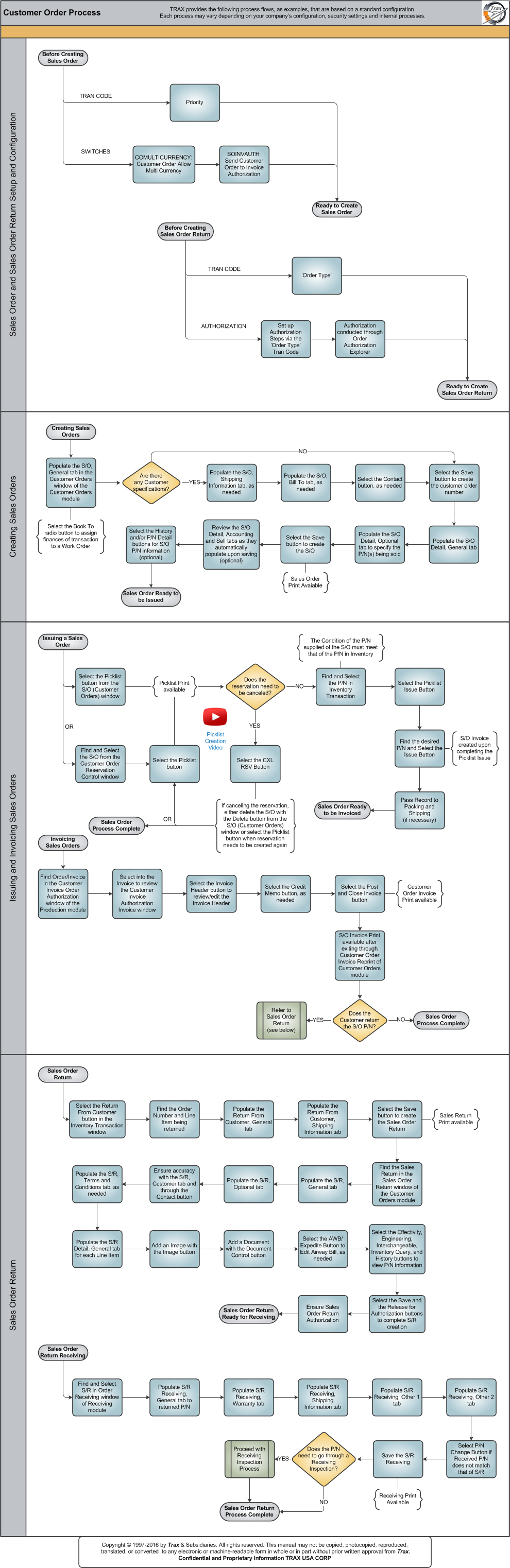
Click on the steps to see details!

Sales Order and Sales Order Return Setup and ConfigurationPrioritySOINVAUTHReady to Create Sales OrderSales Order and Sales Order Setup and ConfigurationOrder TypeAuthorization ProcessOrder Authorization ExplorerSales Order ReturnCreating Sales OrdersS/O, General TabAre there any Customer specifications?S/O, Shipping Information TabS/O, Bill To TabContact ButtonSelect the Save Button to Create Customer Order NumberS/O Detail, General TabS/O Detail, Optional TabSelect the Save Button to Create the S/OS/O Detail, Accounting and Sell TabsS/O P/N InformationSales Order Ready to be IssuedIssuing a Sales OrderPicklist ButtonCustomer Order Reservation ControlPicklist ButtonDoes the reservation need to be canceled?Find P/N in Inventory TransactionPicklist Issue ButtonPicklist IssuePass Record to Packing and ShippingCXL RSV ButtonSales Order Ready to be InvoicedInvoicing Sales OrdersCustomer Invoice Order AuthorizationCustomer Invoice Authorization InvoiceInvoice Header ButtonCredit Memo ButtonPost and Close Invoice ButtonCustomer Order Invoice ReprintDoes the Customer return the S/O P/N?Sales Order ReturnSales Order Process CompleteSales Order Process CompleteSales Order ReturnReturn From Customer ButtonReturn From Customer ButtonReturn From CustomerReturn From Customer, Shipping Information TabSelect the Save Button to Create the Sales Order ReturnSales Order ReturnSales Order Return, General TabSales Order Return, Optional TabS/R, Customer Tab and Contact ButtonSales Order Return, Terms and Conditions TabSales Order Return Detail, General TabImage ButtonDocument Control ButtonAWB/Expedite ButtonS/R P/N InformationSelect the Save and Release for Authorization ButtonsSales Order Return Ready for ReceivingSales Order Return ReceivingOrder ReceivingSales Order Return Receiving, General TabSales Order Return Receiving, Warranty TabSales Order Return Receiving, Shipping Information TabSales Order Return Receiving, Other 1 TabSales Order Return Receiving, Other 2 TabP/N Change ButtonSave the Sales Order ReceivingDoes the P/N need to go through a Receiving Inspection?Receiving Inspection SubprocessSales Order Return Process CompletePicklist Creation Video

The following sections are the primary elements covered in this process flow:

See Also

PROCESS FLOWS

Aircraft Actual Flight (Manual Entry) Process

Aircraft Initial P/N Load Process

Aircraft Return and Archiving Process

Aircraft Units Process

APU Process

Assembly Management

Concession Registry Process

Consigned Inventory Process

Contract Order Process

Customer Creation Process

Defect Report Process

Delete E/C and P/N Control Compliance Process

Dent Mapping Process

Employee and Skill Creation Process

Engineering Control Process

Engineering Pending Release Process

ETOPS Process

Exchange Order Out Process

Exchange Order Process

Fault Code Report Process

Flight Accumulation Process

Ground Service Equipment (GSE) Process

Helicopter Process

Importing a File Process

Interactive Planner Overview

Internal Component Repair (Shop) Process

Kit Management

Library and Read & Sign Process

Loan Order Process

Location Creation Process

Man Hours Schedule Planning Process

Managed A/C Process

MEL Process

MEL Authorization Process

Missing Parts Process

Monthly Financial Procedures

New Aircraft Process

Order Invoice Process

P/N Control - General Configuration

P/N Control - Life Limited Parts (LLP)

P/N Control - Proration Process

P/N Initial Load Process

P/N Pool Agreement Process

P/N Remove/Install Process

P/N Software Configuration

Packing and Shipping Process

Part Number Creation Process

Physical Inventory Process

Picklist and Requisition Process

Printer Setup and Configuration

Purchase Order Process

Quality Assurance Process

R/O Capability Employee Rating Process

Receiving Process

Recurrent Item Alert (Reliability) Process

Rental Order Process

Re-Order Level Process

Repair Order Process

Repair Order Following Process

Return to Stock Process

Return To Vendor Process

Scrap Process

Security Explorer Process

Service Order and Power By The Hour Process

Skill Master Process

Standard Authorization Process

Supply Chain Process

System Notification Creation Process

Task Card Creation Process

Task Card Discrepancy Process

Third Party Work Order Process

Tool Management

Training Process

Transfer Order Process

TRAX General Process Flow

TraxDoc Process

Vendor Contract Process

Vendor Creation Process

W/O Task Card Assignment and Workshop Process

Warehouse Management

Warranty Management

Work Order Process

Work Order Reservation Control Process

Work Turnover Process

Top of Page Publication Date: 8/17/2026 Share Print